Launch Utility
Launch Utility
Introduction
The launch utility on the MX7 Tecton has two functions:
l Process registry based Launch items
l Process script based Launch items.
The registry based Launch items are processed before the script based Launch items.
Note: There is no Warm Boot/Warm Start/Warm Reset (as used in other versions of Microsoft operating systems)
function available for Windows Mobile devices. Suspend/resume performs the equivalent function.
Registry Based Launch Items
Note: The Registry based Launch items (documented here) are processed before the Script Based Launch items.
The Launch utility can use registry entries to auto-launch Windows CAB files. These CAB files exist as separate files from the
main installation image, and are copied to the device using ActiveSync, or using the optional SD card. The CAB files are
copied into the folder System, which is the internal Flash drive. Then, information is added to the registry, if desired, to make
the CAB file auto-launch at startup.
The registry information needed is under the key
HKEY_LOCAL_MACHINE\SOFTWARE\LXE\Persist
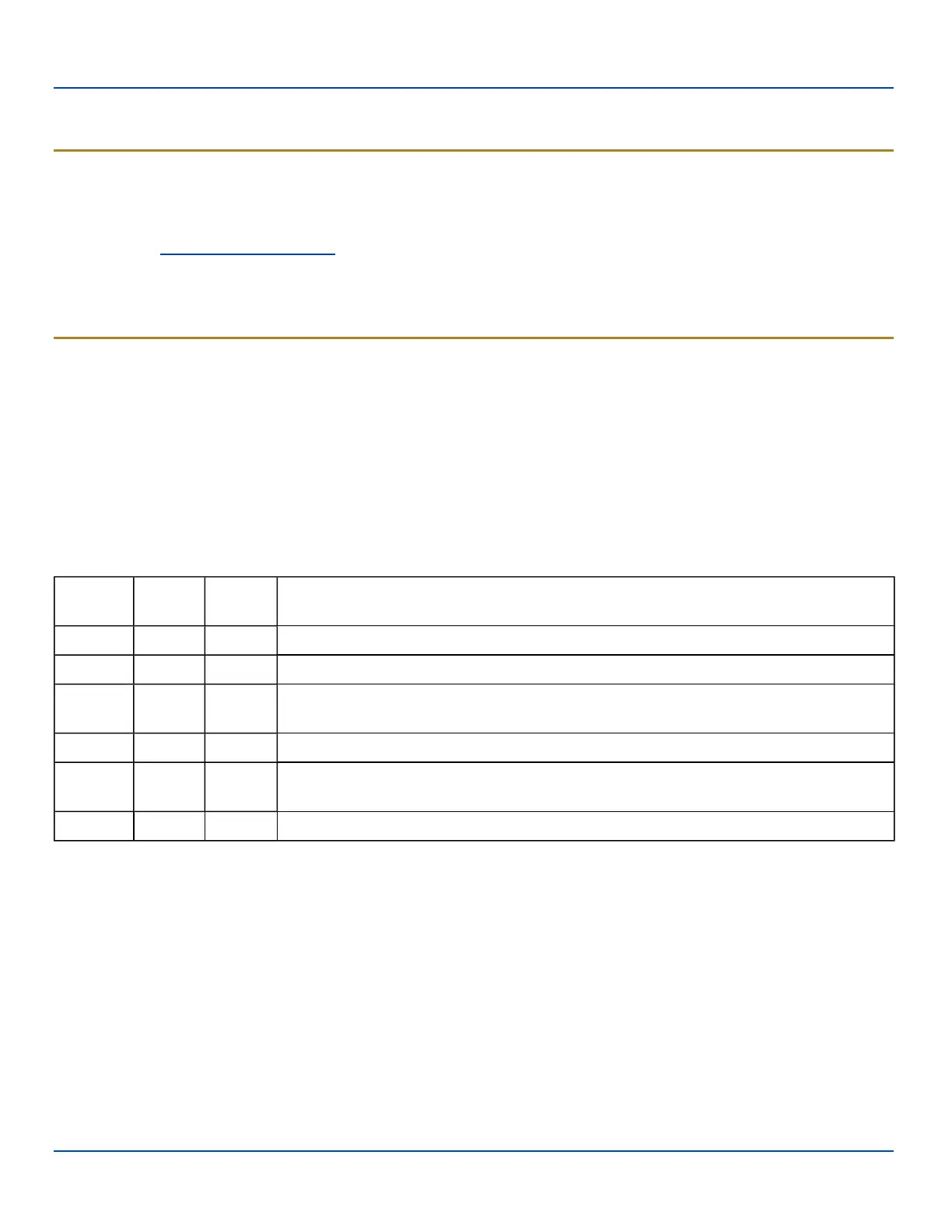
The main subkey is any text, and is a description of the file. Then the values are added:
Value Need
Data
Type
Description
FileName Required String Name of the CAB file, with full path (usually \System)
Installed Required DWORD Starts as 0, changed to 1 when the CAB file is installed
FileCheck Required String
File name, with full path, of a file installed by the CAB file. If this file is not found, Launch
assumes the CAB file is not installed or memory was lost.
Order Optional DWORD Determines sequence of installation. Order=0 is installed first, order=99 is installed last.
Delay Optional DWORD
Delay, in seconds, after this item is installed and before the next one is installed. If the
install fails (or is not found) the delay does not occur.
PCMCIA Optional DWORD 1=power up PCMCIA/CF slot after installation
The auto-launch process is as follows.
1. The launch utility opens the registry database and reads the list of CAB files to auto-launch.
2. First it looks for FileName to see if the CAB file is present.
l If not, the registry entry is ignored.
l If it is present, and the Installed flag is not set, auto-launch makes a copy of the CAB file (since it gets
deleted by installation), and runs the Microsoft utility WCELOAD to install it.
3. If the Installed flag is set, auto-launch looks for the FileCheck file.
l If it is present, the CAB file is installed and that registry entry is complete..
l If the FileCheck file is not present, memory has been lost, and the utility calls WCELOAD to reinstall the
CAB file.
4. This process repeats for the next entry in the registry, until all registry entries are analyzed.
E-EQ-MX7WMRG-A [ 201 ] MX7 Tecton™ for Windows Mobile Reference Guide



 To Next Page