VJ-1604 Maintenance Manual 5 Self-Diagnosis Mode
5-43 Rev.-05
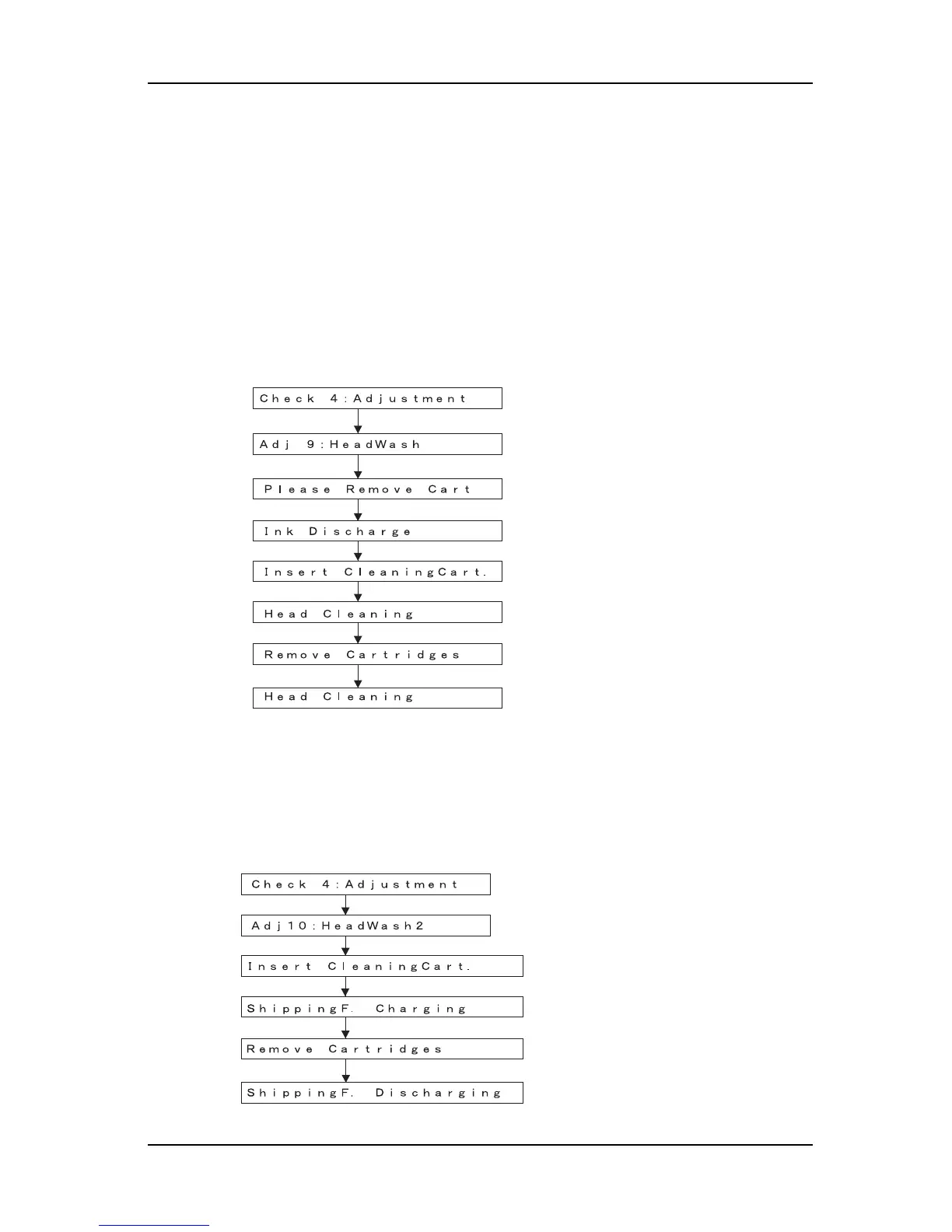
5.7.8 HeadWash Menu
This menu is used to purge ink and clean the heads before print head replacement.
The actual procedure is as follows.
1. Press [Enter] key in the operation panel to determine the Head Cleaning Menu.
2. Remove all ink cartridges.
3. Press [Enter] key in the operation panel to discharge ink.
4. After ink is discharged, install the head cleaning jig.
5. Press [Enter] key in the operation panel to charge cleaning liquid.
6. After cleaning liquid is charged, remove the head cleaning jig.
5.7.9 HeadWash Menu 2
Maintain the conditions of the heads at the time of shipping by cleaning tubes and heads with shipping fluid.
* This function is not usually used in maintenance work.
Go to “Adj 10: HeadWash2“ after charging shipping fluid.
Remove cleaning jig and press [Enter] key to discharge
shipping liquid
After shipping liquid is charged
Set cleaning jig and press [Enter] key to charge shipping liquid
Finish Ink Discharge
Remove all cartridges and press [Enter] key to discharge ink
Insert cleaning cartridge, then press [Enter] key to fill shipping fluid
After shipping fluid is filled
Remove the cleaning cartridge,
then press [Enter] key to discharge the shipping fluid
㨇Enter㨉
㨇Enter㨉















 To Next Page