3 Specifications VJ-1604 Maintenance Manual
Rev.-05 3-6
3.5 Choosing a Place for the Printer
• Do not place the printer in a location under the following conditions. Doing so may cause
the product to fall, become damaged, or cause injury.
• Unstable surfaces
• Slanted areas
• Locations that are subject to vibration from other product
• Do not stand on the printer or place any heavy objects on it.
Doing so may cause it to fall over, become damaged, or cause injury.
• Do not cover the ventilation hole of the printer with cloth, such as a blanket or table cloth.
Doing so could prevent the printer from ventilating and cause fire.
• Keep the printer away from humid and dusty areas. Failure to do so may result in
electrical shock or fire.
(1) Installation Environment Requirements
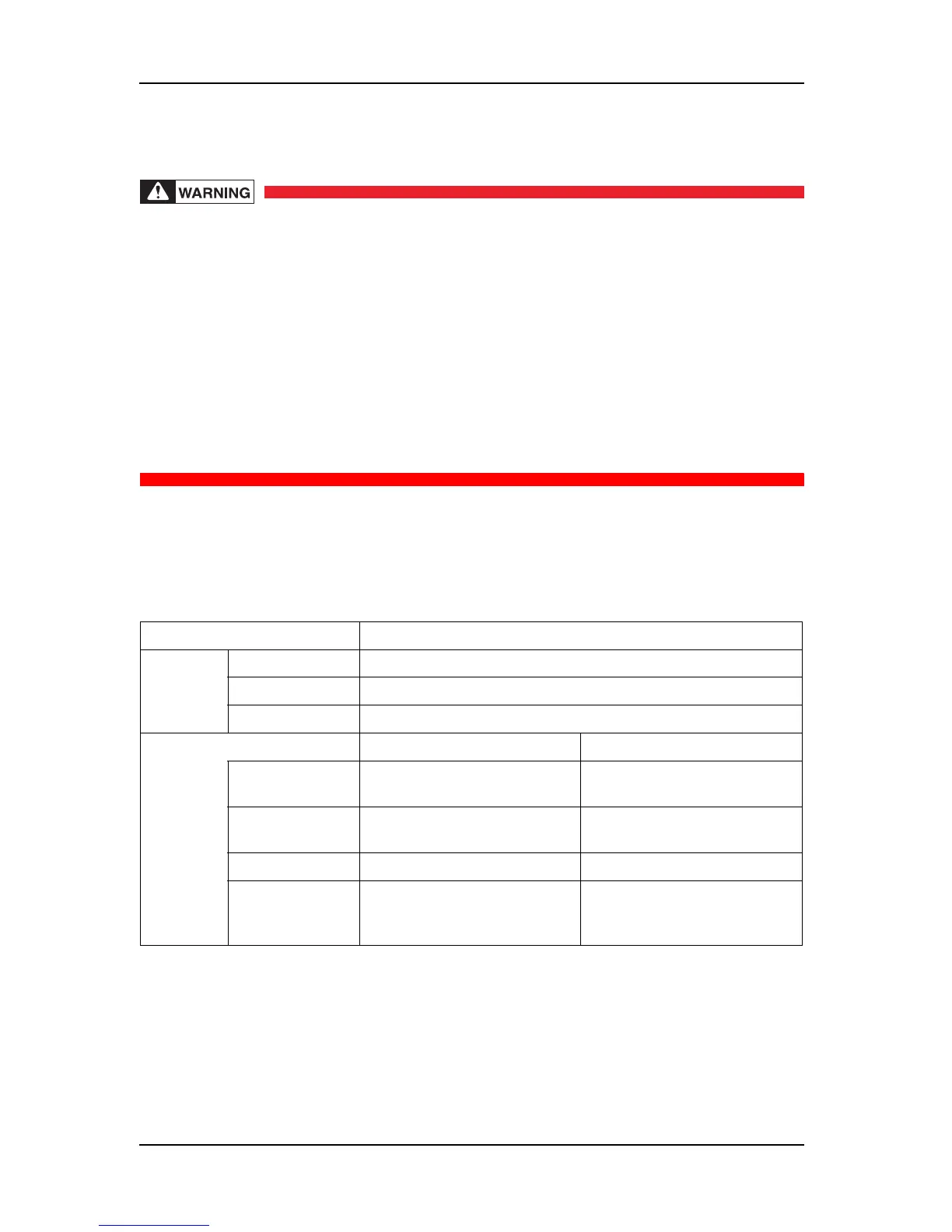
Choose a place for printer installation following the requirements of the table below.
Table 3-1 Installation Environment Requirements List
Floor loading capability 2940Pa (300kgf/m
2
) or over
Electrical
specification
s
Voltage AC 90-132 V
Frequency 50/60Hz ± 1Hz
Capacity Main side: 8.5 A, Heater side: 8.5A
Environmental conditions Temperature Humidity
Operation
environment
20ºC (68ºF) - 32ºC (89.6ºF) 40% - 60%, with no condensation
Plotting accuracy
warranty range
22ºC (71.6ºF) - 30ºC (86ºF) 40% - 60%, with no condensation
Rate of change 2ºC/hour or less 5%/hour or less
Storage
environment
-20ºC (-4ºF) - 60ºC (104ºF) 20% - 80%
No condensation (when ink is not
charged)















 To Next Page