2 Product Overview VJ-1604 Maintenance Manual
Rev.-05 2-4
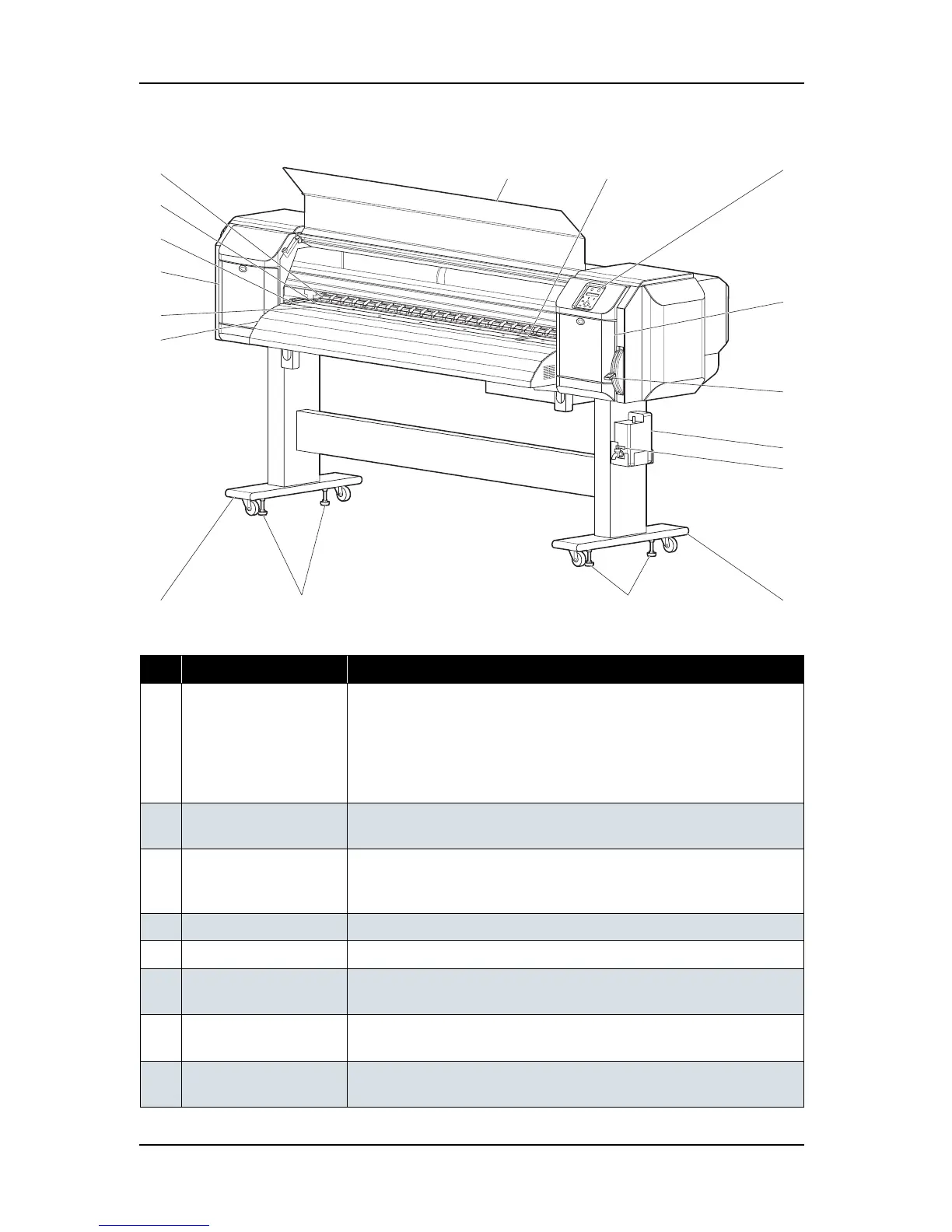
2.3.1 Front Section
Table 2-1 Part Names and Functions of Front Section
No. Name Function
1 Media set lever Used for fixing or releasing the media
• Lower the lever to fix the media
• Lower the lever further to fix the media firmly
Used to improve the accuracy of media feeding
* The accuracy of media feeding may decline depending on media.
• Raise the lever to release the media
2 Operation panel Used to set operational conditions, the status of the plotter, and other
functions
3 Front cover Keeps the operator safe from the drive parts of the plotter while it is
operating. Opened and closed when media is set or jammed. It is normally
closed.
4 Waste fluid tank Used to store waste ink discharged from print head
5 Stand Used to set the plotter on the level surface of the floor
6 Media guide Used to feed media smoothly when setting media and printing
The heater (after-heater) for drying ink is installed inside.
7 Platen Installed inside the front cover
The heater (platen heater) for drying ink is installed.
8 Pressure roller Installed inside the front cover
Used to press the media from above and hold it when printing
13
1
4
12
2
133
10
11
5
8
9
6
5
10
7
12















 To Next Page