VJ-1604 Maintenance Manual 2 Product Overview
2-9 Rev.-05
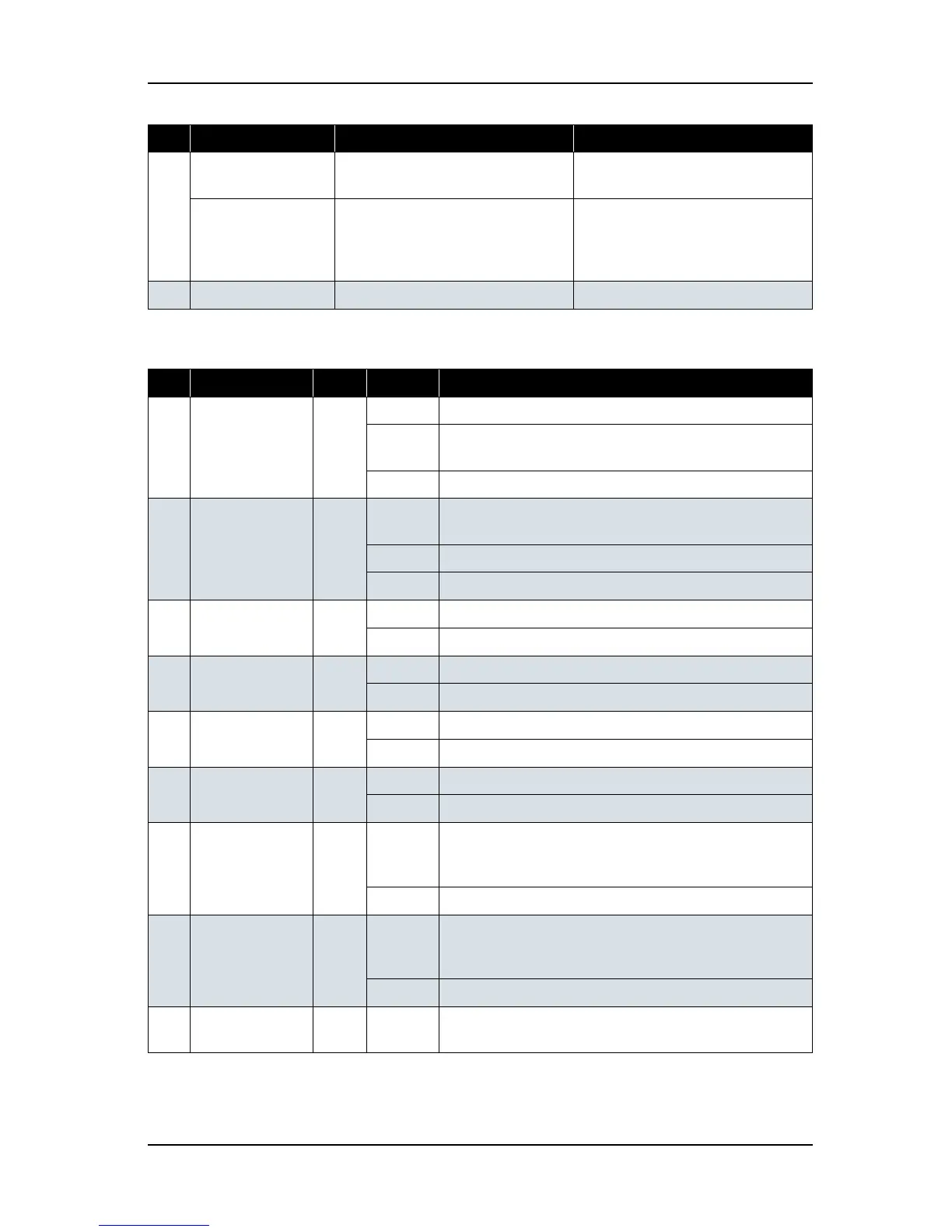
(2) LCD Monitor and Status Lamps
7[Forward ↓] key Feeds the media in the forward
direction.
-
[-] key - - Changes the menu in the reverse
direction.
- Decreases the value when inputting
values.
8 [Power] key Turns the plotter on and off. Turns the plotter on and off.
No. Name Color Status Function
9 Power lamp Green On The plotter is switched on.
Blinking An error has occurred. The contents will be displayed on the
LCD monitor.
Off The plotter is switched off.
10 Data lamp Orange On - The plotter is analyzing received data.
- The plotter is printing data.
Blinking The plotter is receiving data.
Off The plotter is not receiving, analyzing or printing data.
11 High lamp Green On The print head height is set to High position.
Off The print head height is set to Low position.
12 Low lamp Green On The print head height is set to Low position.
Off The print head height is set to High position.
13 Wave lamp Red On The effect menu is set to Wave.
Off The effect menu is set to either Fine or SuperFine.
14 Fine & S.Fine
lamp
Red On The effect menu is set to either Fine or SuperFine.
Off The effect menu is set to Wave.
15 Strong lamp Green On - The cleaning mode is set to Strong.
- When the Normal lamp is also on, the cleaning mode is set
to Economy.
Off - The cleaning mode is set to Normal.
16 Normal lamp Green On - The cleaning mode is set to Normal.
- When the Strong lamp is also on, the cleaning mode is set
to Economy quality.
Off The cleaning mode is set to Strong.
17 LCD monitor - - This monitor displays the operation status and error
messages of the plotter.
No. Name Normal Setup menu display















 To Next Page