122
Maintenance
G Wiper sponge replacement
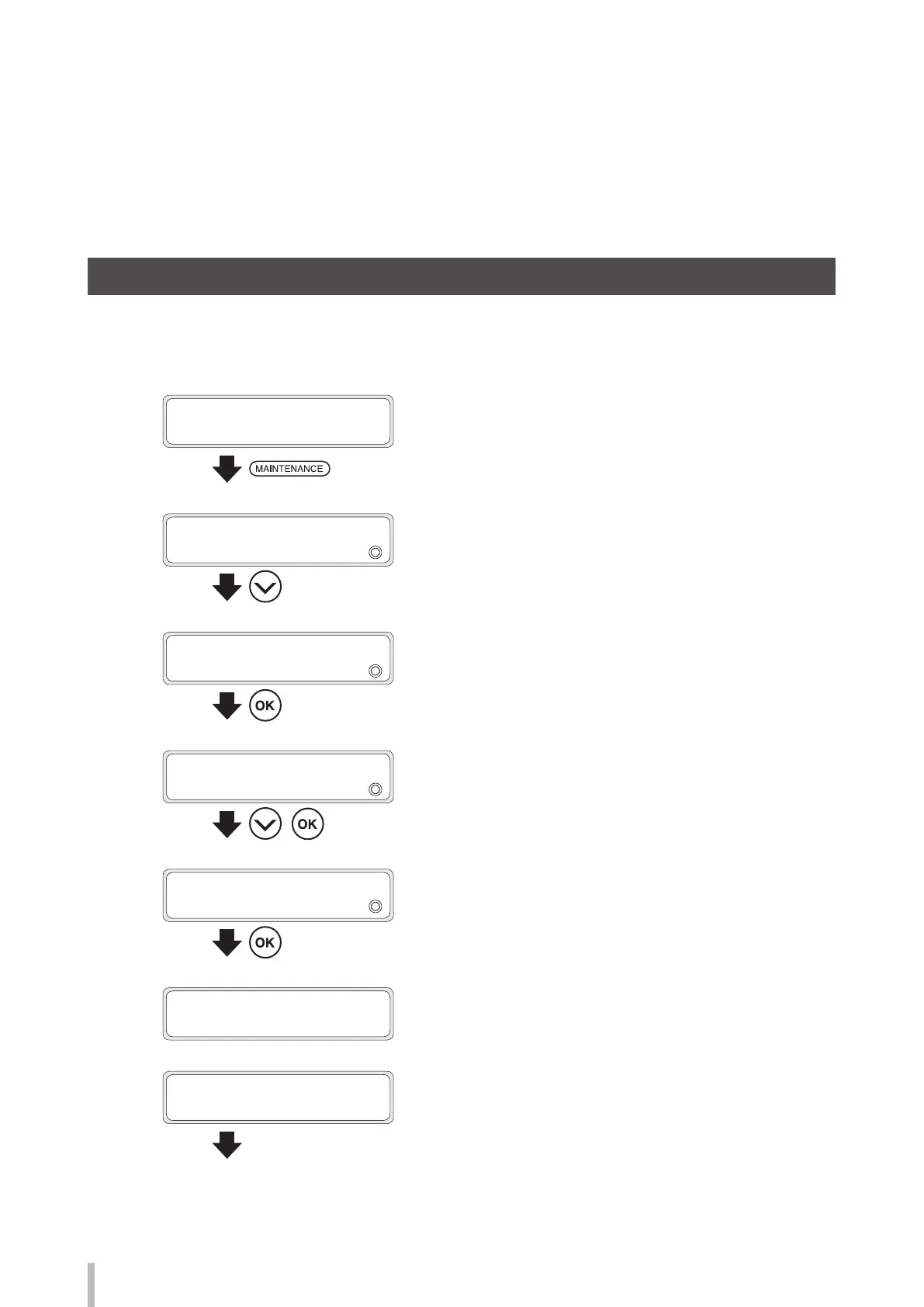
Replace the wiper sponge with the procedure below when a printer message prompts you to do so. Generally, the
wiper sponge should be replaced approximately once every six month.
1
PRINTER READY
01: PAPER / 1626mm
Press the MAINTENANCE button.
2
MAINTENANCE
2
START MAINTENANCE
Press the DOWN button to select WIPER
MAINTENANCE.
3
MAINTENANCE
2
WIPER MAINTENANCE
Press the OK button.
4
WIPER MAINTENANCE
2
REPLACE SPONGE
,
Press the Down button to select REPLACE
SPONGE, and then press the OK button.
5
>REPLACE SPONGE
OK?
Press the OK button to start the operation.
To cancel the operation, press the CANCEL button.
WIPER IS MOVING...
PLEASE WAIT
6
OPEN COVERS AND
REPLACE WIPER SPONGE
Open the front cover, and then the capping
unit cover.
Maintenance when a message
is displayed


 To Next Page