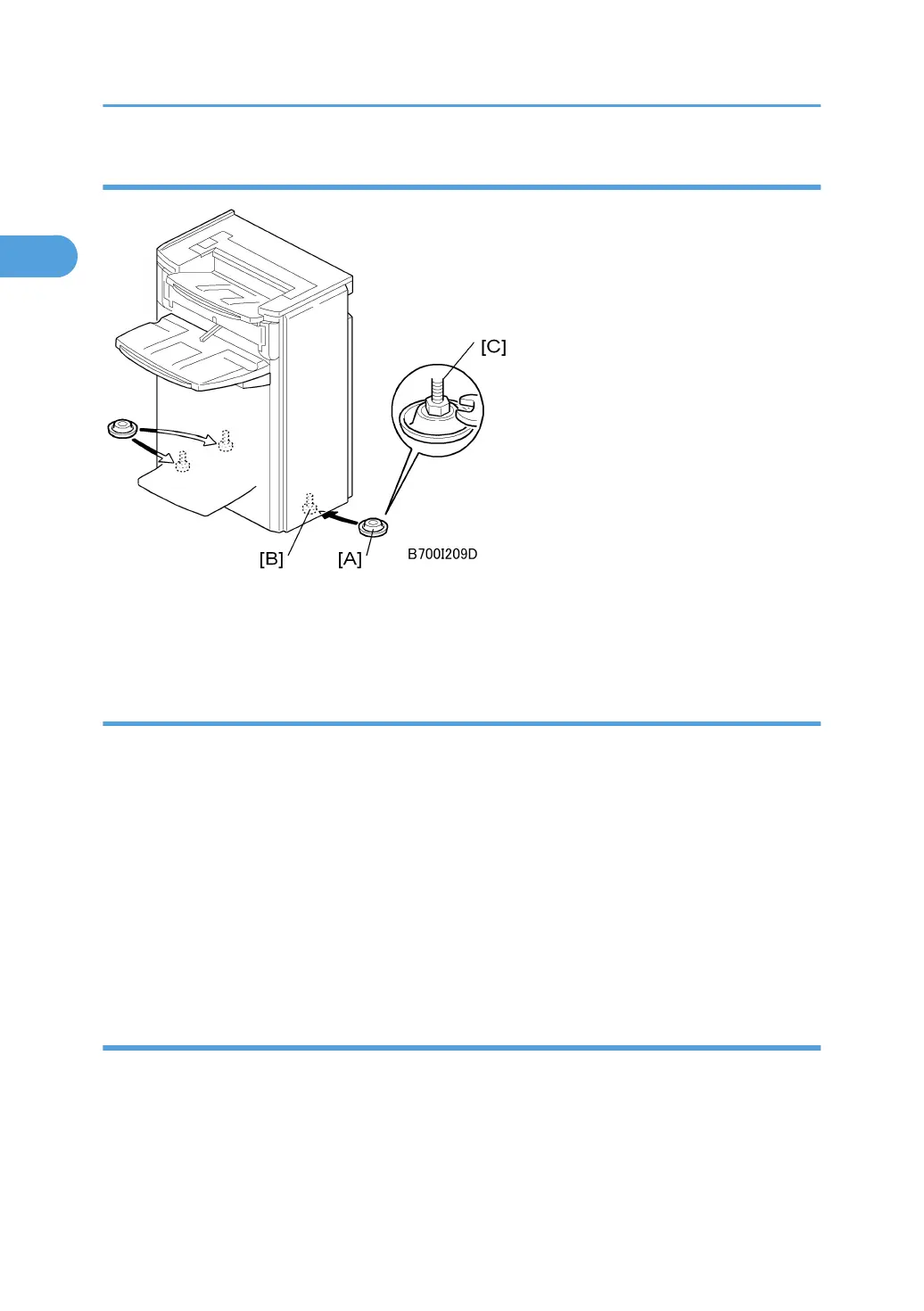
Leveling the Finisher
1. Set the leveling shoes [A] (x 3) under the feet [B].
2. Use a wrench to adjust the height of the screws [C] to level the machine.
Auxiliary Trays
The auxiliary trays are stored in the auxiliary tray storage pocket mounted on the back cover of the finisher.
Make sure that the customer understands the following points about these auxiliary trays:
• The trailing edges of excessively curled paper can activate the tray full sensors before the tray is
actually full.
• Once the "Exit Tray Full" message displays, the job cannot continue until some sheets are removed
from the tray which is only partially full. The trays are designed to prevent this problem.
• The auxiliary tray for the proof tray should be installed only when excessively curled paper is triggering
early "Exit Tray Full" alerts.
• Normally, both auxiliary trays should be placed in the pocket mounted on the back of the finisher.
Proof Exit Auxiliary Tray
Follow the procedures below to install the auxiliary tray for the proof tray.
1. First, remove the paper form the paper feed tray, turn it upside down, and continue printing.
This may solve the problem.
2. If the "Exit Tray Full" alerts continue, set the proof auxiliary tray [A] on the proof tray on the
top of the finisher.
1. Installation
86



 To Next Page