Chapter 2 Basic Operations
35
2
4
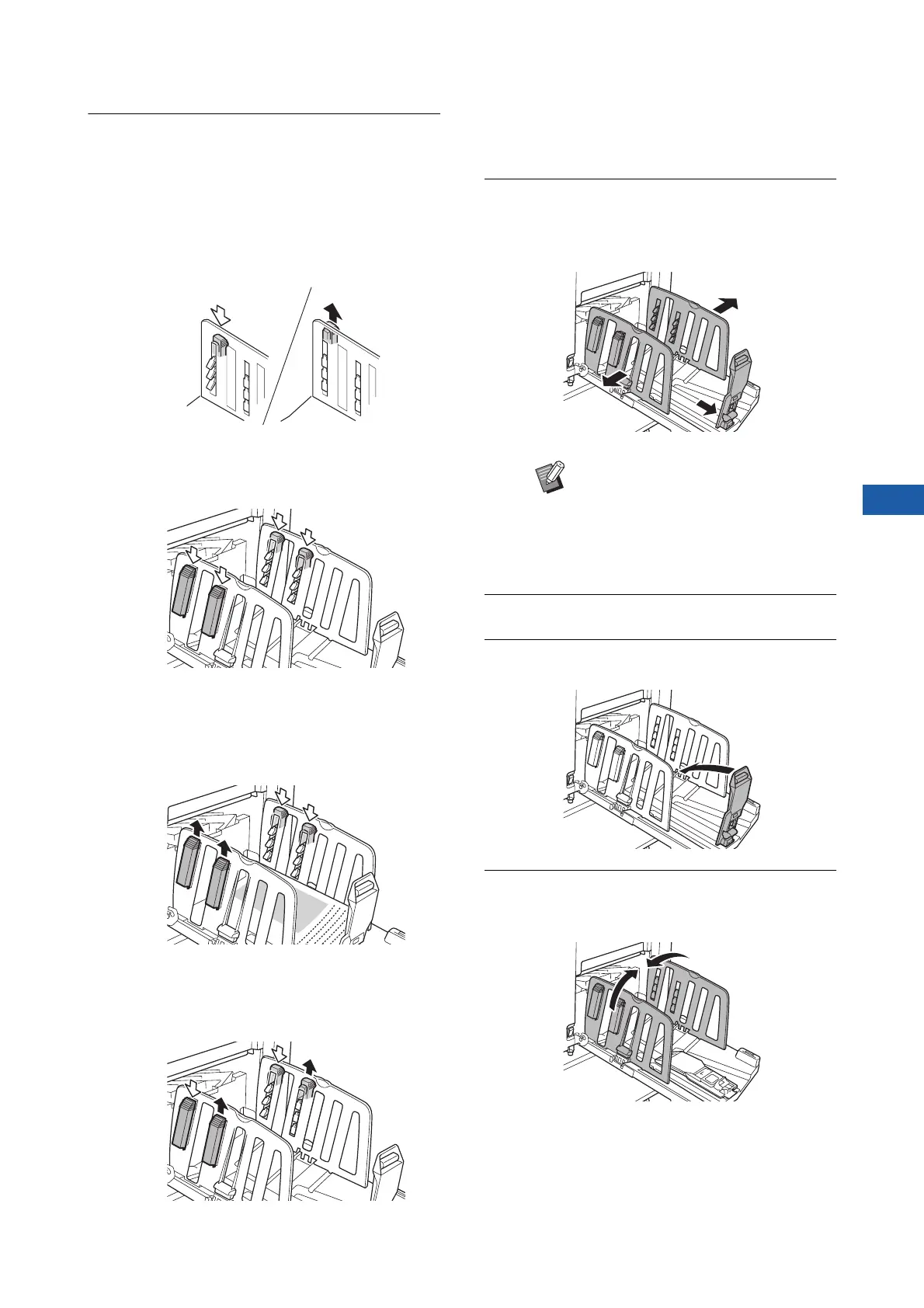
Adjust the paper arrangers.
Adjust the paper arrangers so that printed
paper is aligned.
• To open a paper arranger, press down the
paper arranger knob.
• To close a paper arranger, pull up the paper
arranger knob.
■ For normal paper
Open all four of the paper arrangers.
■ When a printed area is concen-
trated on one side of the page
Open the paper arrangers on the side with
more printed ink.
■ For thick paper
Open only the paper arrangers that are close to
the machine.
■ How to close the paper receiving tray
1
Remove all of the printed paper.
2
Slide the receiving-tray paper
guides and paper stopper to the
ends.
3
Close all of the paper arrangers.
4
Fold the paper stopper inward.
5
Fold the receiving-tray paper
guides inward.
BWhen using the optional auto-con-
trol stacking tray, pressing the paper
guides positioning button (A 23)
widens the receiving-tray paper
guides and paper stopper to the
ends.



 To Next Page