Processing
X
TRA Operator’s Manual 20077/021 US 5-27
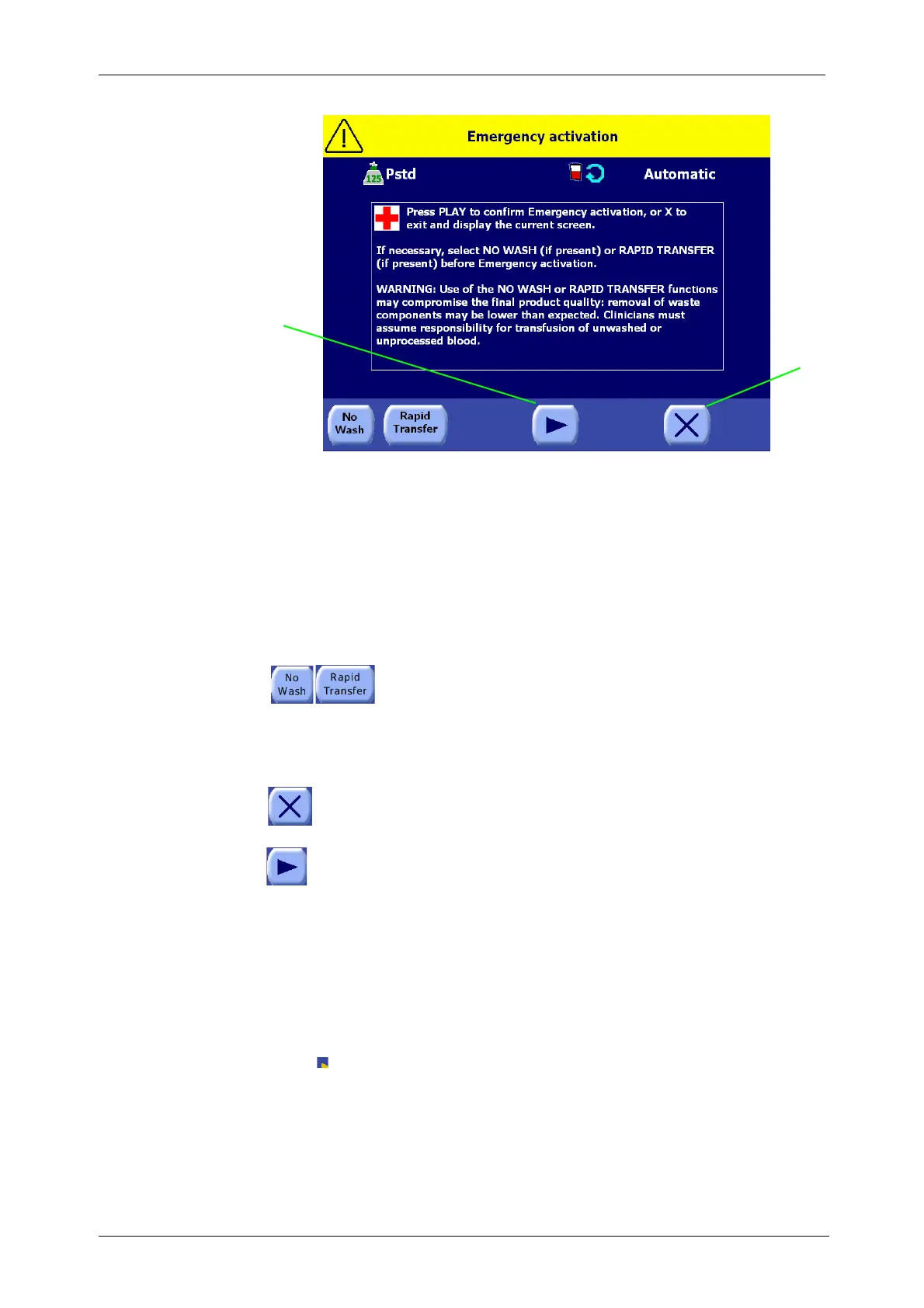
Figure 5-28 Emergency Activation Screen
From the Emergency Activation Screen, the operator may toggle the “No Wash” and “Rapid Transfer”
options before activating the Emergency function. The No Wash and Rapid Transfer options will not be
available if disabled in the current configuration (refer to “Setting the Enabled Protocols” on page 8-6).
The No Wash and Rapid Transfer options are intended to speed up the collection of blood in the RBC
bag. When the No Wash option is ON, the RBC’s in the bowl are concentrated but not washed. When
the Rapid Transfer option is ON, blood is pumped from the bowl to the RBC bag without being
concentrated or washed. Only one option may be enabled at the same time.
Touch the “No Wash” and “Rapid Transfer” buttons to toggle the options ON or
OFF, as desired, before touching the Start button to begin the Emergency
protocol. When the No Wash or Rapid Transfer option is ON, the corresponding
button will appear inset and green.
The No Wash and Rapid Transfer options always default to OFF when entering the Emergency
Activation Screen. They are mutually exclusive functions: only one may be enabled.
When the Close button is touched, the Emergency Activation Screen is closed without
activating the Emergency function, and control is returned to the previously displayed
screen.
When the Play button is touched, the Emergency function is activated. The following takes
place:
• Any active pause is deactivated.
• The Emergency (Pstd-based) protocol is made the active protocol.
• If the Emergency button was touched from the Ready Screen (no cycle being processed), the Fill
phase is immediately started.
If the machine was in any of the operating phases when the Emergency function was activated, it
continues with the same phase but with the emergency parameters active.
In both cases, the protocol name displayed in the status area changes to “Emergency” and an
icon ( ) appears in the status area of every Processing Screen.
• The pump is activated immediately, without any gradual ramping up.
• The operating mode is forced to 1 Touch if this mode is allowed in the current configuration.
Otherwise, if 1 Touch is not available, Automatic mode is activated, with the Continue automation
forced ON.
• Better Quality Wash, if active, is forced OFF.
1
2
1 Start button 2 Close button





 To Next Page