Note:
These Quick Operating Instructions represent only an
overview of the operating procedures. For a complete setup and
use of the machine, please refer to the Xtra Operator’s Manual.
C-10 20077/021 US XTRA Operator’s Manual
Note: When preoperative sequestration procedure from transfer bag is performed, the blood must be previously taken from the patient and collected
in a sterile bag with anticoagulant (such as ACD-A), suitable for the collection of whole blood. A sequestration case can be run when the quantity of
collected blood is enough to allow the filling of the bowl.
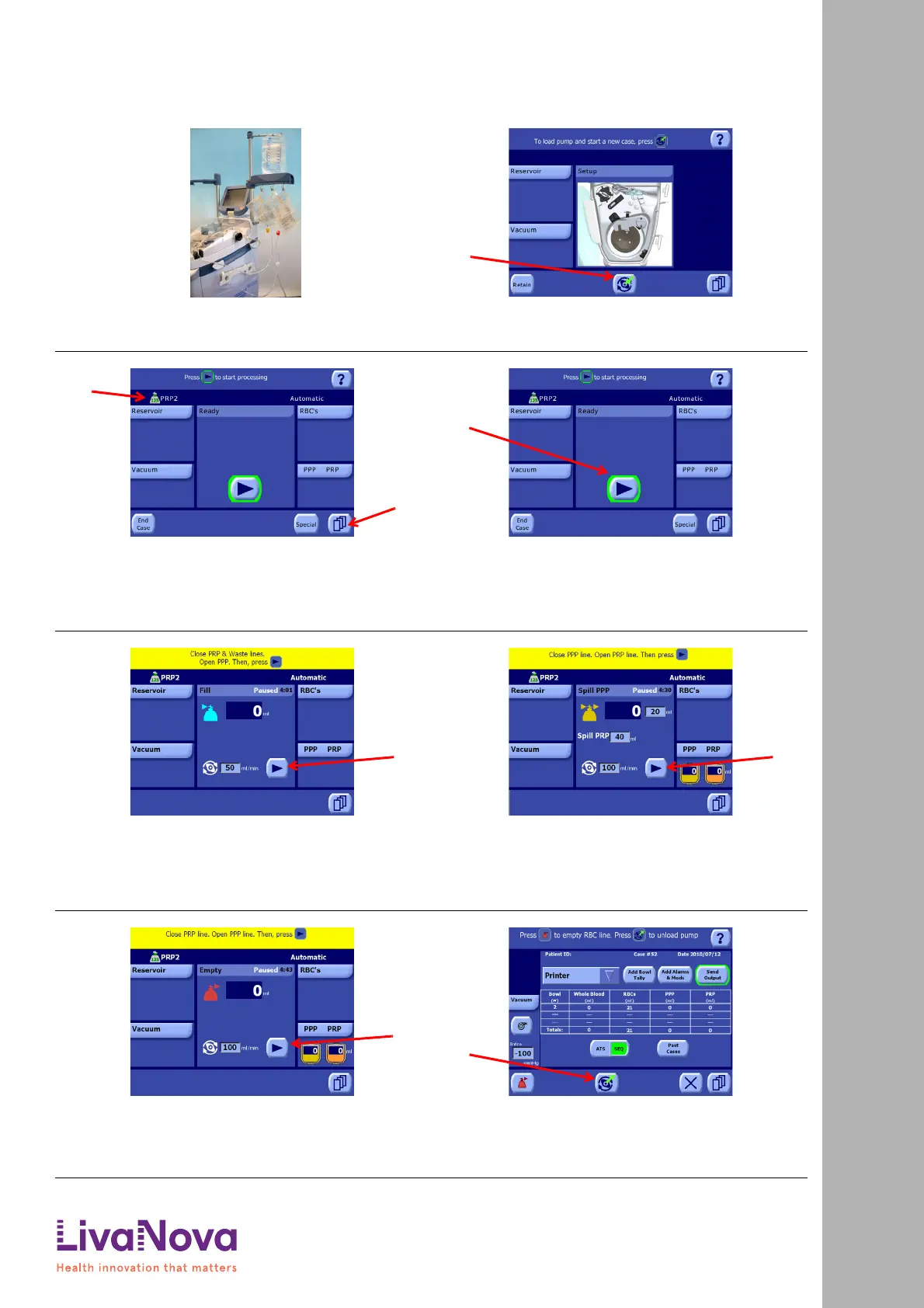
1. Install the disposable set, hang the PPP and PRP bags, and
connect the whole blood bag.
2. Turn on the machine using the ON/OFF switch located on the
rear panel. Once the system has booted and the Setup
Screen is displayed, touch the Load button (A) to autoload
the pump loop tubing and begin a new case.
3. Looking at the status area (A) of the Ready Screen, make
sure that the active protocol is PRP2 and the active operating
mode is Automatic.
If they aren’t so set, touch the Menu button (B) to enter the
Menu Screen, select the Protocols/Mode tab from the left of
the Menu Screen, set the active protocol to PRP2 and set the
mode to Automatic.
4. Once ready, touch the Start button (A) to begin processing.
5. Follow the on-screen instructions: clamp the PRP and waste
bag lines, open the PPP line, and then touch the Play button
(A).
The machine will begin processing the whole blood through
the Fill and Spill PPP phases. Once all the PPP has been spilled
into the PPP bag, and after an automatic 5 minute pause, the
Spill PRP sub-phase is started.
6. Follow the on-screen instructions: clamp the PPP line, open
the PRP line, and then touch the Play button (A).
After an automatic pause, the machine will continue
processing the blood in the bowl and spill the PRP into the
PRP bag. When all the PRP has been spilled, processing will
automatically switch to the Empty phase.
7. Follow the on-screen instructions: clamp the PRP line, open
the PPP line, and then touch the Play button (A).
The blood components remaining in the bowl will be emptied
into the RBC bag. Once the bowl is empty, the cycle is
complete, and the Ready Screen is displayed.
8. From the Ready Screen, touch the Start button to begin
another processing cycle (see Step 1).
Or, if no further processing to required, touch the End Case
button to end the case. From the End of Case screen, touch
the Unload button (A) to unload the pump loop tubing, and
then shutdown the machine.
Running a PRP Sequestration Case
Quick Start Instructions: Running a PRP Sequestration Case









 To Next Page