Programmability Option
X
TRA Operator’s Manual 20077/021 US 9-7
The Protocol/Mode Tab
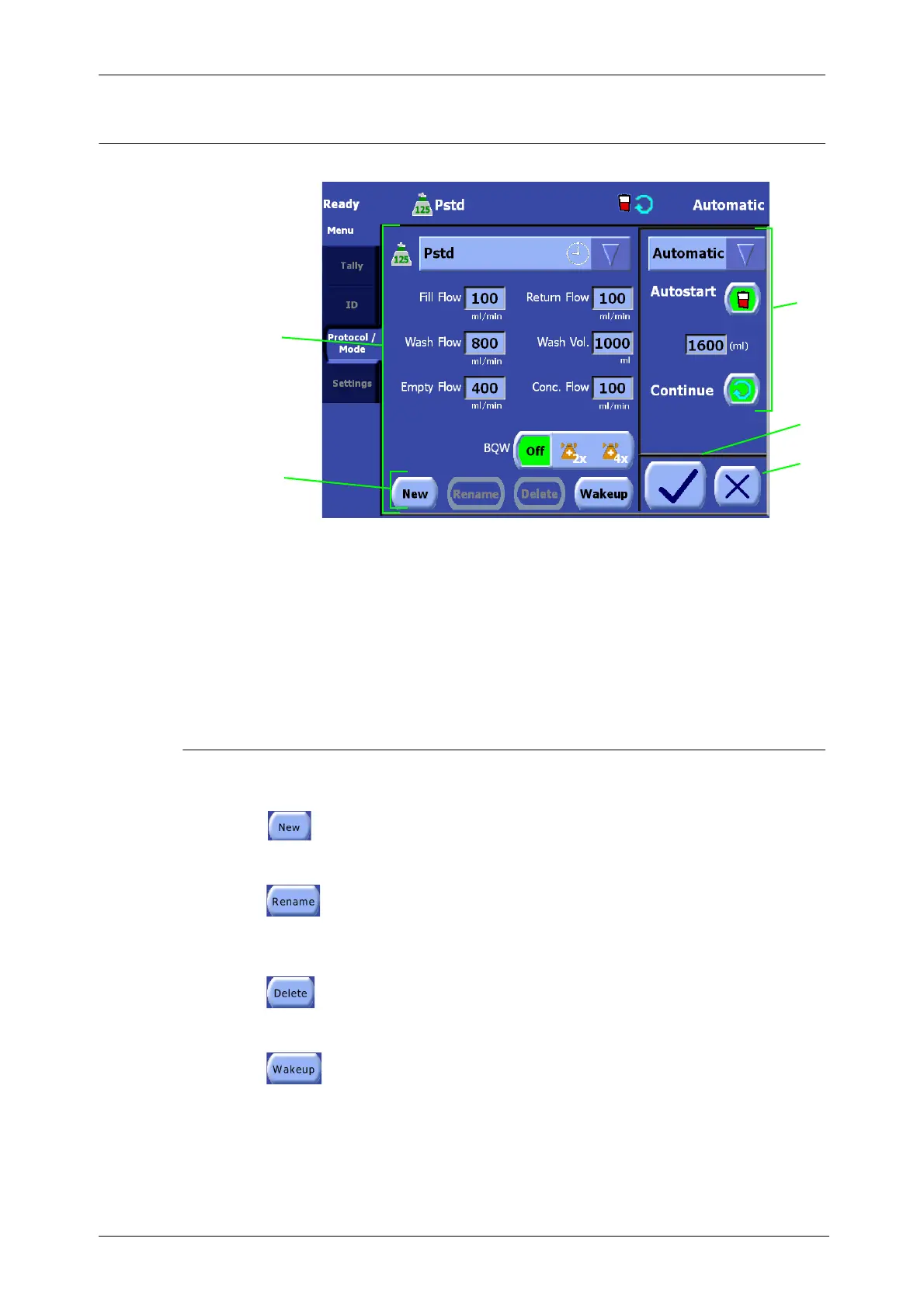
Figure 9-3 Protocol/Mode Tab of the Menu Screen
For a description of the
non-programmability related
features of the Protocol/Tab
screen, read “Protocol/Mode
Tab” on page 5-46.
Mode Buttons
New Button
Touching the New button creates a new custom protocol based on the selected protocol.
Refer to “Creating a New Protocol” on page 9-3.
Rename Button
Touching the Rename button displays the Keyboard Screen allowing the operator to
rename the suffix portion of a custom protocol’s name. A factory protocol cannot be
renamed. Refer to “Renaming a Protocol” on page 9-6.
Delete Button
Touching the Delete button deletes the selected custom protocol. Factory protocols cannot
be deleted. Refer to “Deleting a Protocol” on page 9-6.
Wakeup Button
Touching the Wakeup button toggles the wakeup designation of the selected protocol.
Refer to “Changing the Wakeup Protocol” on page 9-6.
4
5
2
3
1 Protocol buttons 3 Mode area
2 Protocol area 4 Save Modifications button
5 Close button
1









 To Next Page