Note:
These Quick Operating Instructions represent only an
overview of the operating procedures. For a complete setup and
use of the machine, please refer to the Xtra Operator’s Manual.
C-8 20077/021 US XTRA Operator’s Manual
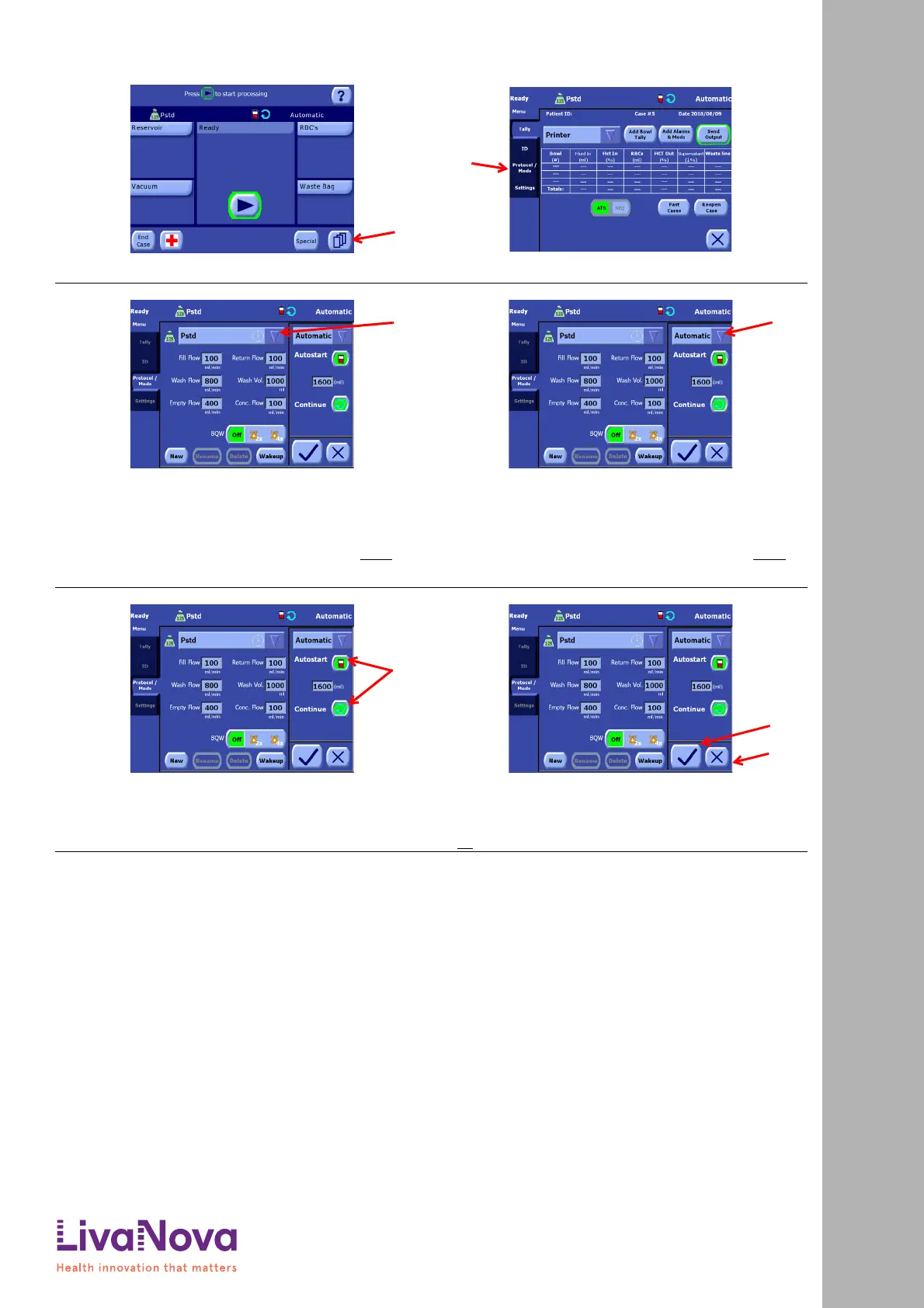
Setting the Active Protocol and Mode
1. From either the Setup Screen or the Ready Screen (pictured),
touch the Menu button (A) to enter the Menu Screen.
2. The Menu Screen will initially display the Tally tab. From the
left side of the Menu Screen, touch the Protocol/Mode tab (A).
3. Perform the following to set the active protocol from the
Protocol/Mode tab:
a. Touch the triangle menu button located on the right side of the protocol
drop-down menu (A). A list of available protocols will be displayed.
b. Touch the name of the desired protocol to close the menu and set it as the
active protocol. (Touching the triangle menu button a second time without
selecting a protocol from the list will close the Protocol menu without
changing the active protocol.)
4. Perform the following to set the active operating mode from
the Protocol/Mode tab:
a. Touch the triangle menu button located on the right side of the Mode menu
(A). A list of available modes for the selected protocol will be displayed.
b. Touch the name of the desired mode to close the menu and set it as the
active operating mode. (Touching the triangle menu button a second time
without selecting a mode from the list will close the Mode menu without
changing the active mode.)
5. Optionally, enable or disable any automations desired
for the selected mode using the buttons (A) in the
area immediately below the mode drop-down menu.
6. Touch the Save Modifications button (A) to exit and make all
changes in the Protocol/Mode tab take effect.
If the screen is exited by touching the Close button (B), or is
interrupted by a warning or alarm, then the modifications are
not
saved.
Quick Start Instructions: Setting the Active Protocol and Mode





 To Next Page