Vacu um M odu le
13-6
20077/021 US XTRA Operator’s Manual
Use of the XVAC System Through the XVAC Control Panel (Local Control)
The XVAC vacuum module can be controlled using its built-in control panel only when the touch screen
user interface of X
TRA is not available, in the following two cases:
1. When the X
TRA system is booting up
2. When a fatal error occurred on the X
TRA system
XVAC Control Panel
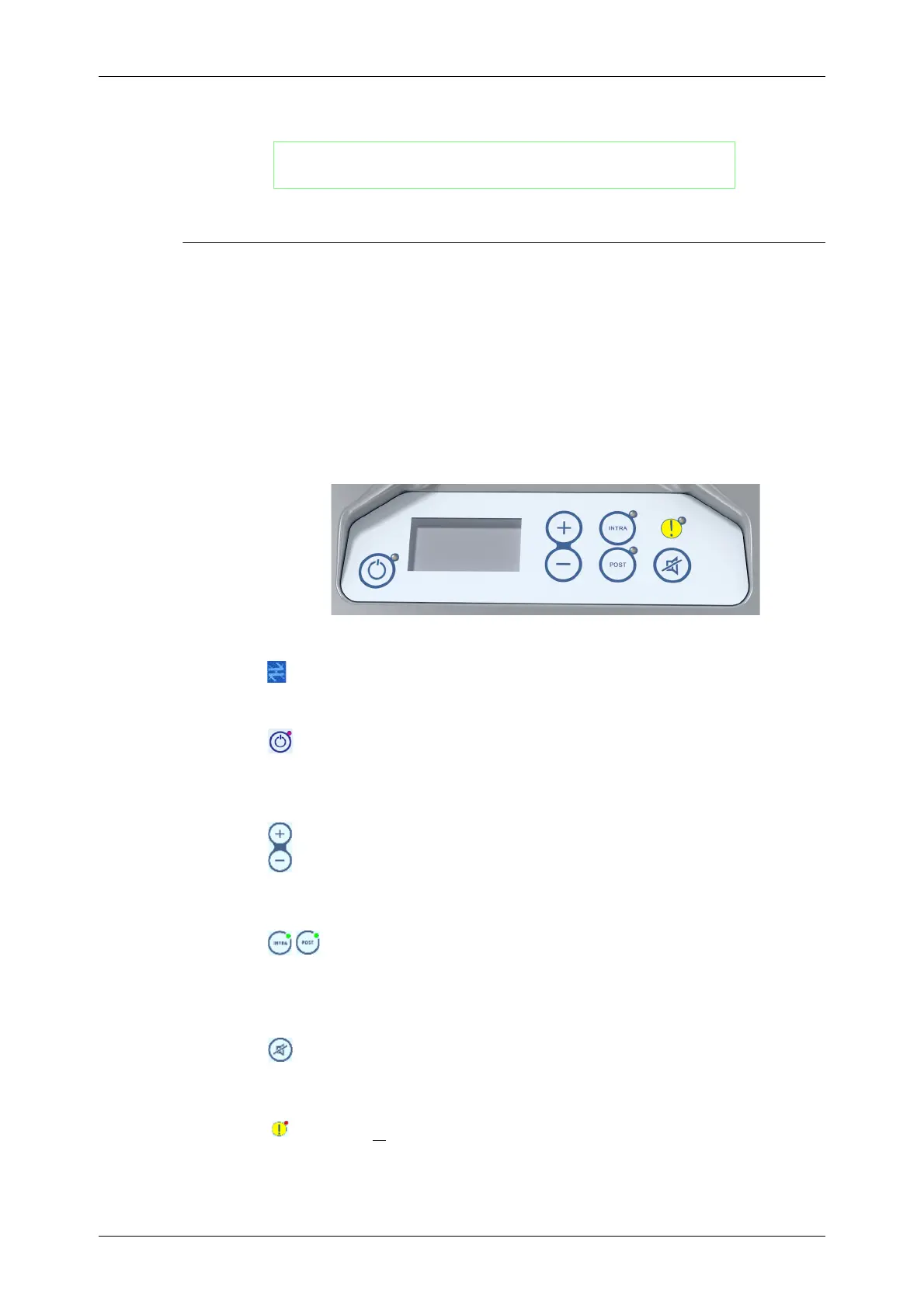
The control panel (see Figure 13-6) is located on the front of the XVAC module and is used to control
the vacuum when the X
TRA user interface is not available (local control) (i.e., when the XTRA system is
booting up or when a fatal error occurred on the X
TRA system).
Figure 13-6
XVAC
Control Panel
When operating in local control, the display of the XVAC control panel will show the “not linked” icon:
Vacuum Pump On/Off Button
Pressing the vacuum on/off button will toggle the vacuum pump on and off when it is operating
in local control. The current state of the vacuum pump is indicated by the green vacuum status
LED (light=ON; dark=OFF).
Vacuum Level Setpoint Selector (Up/Down buttons)
Pressing the increase (+) and decrease (-) buttons will change the vacuum level setpoint
(mmHg) for the selected operating mode.
Mode Buttons
Pressing the INTRA and POST mode buttons changes the XVAC’s operating mode between
intraoperative and postoperative, respectively. A green LED next to each button indicates
the current mode (LED on or blinking next to a button indicates that the module is working
or is ready to work in that mode).
Mute Button
Pressing the mute button silences the system beep when an alarm occurs.
Alarm Indicator LED
The red LED, located near the yellow warning icon at the upper-right corner of the control
panel, turns on
to indicate that an alarm or error has occurred.
WARNING
The blood collected with the XVAC vacuum module must be
processed only with the X
TRA Autotransfusion System.









 To Next Page