Note:
These Quick Operating Instructions represent only an
overview of the operating procedures. For a complete setup and
use of the machine, please refer to the Xtra Operator’s Manual.
XTRA Operator’s Manual 20077/021 US C-11
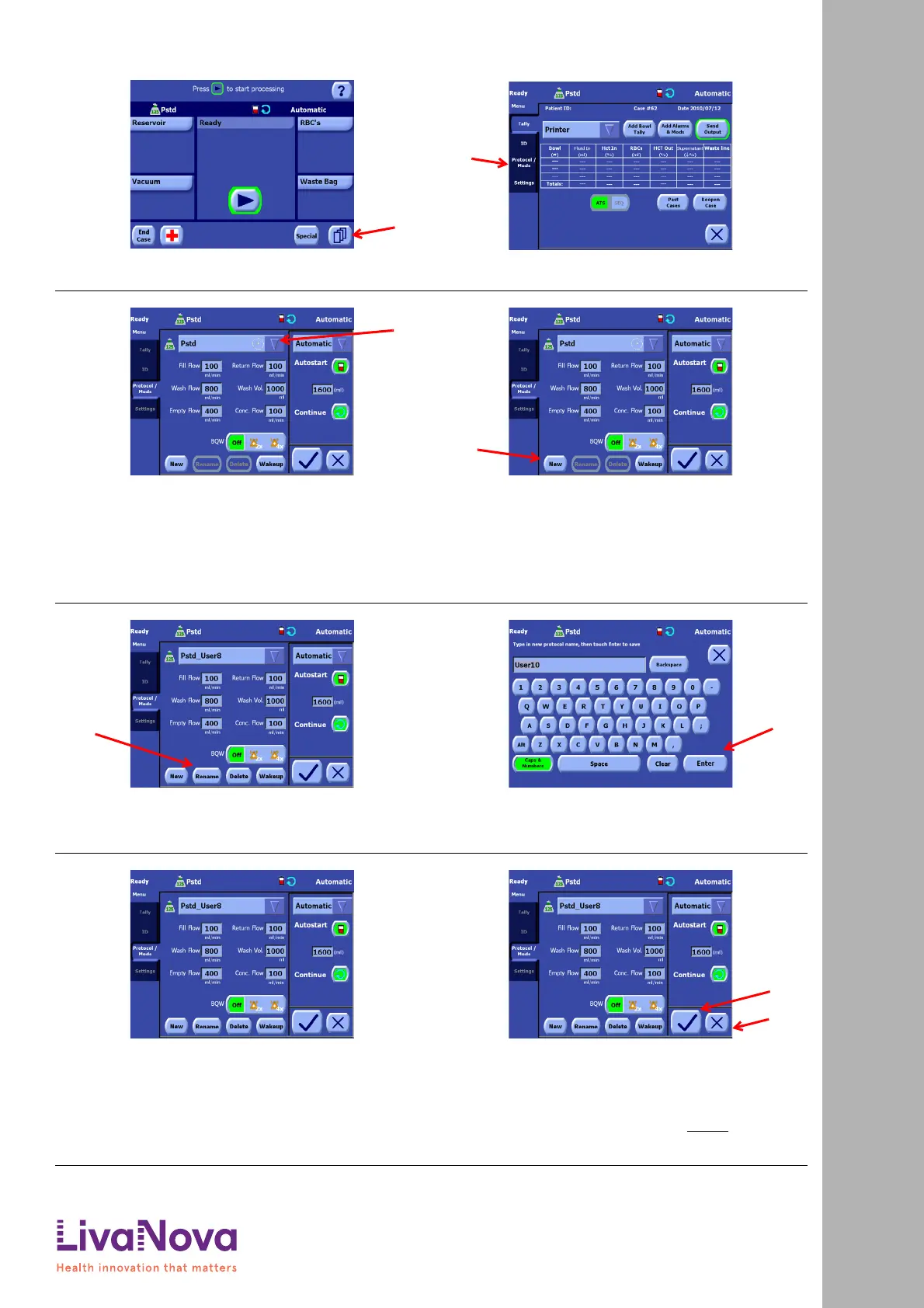
1. From either the Setup Screen, the Ready Screen (pictured), or
any processing screen, touch the Menu button (A) to enter
the Menu Screen.
2. The Menu Screen will initially display the Tally tab. From the
left side of the Menu Screen, touch the Protocol/Mode tab (A).
3. Select a base protocol from the protocol drop-down
menu (A). This can be either a factory protocol or an
existing custom protocol. You will duplicate and then
customize the base protocol in order to create the
new protocol.
Choose a base protocol whose parameters are
closest to what you desire for the new protocol.
4. Touch the New button (A). This will duplicate the
selected protocol and will give the newly created
protocol a unique name (prefixed by the base
protocol’s factory type).
5. Touch the Rename button (A) to display the
Keyboard Screen.
6. Use the keys on the Keyboard Screen to rename the
newly created protocol to a more useful name. When
satisfied with the name, touch the “Enter” button
(A).
7. Make any desired changes to the protocol
parameters using the controls in the protocol area
beneath the protocol drop-down menu. For example,
adjust the pump speed for each of the protocol’s
phases.
The parameters available for modification are dependent on
the base protocol.
8. Once all parameters have been set to your desired
values, touch the Save Modifications button (A) to
save your modifications and close the Protocol/Mode
tab.
Alternatively, if you wish to close the tab without
saving your modifications, touch the Close button
(B).
Quick Start Instructions: Creating a Custom Protocol
Creating a Custom Protocol









 To Next Page