Data Download Option
X
TRA Operator’s Manual 20077/021 US 11-1
Chapter 11: Data Download Option
Description
The XTRA data download option enables the operator to download processing tallies and information
for blood recovery and preoperative sequestration procedures in several ways:
• Integrated printer module
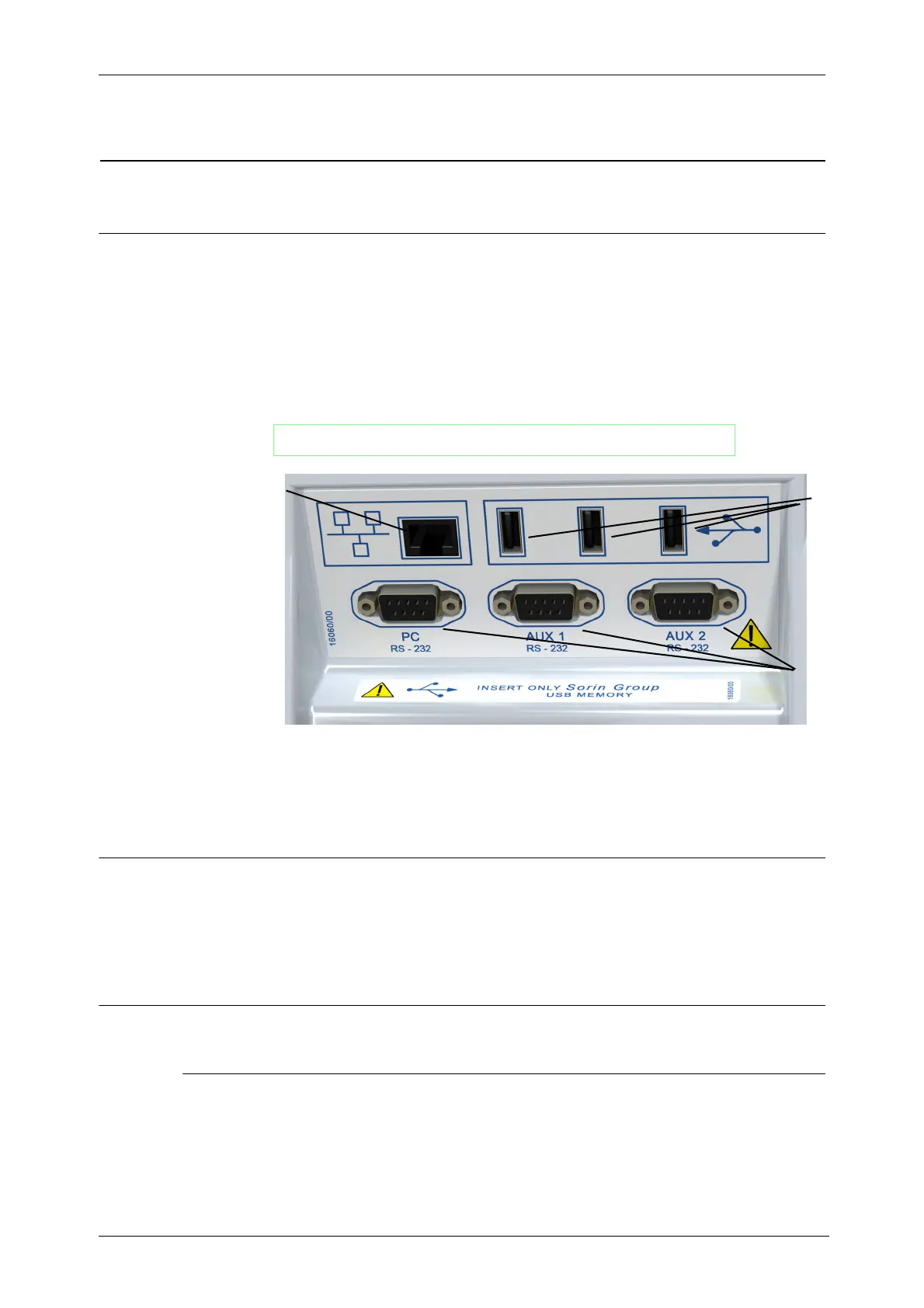
• Integrated USB (three) and RS232 serial ports (three)
•Ethernet port
[
Figure 11-1 Data Ports Panel on Rear of Machine
Enabling Data Download Option
The various methods of data download must be enabled in the Features tab of the Configuration Mode
Screen before they will be available for use. Refer to “How to Enter the Configuration Mode” on page
8-2 for instructions on entering the Configuration Mode Screen. For more on configuring the X
TRA
system refer to the rest of
Chapter 8: Configuring X
TRA
.
XTRA Output Devices
Printer
The integrated dot-matrix printer situated inside the rear panel enables the operator to print paper
reports of case data (see Figure 11-2).
WARNING
Use only XTRA USB memory sticks.
1 Ethernet Port 2 USB Ports
3 RS232 Ports
3
2
1









 To Next Page