Note:
These Quick Operating Instructions represent only an
overview of the operating procedures. For a complete setup and
use of the machine, please refer to the Xtra Operator’s Manual.
C-12 20077/021 US XTRA Operator’s Manual
The tally data for the current case may be printed from either the Tally tab
of the Menu Screen at any time or from the End of Case Screen after
processing the case. These quick operating instructions illustrate printing
from the Tally tab of the Menu Screen:
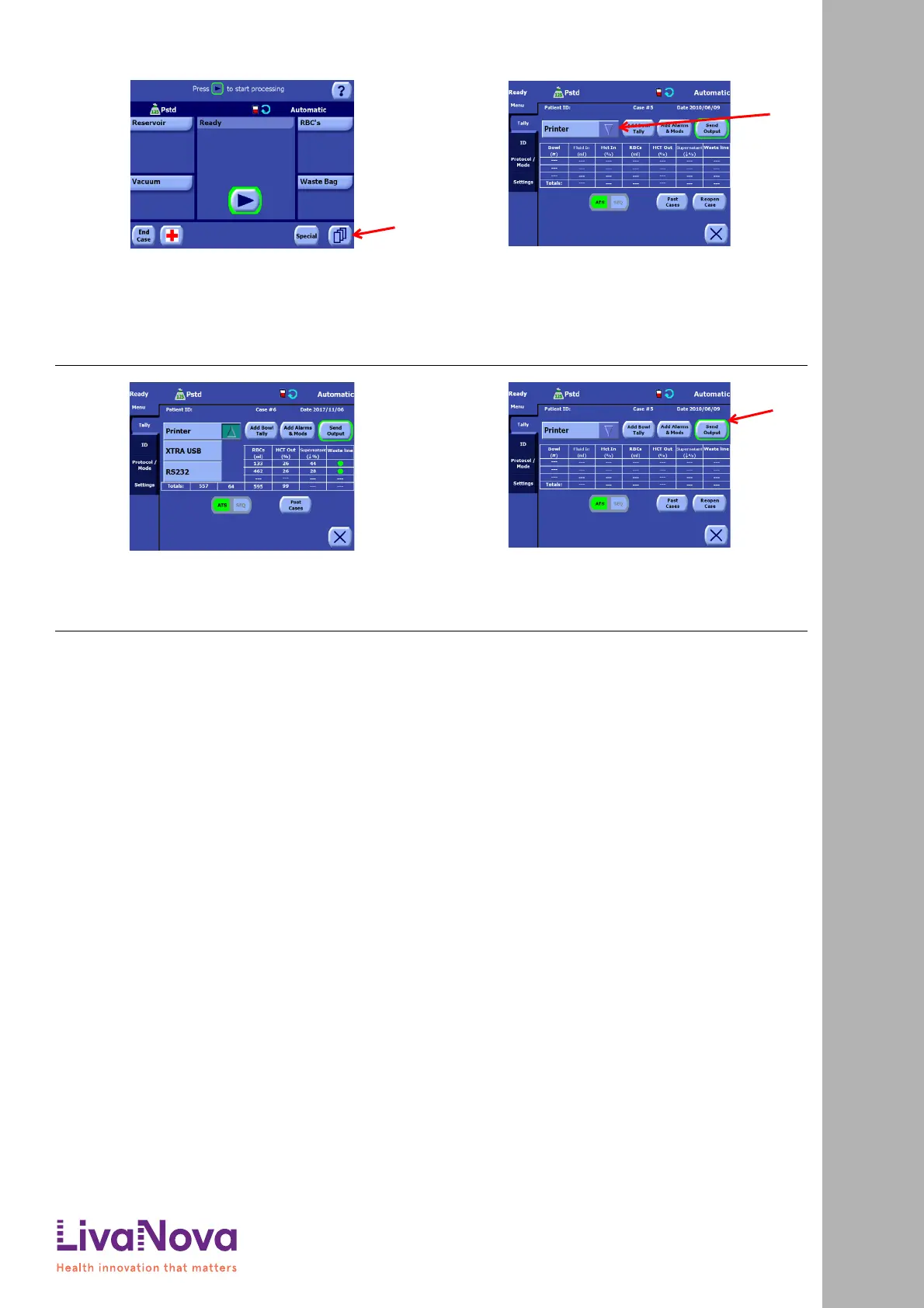
1. From either the Setup Screen, the Ready Screen (pictured), or
any processing screen, touch the Menu button (A) to enter
the Menu Screen.
2. From the Tally tab, check to see if “Printer” is set as the
current destination in the destination drop-down menu (A).
3. If “Printer” is not the currently selected destination,
then touch the arrow portion of the destination
drop-down menu to display the list of available
destinations. From the displayed list, touch “Printer”
to select it as the destination for the case data.
4. Touch the “Send Output” button (A). While the case
data is being printed, the text “Outputting case...” is
displayed above the “Send Output” button, and the
“Send Output” button will appear inset and green.
Printing a Report for the Current Case
Quick Start Instructions: Printing a Report for the Current Case









 To Next Page