Processing
5-52
20077/021 US XTRA Operator’s Manual
Past Cases Screen
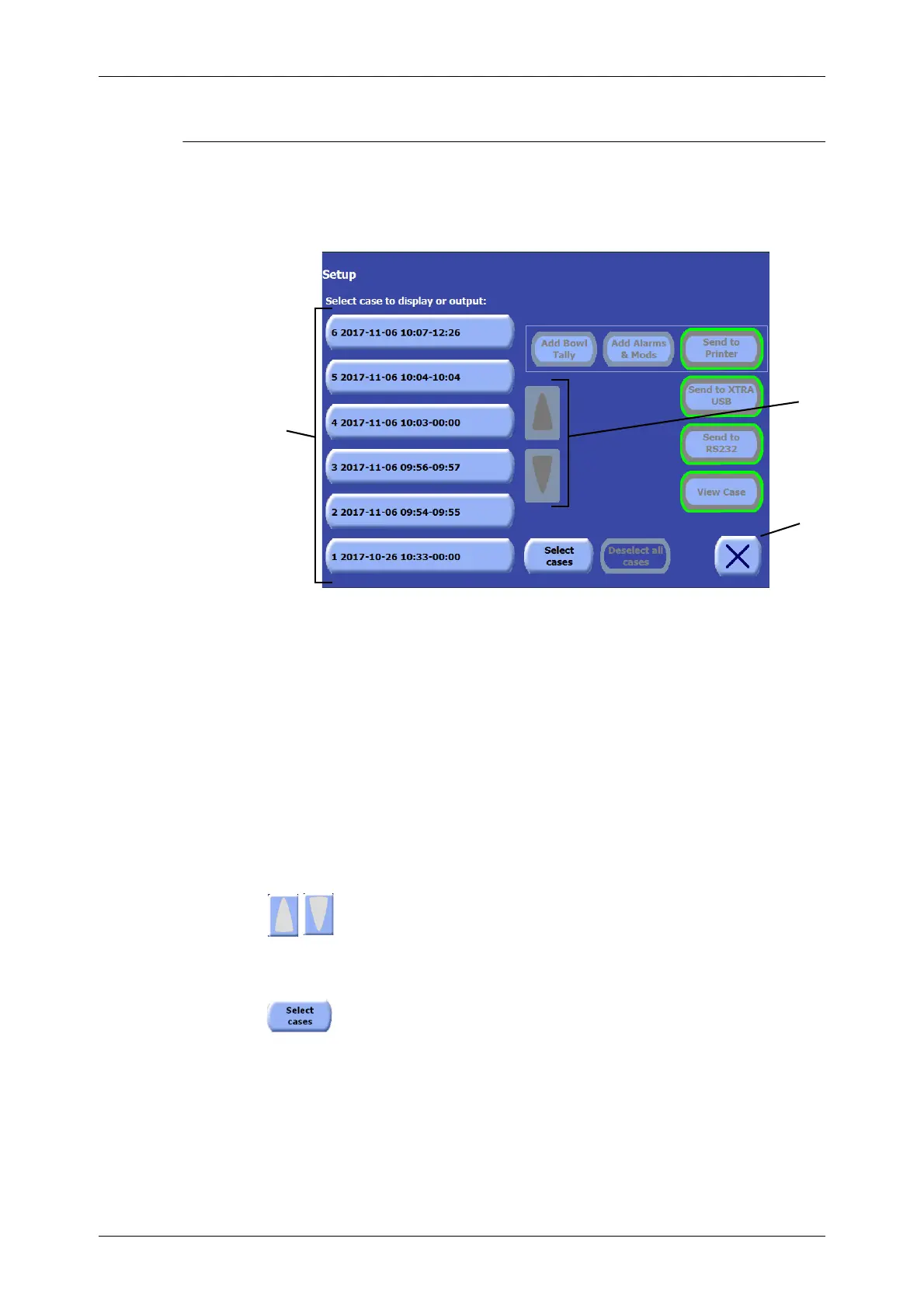
The Past Cases Screen displays a list of past cases that have been run on the XTRA system, allowing
those cases to be selected for display, export, or printing (see Figure 5-50).
For more information on printing and saving case data, read
Chapter 11: Data Download Option
.
Figure 5-50 Past Cases Screen
1. Past Cases List
Most of the Past Cases Screen is made up of the past cases list on the left side of the screen. Each
case in the list is represented by a button labelled with the case number, date, and time span for that
case.
Touching a case in the past cases list selects it for viewing, printing, or saving. When a case is
selected, it appears inset and green. Touching the case a second time deselects it.
Multiple cases may be selected for sending to a X
TRA USB device or RS232 port. To print or view a
case, however, only one case may be selected.
2. Up and Down Arrow Buttons
The up and down arrow buttons become active only when the number of past cases
exceeds the number that can be displayed on the screen at once. In that case, touching
the up and down arrow buttons scrolls the past cases list so that older cases may be
accessed.
Select multiple past cases
From the Past Cases screen, touch “Select Cases” to access the selection screen.
3
1 Past cases list 2 Up and down arrow buttons
3 Close button
2
1









 To Next Page