Chapter 9 — Configuring and Using Media Lifecycle Management Using MLM Reporting
December 2019 User Guide—Spectra T200, T380, and T680 Libraries
300
5. Click Go. The Media Lifecycle Management Report screen refreshes to
display the selected report with a list of the barcode labels for all media
in the selected location. A media health icon indicates the overall health
of each MLM-enabled cartridge as of the last time it was loaded into a
drive.
Note: Health icons are not used with LTO media that is not MLM-
enabled Spectra Certified media.
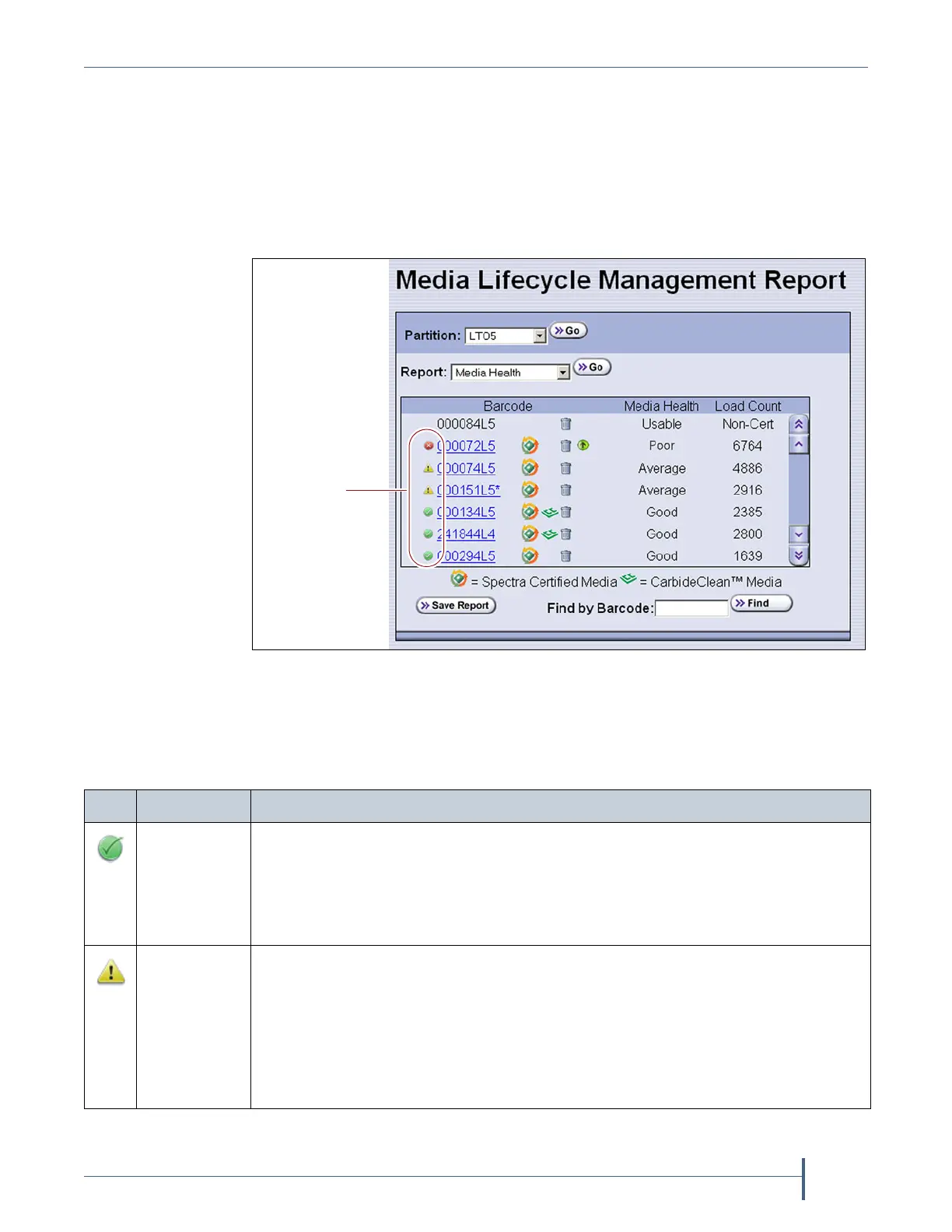
The following table describes the meaning of each media health icon.
Select the barcode next to the icon to view detailed information about
that specific piece of media.
Figure 170 Use the health icons on the Media Lifecycle Management Report
screen to quickly assess media health.
Icon Health score Meaning
100 – 80 The media health is Good.
Data cartridge: The media is in good condition and operating properly. The
cartridge can be used for writing new data and reading previously written
data.
Cleaning cartridge: More than 10 cleaning cycles remain on the cartridge.
79 – 50 The media health is Average.
Data cartridge: When the Health graph on the Details screen for the cartridge
falls below a health score of 80, the media health icon changes from green to
yellow (generally due to normal aging). For maximum reliability, only use the
cartridge for restores.
Cleaning cartridge: The cleaning cartridge is near expiration. From one to ten
cleaning cycles remain.



 To Next Page