Objet30 User Guide 6 Operating and Maintaining the Printer
DOC-34025 Rev. I 6-45
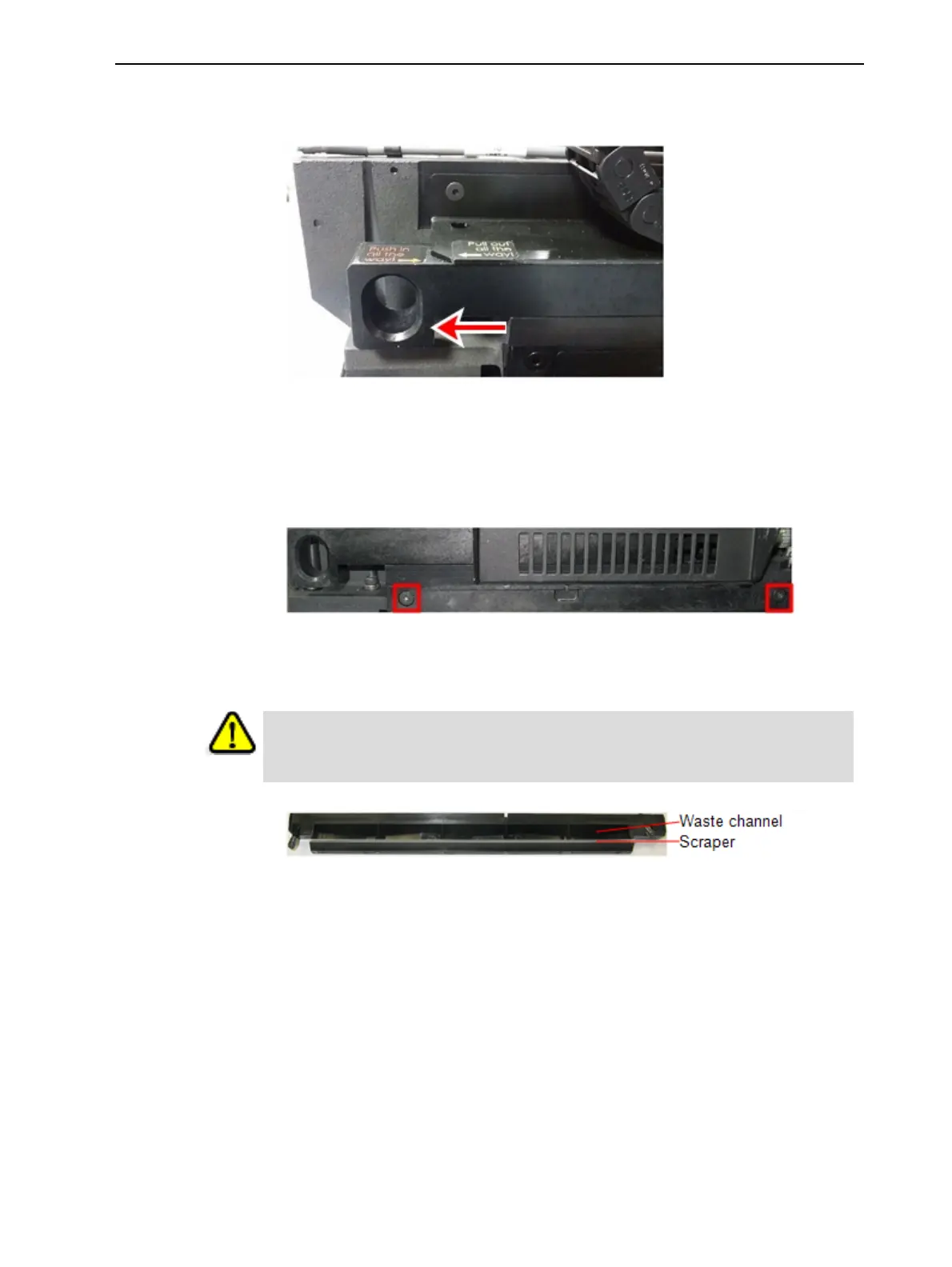
6. Pull out the drain-tube release mechanism to raise the tubes out of the
waste collector (see figure below).
Figure 6-55 Freeing the drain tubes from the waste collector
Important: Pull out the release mechanism completely.
7. Support the roller waste collector with your hand under it, and use a 3 mm
hex (Allen) key to loosen the screws.
Figure 6-56 Roller-waste-collector screws
8. Pull out the roller waste collector, taking care not to touch or damage the
scraper.
Warning
The scraper is very sharp! Proceed with caution.
Figure 6-57 Roller waste collector
9. Inspect the roller waste collector.
❒ If the scraper is damaged, replace the entire roller-waste-collector unit.
❒ If the scraper is not damaged, carefully remove any waste from the
waste channel, taking care not to damage the scraper. If necessary, use
90% IPA or ethanol to dissolve residue material in the waste channel
and on the scraper.
Note: The waste collected in this unit contains uncured resin. Dispose of it
in accordance with applicable environmental regulations.
To install the roller waste collector:
1. Carefully insert the roller-waste-collector unit.













 To Next Page