6.2 Explanation of Windows
6-27
6
How to Operate Sampling Scope
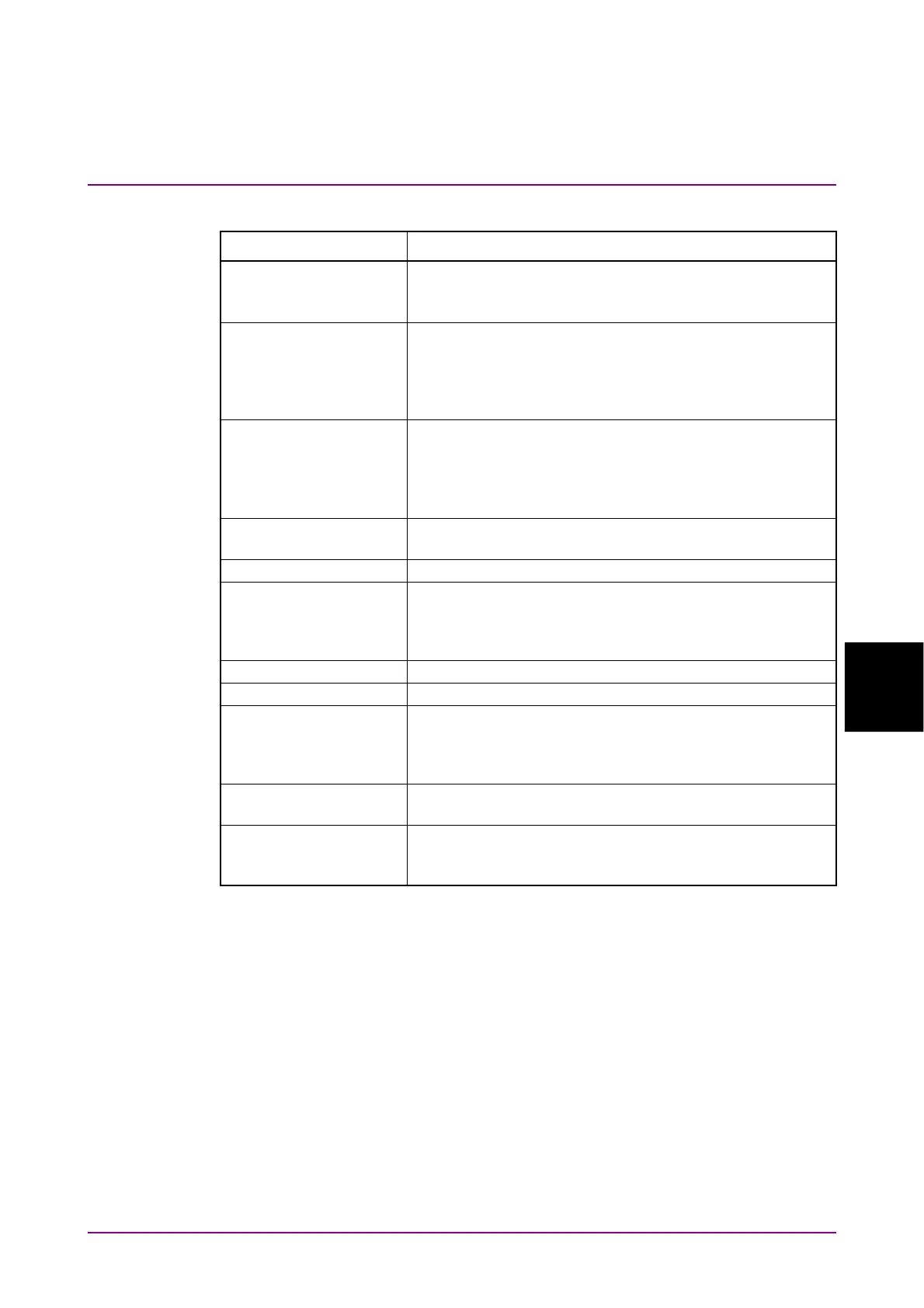
Table 6.2.3-1 Items of Setup Dialog Box (General tab)
Item Description
Signal Type When MP2110A-095 is installed, select the type of signal
(NRZ or PAM4).
To measure jitter, select NRZ.
Sampling Mode* Select sampling mode from Eye, Pulse, Coherent Eye,
Advanced Jitter.
Pulse, Coherent Eye can not measure jitter.
For the jitter graph, see Table 6.2.3-4 “Sampling Mode
Setting and Graph”.
Test Pattern This is available when the MP2110A-095 is installed.
When Signal Type is set to PAM4, select the pattern from
Variable, PRBS2^7-1, PRBS2^9-1, PRBS2^11-1,
PRBS2^13-1, PRBS2^15-1, SSPRQ.
When Sampling Mode is Eye, it is set to Variable.
Number of Samples Sets the number of samples. When Sampling Mode is set
to Advanced Jitter, the number of samples is 8128.
Accumulation Type Sets the accumulation method of the sampling data.
Limit Type Select the sampling end condition from Time, Samples,
Waveforms, or Pattern. Pattern can be selected when
Sampling Mode is Pulse, Coherent Eye, or Advanced
Jitter.
Time Sets the sampling time.
Samples Sets the number of samples.
Waveforms Sets the waveforms. The number of samples is the
product of Waveforms and Number of Samples.
When Sampling Mode is set to Advanced Jitter, it is the
number of waveform sweeps
Averaging When measuring the pulse mode, set the averaging
process count.
Pattern Set the number of patterns.
The number of samples is automatically set by the
product of the pattern length and the number of patterns.
*: When MP2110A-096 is installed, Advanced Jitter is added to
Sampling Mode.














 To Next Page