Chapter 6 How to Operate Sampling Scope
6-28
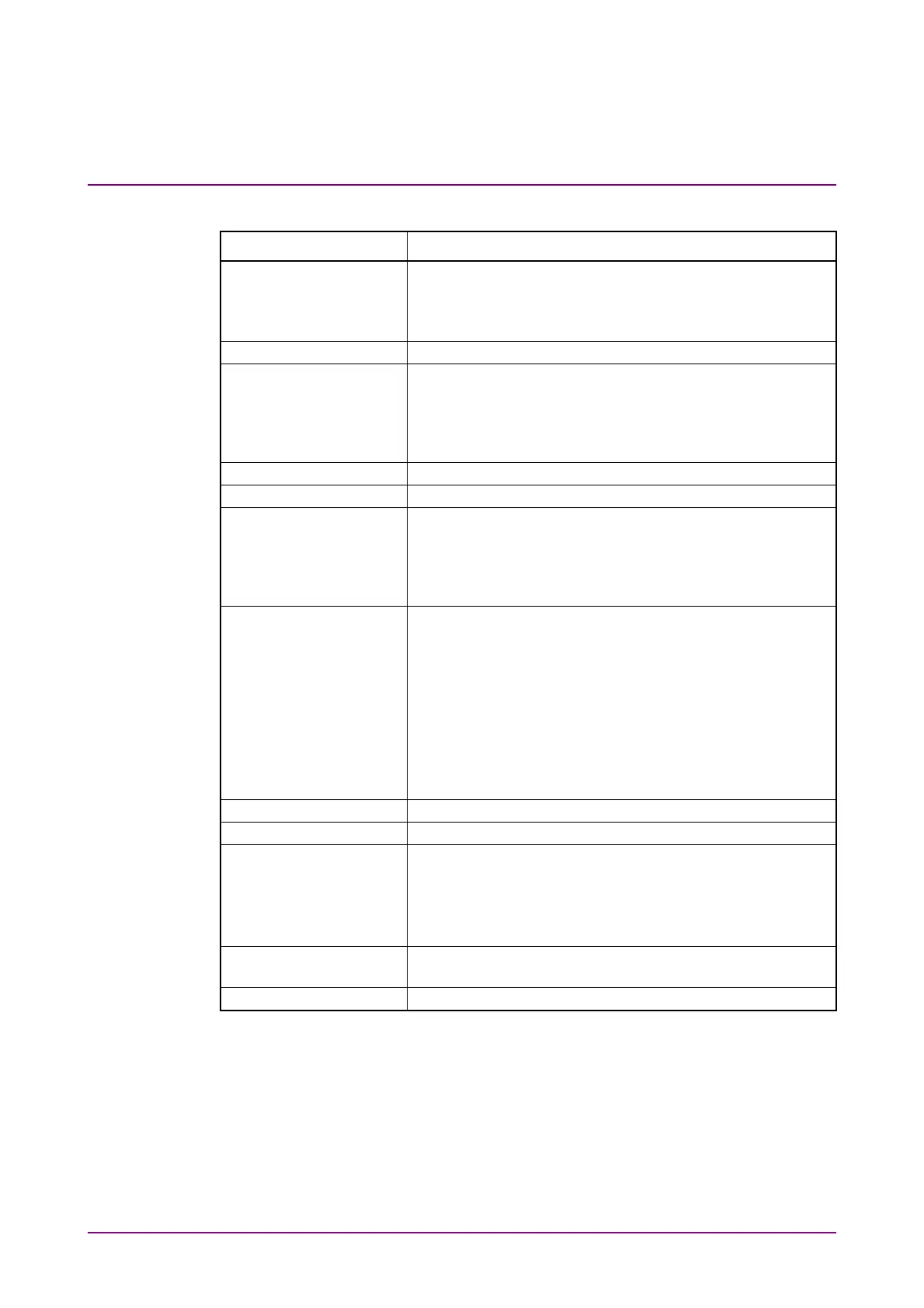
Table 6.2.3-2 Items of Setup Dialog Box (Utilities tab)
Item Description
Waveform Selects the color of waveform from Color Grade or Gray
Scale. It does not apply to jitter graphs.
When Gray Scale is selected, click Color Select, and you
can set the waveform color.
Mask*
1
Selects the color of mask from Purple or Gray.
Preset Information*
1
On: Displays the setting information (vertical
axis/horizontal axis scale, offset, symbol rate, status
of precision trigger (On/Off)) in the waveform
display area.
Off: Hides the setting information other than GND.
Label Add*
1
Adds a new label.
Label Delete*
1
Deletes the displayed label.
Overload On:
Displays a warning (Overload/Clipped) as shown in
Figure 6.2.1-5 when the input signal level becomes
excessively high. If a warning is displayed, N/A is
displayed as a measurement result.
Off:
Does not display a warning (Overload/Clipped).
Questionable Eye On:
Displays N/A as a measurement result except for
Average Power when NRZ? or PAM4? is displayed in
the measurement result/marker display area. NRZ?
and PAM4? indicate that the input signal may not be
measured correctly (refer to Figure 6.9.1-3).
However, in Version 7.02.10 or later, they are all
displayed as N/A except for Average Power, Outer
OMA, and Outer ExR.
Off:
Displays measurement results even when NRZ? or
PAM4? is displayed.
Set Reference*
1
Saves the displayed waveform as the reference trace.
Clear Reference*
1
Deletes the reference trace.
Temperature Displays the temperature of the sampling oscilloscope.
Current: Displays the current temperature.
Last Calibration:
Displays the temperature at the last
calibration, together with date and time.
Calibration*
2
Calibrates the amplitude level of the sampling
oscilloscope.
Application Test*
2
Runs the self test for the sampling oscilloscope.
*1: If Sampling Mode is set to Advanced Jitter, the setting is not
reflected.
*2: Operation is not possible when Sampling Mode is set to Advanced
Jitter.














 To Next Page