Chapter 6 How to Operate Sampling Scope
6-46
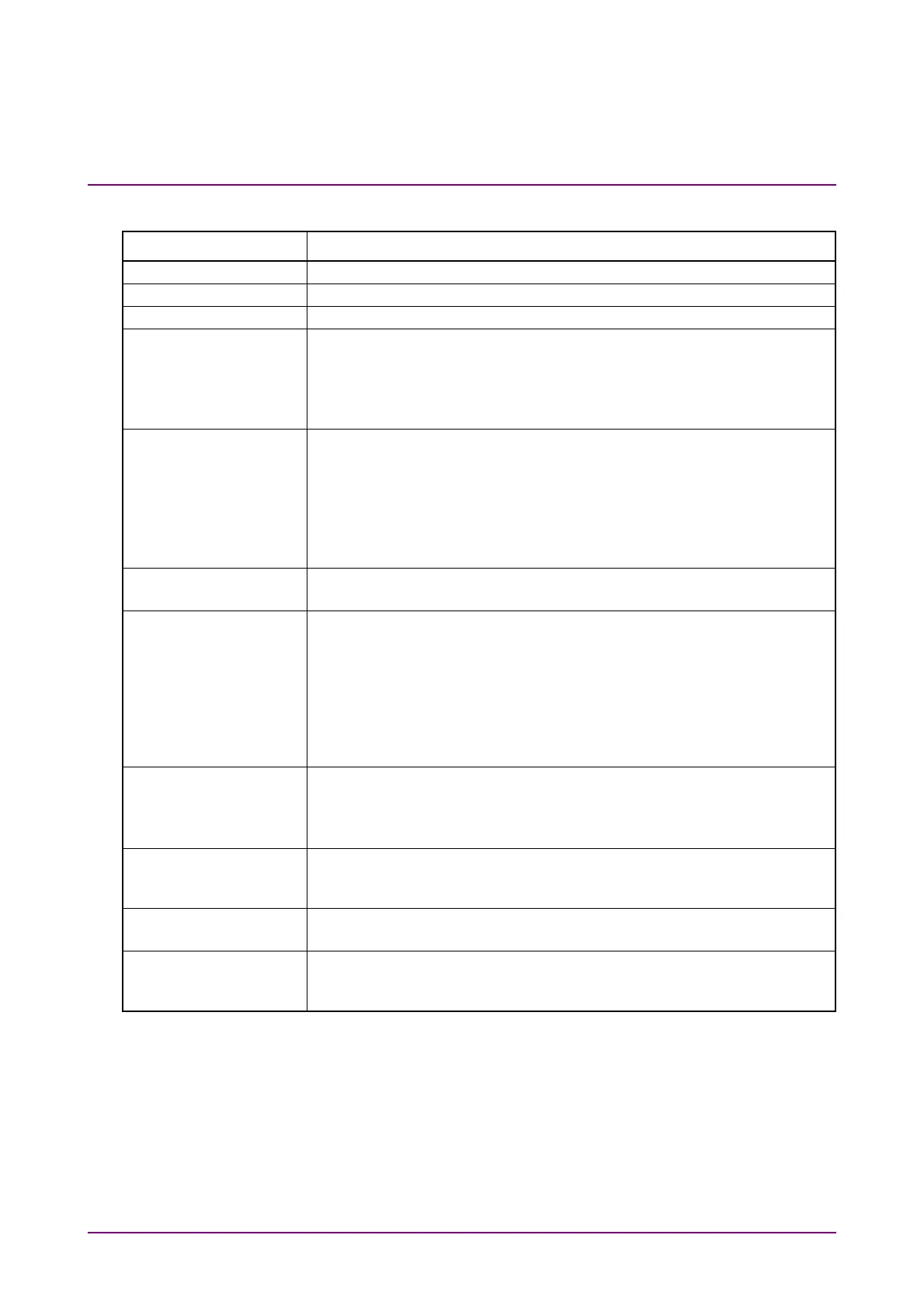
Table 6.2.4-9 Items of Mask Test Tab
Item Description
Mask Test Turns on and off the mask test on the specified channel.
Eye Mask Select Select the Mask type. Refer to “Table 6.9.2-1 Mask List”.
Mask Margin Test Click Run to measure Mask Margin and then stop sampling.
Test Method Continuous: Measures Mask Margin continuously.
One Shot: Measures Mask Margin when Run is clicked for Mask
Margin Test.
The Mask Margin measurement is performed so that the failed samples
will be under the value specified at Margin Type.
Margin Type Selects the method to define the number of failed samples allowed in
Mask Test.
Hit Count: Defined by the number of failed samples.
Hit Ratio: Defined by the ratio of failed samples to total samples/UI.
Judged as “Pass” when the number of failed samples is under the
specified value. When Hit Count is 1 (default), failed samples are not
allowed.
Mask Margin Sets Mask Margin.
When Mask Margin is measured, it is updated to the measured value.
Align Method Set the method of mask position setting.
Zero/One/Crossing: Places the mask at the midpoint between 0 level
and 1 level and at the midpoint between two
waveform crossing points. This alignment is
performed when Update is clicked for Mask
Alignment or when the Limited measurement
ends.
User Defined: The user sets the position of the mask.
Alignment Marker It is displayed when Align Method is User Defined.
Display Off, Display On: Switches marker display.
Center: Moves the mask to the center of the waveform
display area.
X1,
X, Y1,
Y When Align Method is User Defined, the mask position and width are
set. Refer to “Figure 6.9.2-3 Example of Adjusting Mask Position
Manually”.
Mask Alignment It is displayed when Align Method is Zero/One/Crossing.
Click Update to update the mask position.
Mask Area Restriction When setting to On, Angle and Width can be set and the mask area can
be restricted. Refer to “Figure 6.9.2-4 Example of Limiting Mask
Area”.
When setting Sampling Mode to Advanced Jitter in the Setup dialog box,
Equalizer tab and Mask Test tab cannot be operated.














 To Next Page