You can print on the back side of printed paper. Flatten any curls on the printed paper and insert it into the
multi-purpose tray ( Loading Paper in the Multi-Purpose Tray(P. 44) ), with the side to print face up
(previously printed side face down).
● When you want to print on the back side of the paper that is already printed, set <Manual 2-Sided (MP)> to
<2nd Side> in the setting menu of the operation panel. Manual 2-Sided (MP)(P. 458)
● Load one sheet of paper each time you print.
● You can use only the paper printed with this machine.
● You cannot print on the side that has previously been printed on.
Loading a Custom Size Paper
To load custom size paper or other paper whose size is not found in the paper size markings on the paper drawer, use
the following procedure.
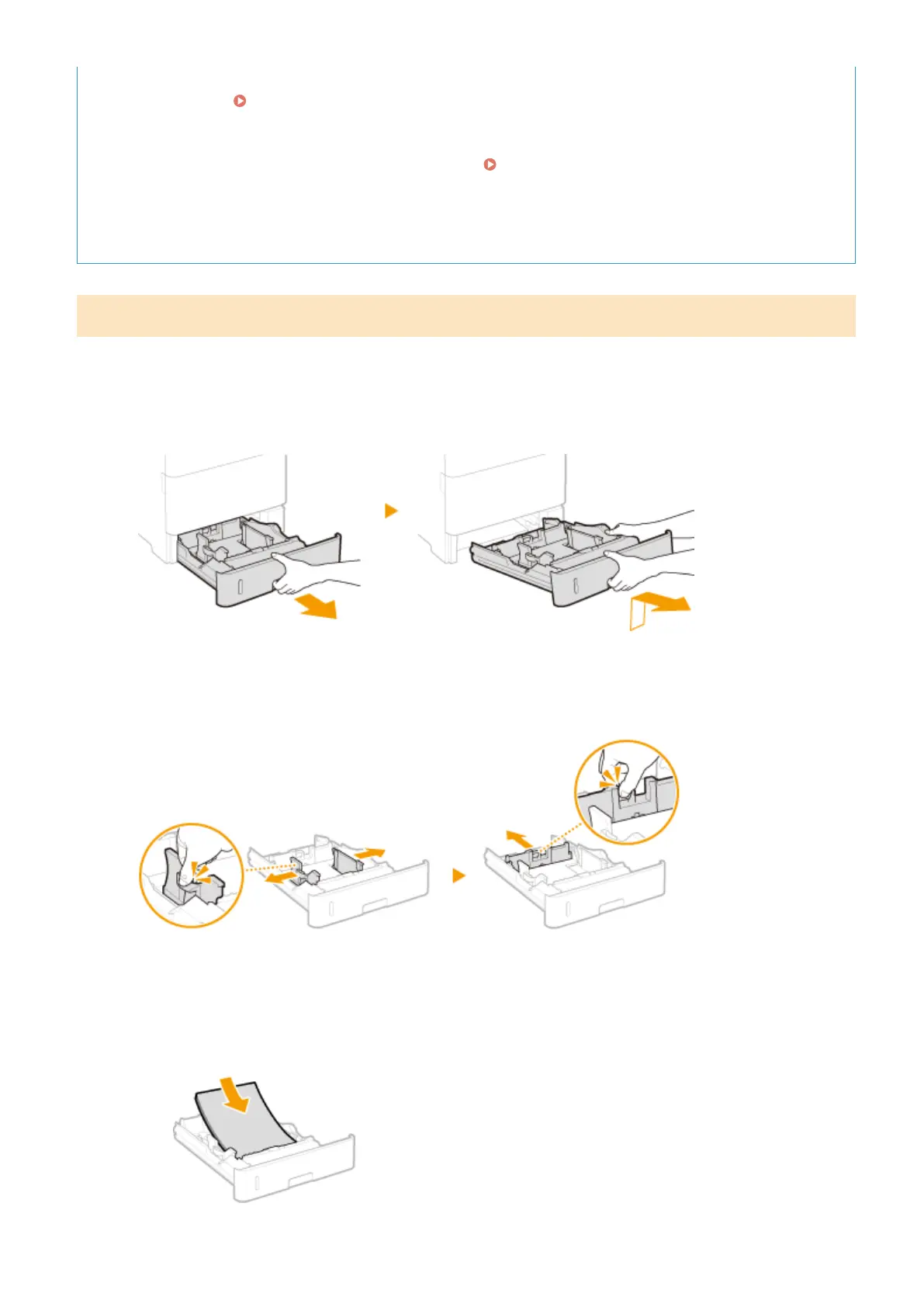
1
Pull out the paper drawer until it stops, and remove it while lifting the front side.
2
Slide the paper guides apart.
● Press the lock release lever to slide the paper guides outward.
3
Load the paper so that the edge of the paper stack is aligned against the front side of
the paper drawer.
● Place the paper stack with the print side face down.
● Fan the paper stack well, and tap it on a at surface to align the edges.
Basic Operations
41



 To Next Page