184 • SMP Gateway User Manual
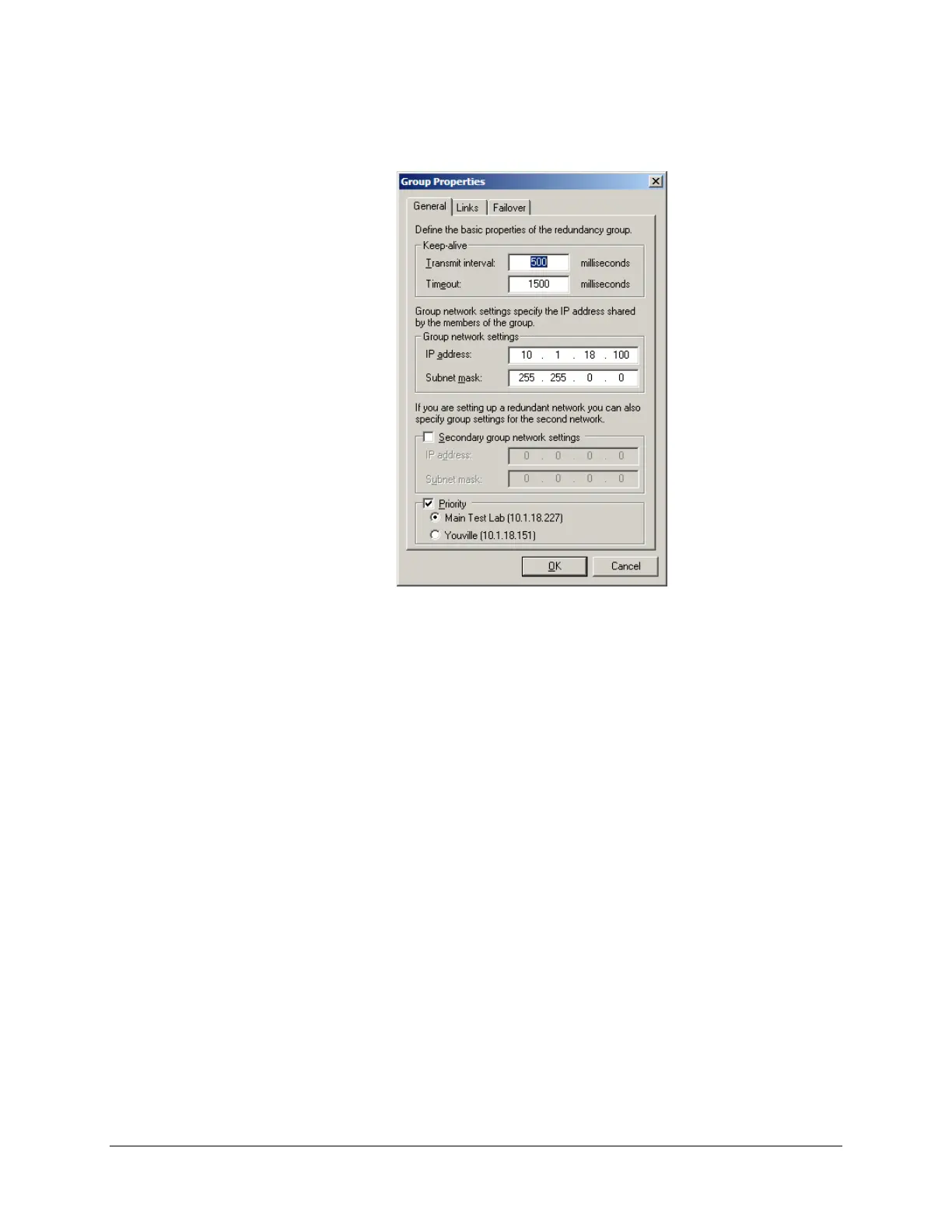
From the Redundancy menu, click Group SMP Gateways to display the Group Properties
dialog box.
The Group Properties dialog box allows you to specify redundancy settings such as the virtual IP
address, the LAN and serial connections to be used, and the conditions that have to exist for the
SMP Gateways to switch roles.
Redundancy is defined by 3 categories of settings, corresponding to the tabs in the dialog box.
In the General settings tab, you identify the basic properties of the group:
The keep-alive settings, i.e., the frequency at which keep-alive messages are to be sent by
the active SMP Gateway (every x milliseconds, where x is between 200 and 10,000), and
the timeout interval after which the standby SMP Gateway presumes that the active
gateway has failed and takes over as the active one (between 600 and 30,000 ms).
The virtual address and subnet mask used to communicate with the group. The virtual IP
address must be different from the physical IP addresses you set up during the initial
configuration of your SMP Gateways. It identifies the group and is used by the control
center to communicate with the active gateway. If the active gateway fails, the virtual IP
address and subnet mask are assigned to the standby gateway.
Optionally, the virtual address and subnet mask of the secondary network, if you are
using a secondary network for communication between the SMP Gateways and the
control center.
Optionally, you can give priority to one of the SMP Gateways: if neither SMP is in a
failure state, the one that has priority will become active.



 To Next Page