C
HAPTER
4
| Configuring the Switch
IGMP Snooping
– 152 –
WEB INTERFACE
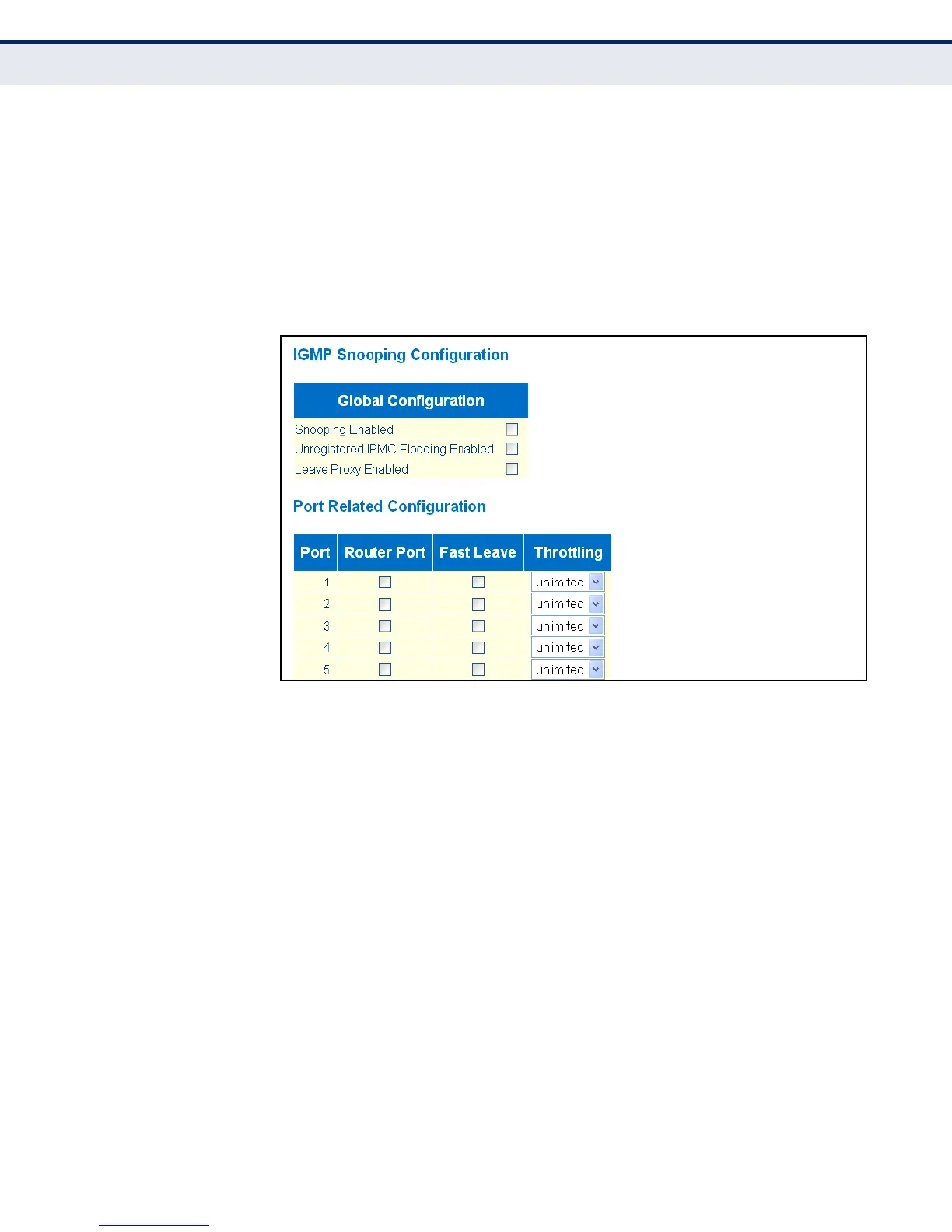
To configure global and port-related settings for IGMP Snooping:
1. Click Configuration, IGMP Snooping, Basic Configuration.
2. Adjust the IGMP settings as required.
3. Click Save.
Figure 45: Configuring Global and Port-related Settings for IGMP Snooping
CONFIGURING VLAN
S
ETTINGS FOR IGMP
SNOOPING AND QUERY
Use the IGMP Snooping VLAN Configuration page to configure IGMP
snooping and query for a VLAN interface
CLI REFERENCES
◆ "IGMP Commands" on page 419
PARAMETERS
The following parameters are displayed on the IGMP Snooping VLAN
Configuration page:
◆ VLAN ID - VLAN Identifier.
◆ Snooping Enabled - When enabled, the switch will monitor network
traffic on the indicated VLAN interface to determine which hosts want to
receive multicast traffic. (Default: Enabled)
When IGMP snooping is enabled globally, the per VLAN interface
settings for IGMP snooping take precedence. When IGMP snooping is
disabled globally, snooping can still be configured per VLAN interface,
but the interface settings will not take effect until snooping is re-
enabled globally.


 To Next Page