C
HAPTER
5
| Monitoring the Switch
Displaying Information on the Spanning Tree
– 231 –
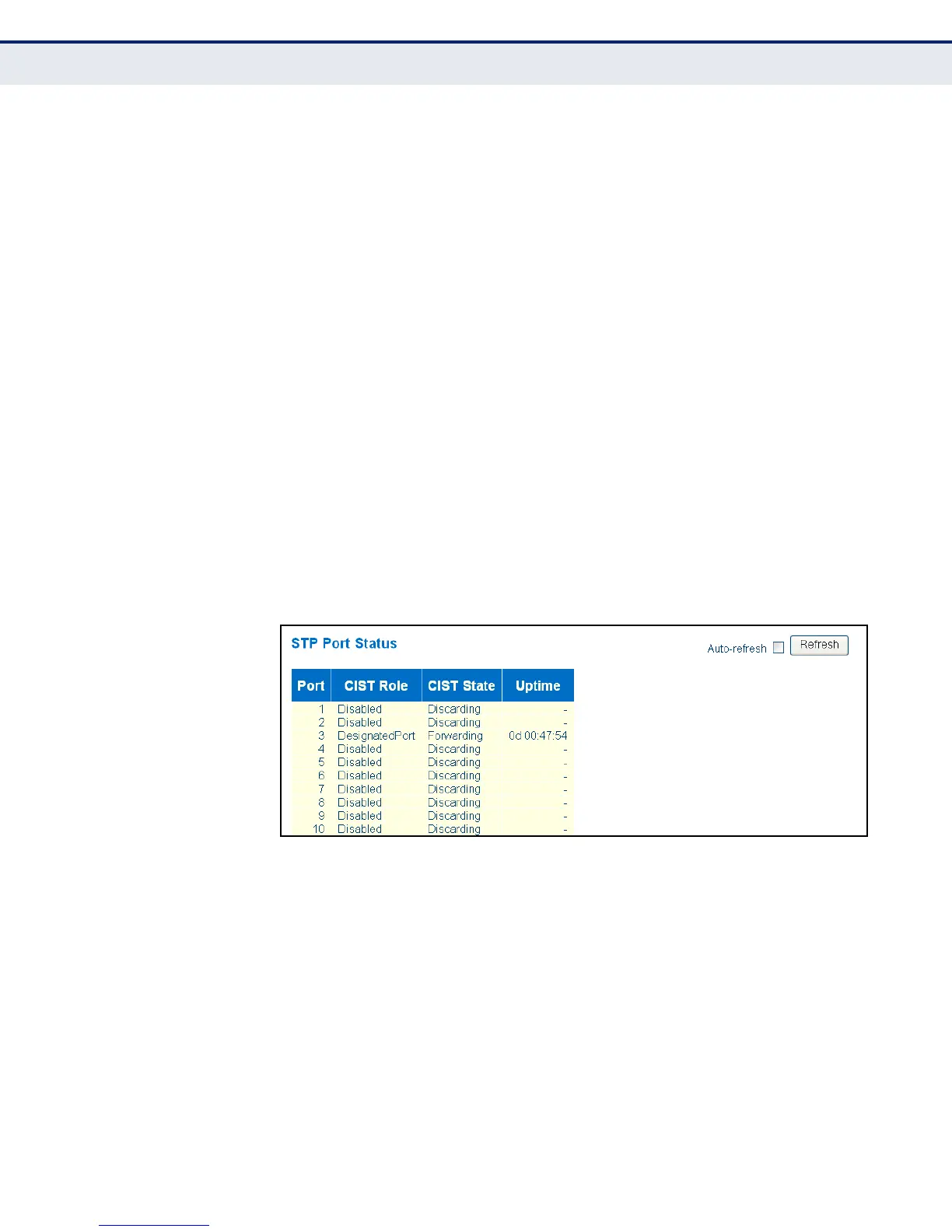
◆ CIST Role – Roles are assigned according to whether the port is part of
the active topology connecting the bridge to the root bridge (i.e., root
port), connecting a LAN through the bridge to the root bridge (i.e.,
designated port); or is an alternate or backup port that may provide
connectivity if other bridges, bridge ports, or LANs fail or are removed.
◆ CIST State – Displays current state of this port within the Spanning
Tree:
■
Blocking – Port receives STA configuration messages, but does not
forward packets.
■
Learning – Port has transmitted configuration messages for an
interval set by the Forward Delay parameter without receiving
contradictory information. Port address table is cleared, and the
port begins learning addresses.
■
Forwarding – Port forwards packets, and continues learning
addresses.
◆ Uptime – The time since the bridge port was last initialized.
WEB INTERFACE
To display information on spanning tree port status, click Monitor, Spanning
Tree, Port Status.
Figure 93: Spanning Tree Port Status
DISPLAYING PORT
STATISTICS FOR STA
Use the Port Statistics page to display statistics on spanning tree protocol
packets crossing each port.
CLI REFERENCES
◆ "stp port statistics" on page 414
PARAMETERS
These parameters are displayed in the web interface:
◆ Port – Port Identifier.


 To Next Page