C
HAPTER
5
| Monitoring the Switch
Displaying Information About Security Settings
– 205 –
WEB INTERFACE
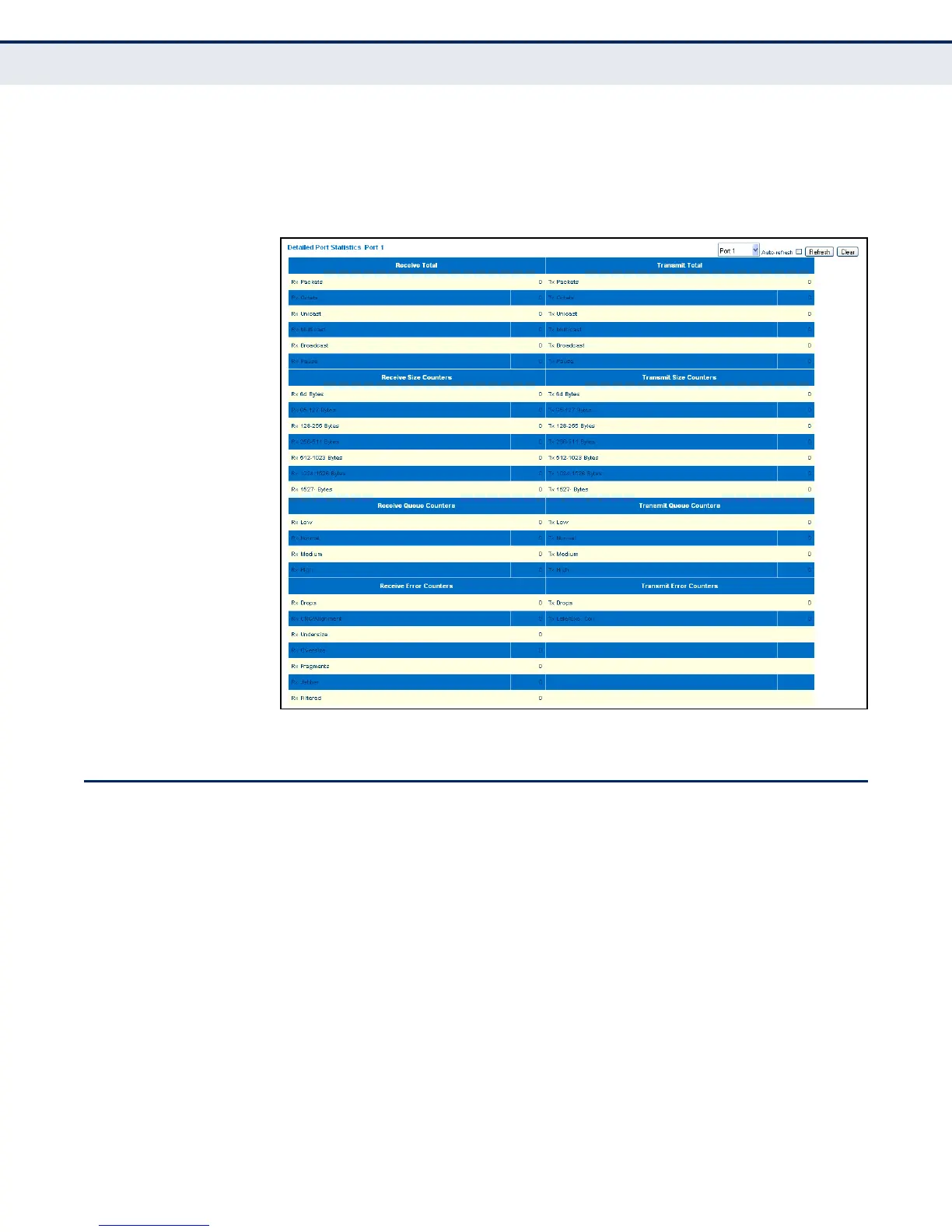
To display the detailed port statistics, click Monitor, Ports, Detailed
Statistics.
Figure 76: Detailed Port Statistics
DISPLAYING INFORMATION ABOUT SECURITY SETTINGS
You can use the Monitor/Security menu to display statistics on
management traffic, security controls for client access to the data ports,
and the status of remote authentication access servers.
DISPLAYING ACCESS
MANAGEMENT
STATISTICS
Use the Access Management Statistics page to view statistics on traffic
used in managing the switch.
CLI REFERENCES
◆ "security switch access statistics" on page 326
USAGE GUIDELINES
Statistics will only be displayed on this page if access management is
enabled on the Access Management Configuration menu (see page 79),
and traffic matching one of the entries is detected.


 To Next Page