C
HAPTER
4
| Configuring the Switch
Configuring Port Connections
– 67 –
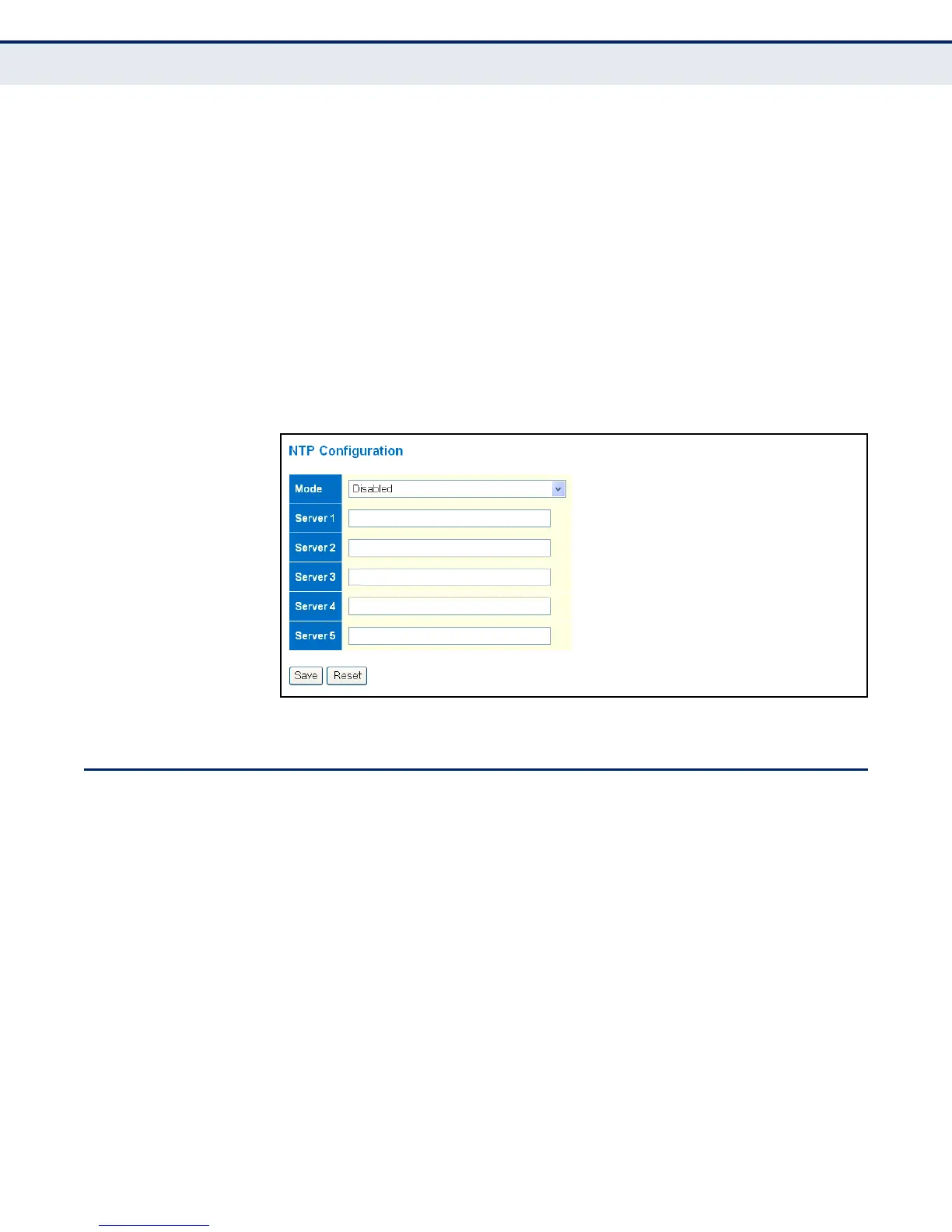
◆ Server – Sets the IPv4 or IPv6 address for up to five time servers. The
switch attempts to update the time from the first server, if this fails it
attempts an update from the next server in the sequence. The polling
interval is fixed at 15 minutes.
WEB INTERFACE
To configure the NTP servers:
1. Click Configuration, System, NTP.
2. Enter the IP address of up to five time servers.
3. Click Save.
Figure 6: NTP Configuration
CONFIGURING PORT CONNECTIONS
Use the Port Configuration page to configure the connection parameters for
each port. This page includes options for enabling auto-negotiation or
manually setting the speed and duplex mode, enabling flow control, setting
the maximum frame size, specifying the response to excessive collisions,
or enabling power saving mode.
CLI REFERENCES
◆ "Port Commands" on page 283
PARAMETERS
The following parameters are displayed on the Port Configuration page:
◆ Link – Indicates if the link is up or down.
◆ Speed – Sets the port speed and duplex mode using auto-negotiation
or manual selection. The following options are supported:



 To Next Page