7.3 Ingesting Content
7.3.1 Ingesting content From a USB Drive
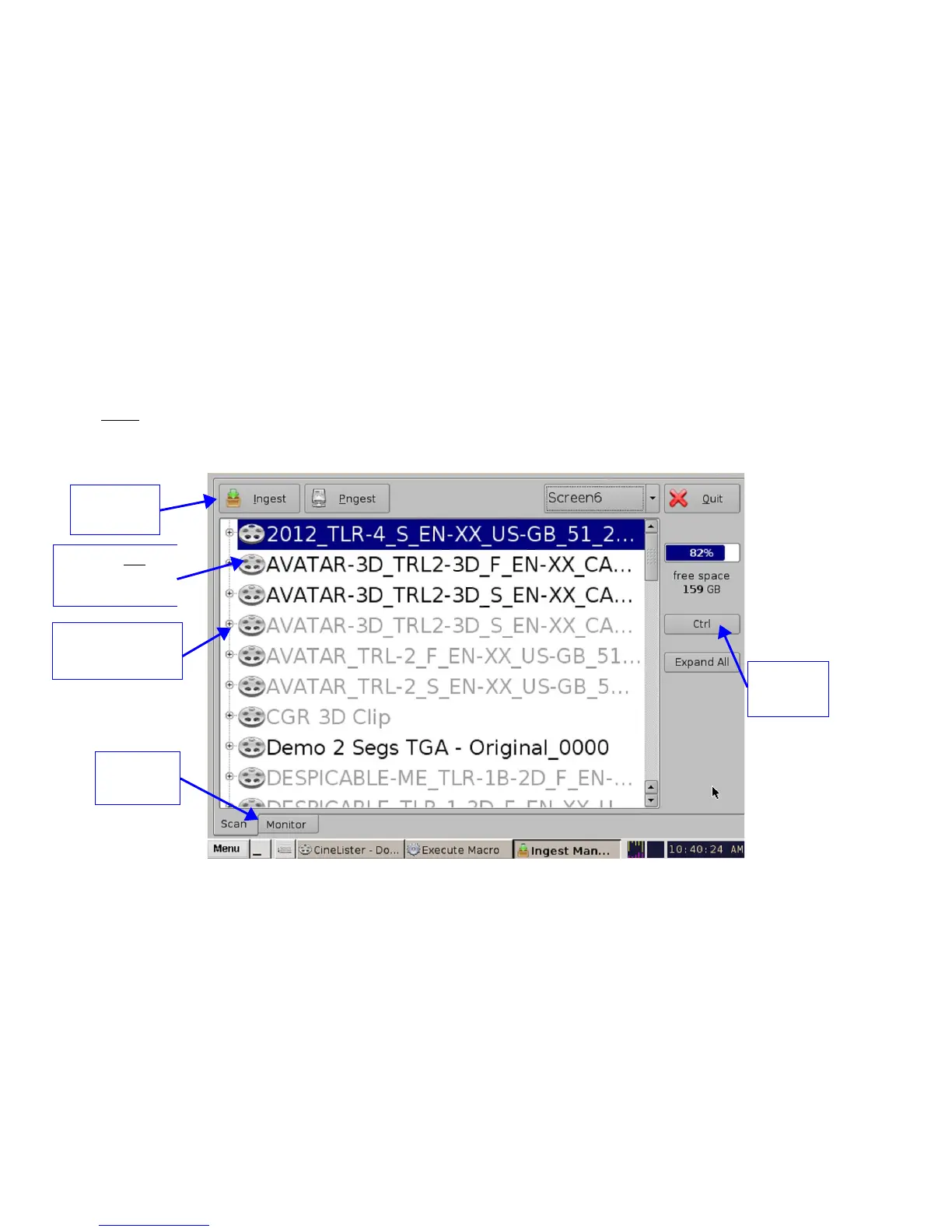
If the content to ingest is on a USB drive, plug the drive into the DCP-2000's USB Port and wait for
the Ingest Manager window to appear ( Figure 137). Note: This assumes that the DCP-2000 has
been installed according to the “Hard Disk Drive Installation” document that ships with the unit.
• Select an item.
• Click on the Ingest button. The ingest process will begin.
• If an item was already ingested, it will appear in gray as illustrated in Figure 137.
• To see the progress of items being ingested, click on the Monitor tab.
• You can also select multiple items by clicking the Ctrl button ( Figure 137) and then clicking
on the Ingest button.
Note: You can playback ingested content while ingesting other content. This is not the same as the
“Pngest” feature (discussed below), which allows for simultaneous ingest and playback of the
same content.
Figure 137: Ingest Manager GUI
______________________________________________________________________________________
D2K.OM.001822.DRM Page 108 of 177 Version 1.5
Doremi Labs
CPL has already
been Ingested
Monitor
Tab
CPL has not yet
been Ingested
Ctrl
button
Ingest
button



 To Next Page