11 Play 2D Content in 3D Mode
11.1 3D Mode Configuration
The user can play 2D content within 3D Shows without having to generate a stereoscopic version
of the 2D content. Changing the mode of the SPL to 3D does not automatically make the content
3D. The content must be in 3D/48fps format to create a 3D SPL.
11.1.1 How to Set the Show Playlist Mode to 3D
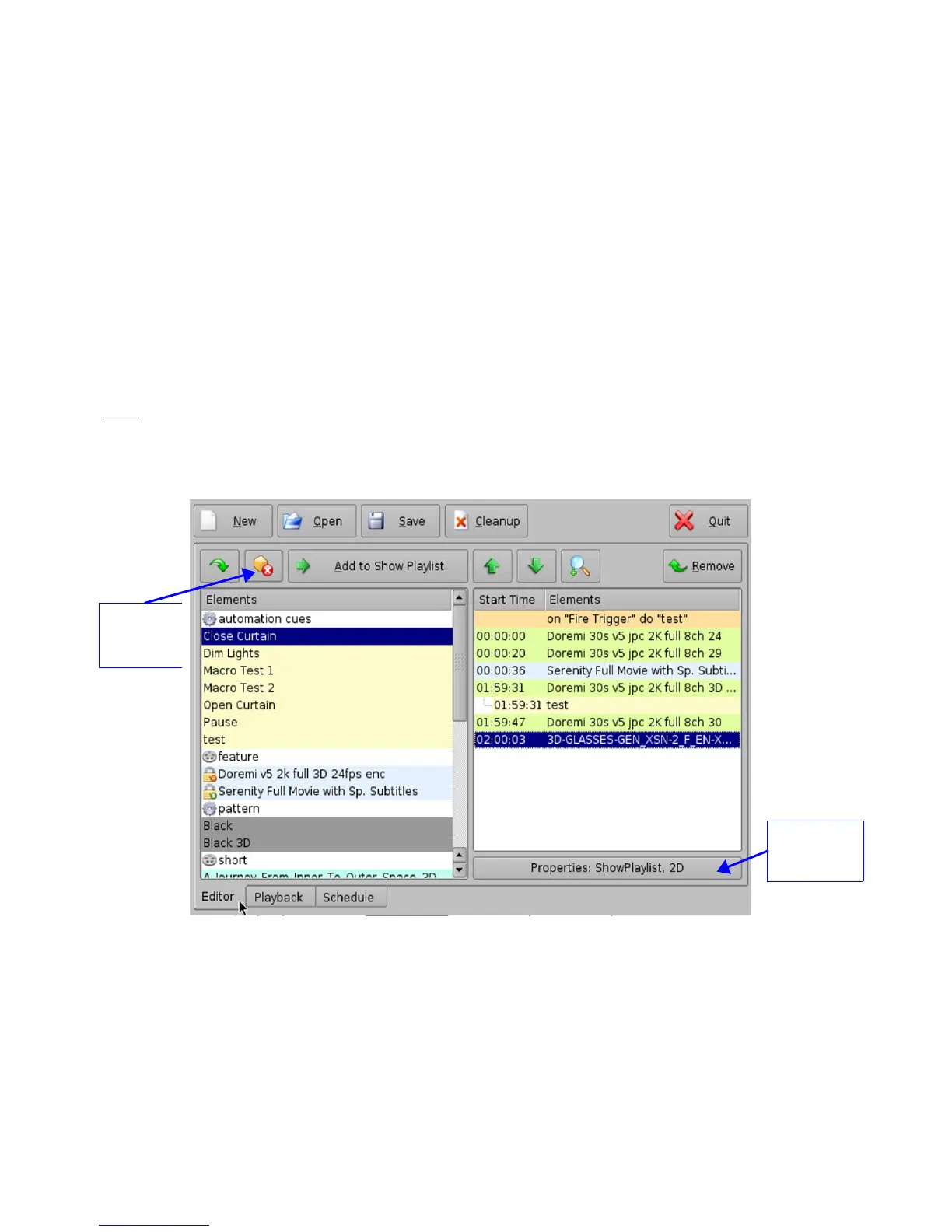
• Click the Show Playlist Properties button ( Figure 158).
• Select the 3D mode from the “display mode” drop-down window (Figure 159).
• Click the Close button.
• The Show Playlist Properties button will reflect the name of the SPL and what mode it is set
to ( Figure 160).
Note: In 3D or 48fps mode, the DCP-2000 video output is in the YCxCz color space. The projector
itself needs to be properly configured to the YCxCz color space in 3D or 48fps
mode for proper display. Contact your projector vendor to configure the projector properly or see
Section “Device Manager Setup.”
Figure 158: CineLister GUI Editor Tab
______________________________________________________________________________________
D2K.OM.001822.DRM Page 126 of 177 Version 1.5
Doremi Labs
Show Playlist
Properties
button
Delete
Content
button



 To Next Page