9.3 Export Show Playlist
You can save and export a Show Playlist to a USB drive or other drive that the server supports.
9.3.1 How to Save and Export a Show Playlist
• Go to the CineLister Editor tab ( Figure 147). You can either open an existing SPL or create
a new SPL to export.
• For an existing SPL, make modifications and then click Save.
Note: You can only save and export an existing SPL, if you make modifications to it.
• For a new SPL, click the Save button.
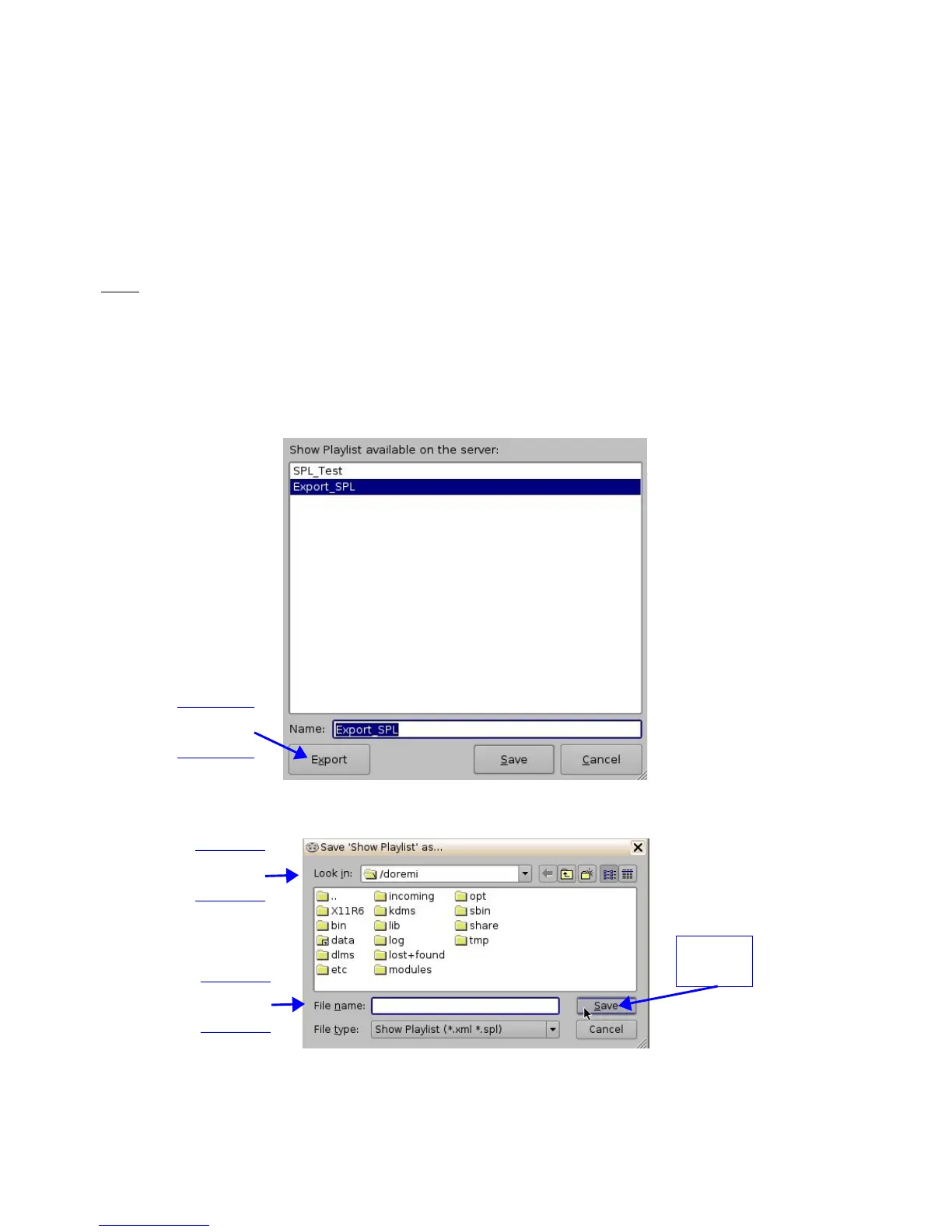
• You will be promoted to the “SPL Saving” Window (Figure 149).
• Click the Export button and you will be prompted to the “Browse Filepath” window (Figure
150).
• Look in the appropriate location to locate the USB drive, and click Save (Figure 150).
Figure 149: Saving Show Playlist Window
Figure 150: Browse Window
______________________________________________________________________________________
D2K.OM.001822.DRM Page 119 of 177 Version 1.5
Doremi Labs
Save
button
Export
Button
File
path
File
Name



 To Next Page