14.2 Trigger Cue Creation
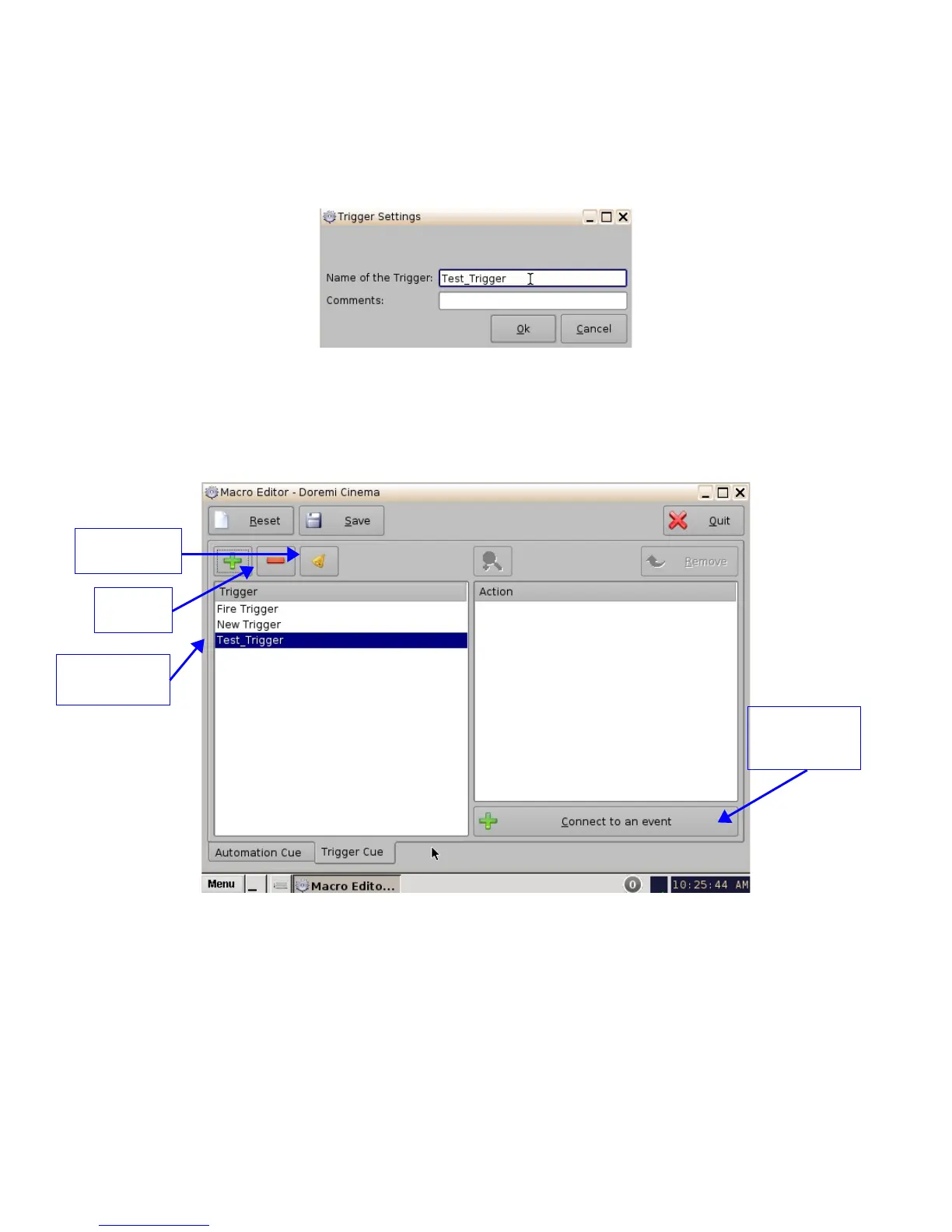
• To create a new Trigger Cue, click the Add button.
• The same type of window for the Automation Cue tab allowing the user to enter the Trigger
Cue name will appear (Figure 182).
Figure 182: Trigger Cue Setting Window
• Enter the appropriate name. It will be the name used by the CineLister application to insert
the Trigger Cue in a Show Playlist.
• The newly created Trigger Cue will appear in the “Trigger” window and it will be ready to
connect to a GPI event.
Figure 183: Trigger Cue Defined
• To edit an existing Trigger Cue, select it in the “Trigger” window and click on the Edit
Trigger button (Figure 183).
• The user will be able to edit the name of the Trigger Cue using the same window.
• To remove a Trigger Cue, select it in the “Trigger” window and click the Delete button.
______________________________________________________________________________________
D2K.OM.001822.DRM Page 144 of 177 Version 1.5
Doremi Labs
Edit Trigger
Button
Delete
Button
New Trigger
Cue Created
“Connect to an
event” button
Button



 To Next Page