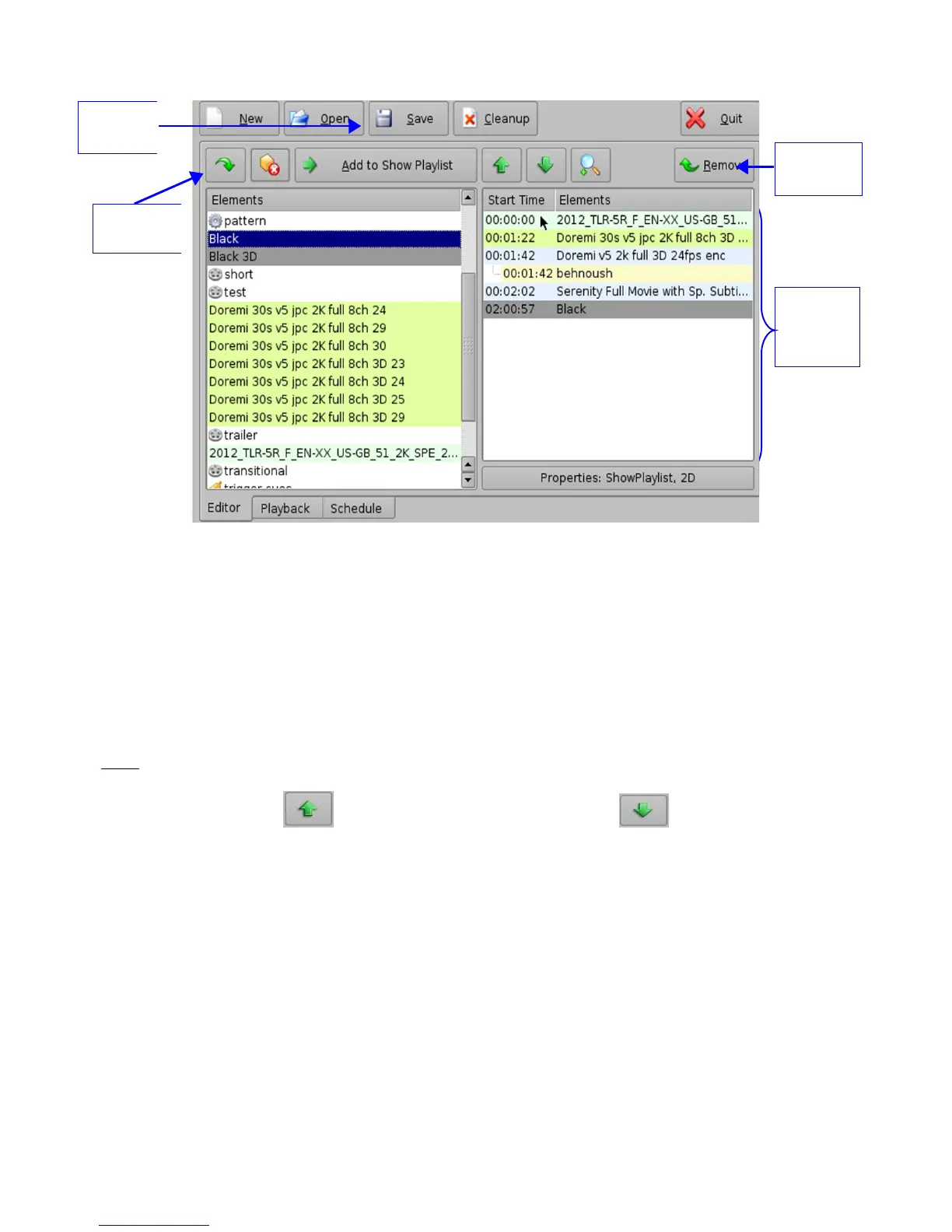
Figure 147: CineLister GUI – Editor Tab
9.2.2 Element Re-Ordering
Using the up and down arrows, each element can be moved to the top or to the bottom of the
Show Playlist:
• To move an element to the top of the Show Playlist, select it and click on the arrow
pointing to the top ( Figure 147).
• To move an element to the bottom, select it and click on the arrow pointing to the bottom
( Figure 147).
Note: When an element is associated with an automation or trigger cue, the cues will also be re-
ordered.
Arrow Pointing to the Top Arrow Pointing to the Bottom
Figure 148: Arrows
9.2.2.1 Refresh Button
Anytime new content and a package is ingested into the server, the items will not be displayed
automatically in the CineLister GUI, if CineLister was already running. Click on the Refresh button
from the Editor tab ( Figure 147), and you will see an updated version of all available items that
have been ingested.
9.2.2.2 Save Button
It is very important to click the Save button when you are done completing any task you wish to
save, especially an SPL. If you don't click the Save button, your changes will not be reflected.
______________________________________________________________________________________
D2K.OM.001822.DRM Page 118 of 177 Version 1.5
Doremi Labs
Elements
added to
the SPL
window
Save
Button
Remove
Button
Refresh
Button



 To Next Page