16.2 Playback Progress
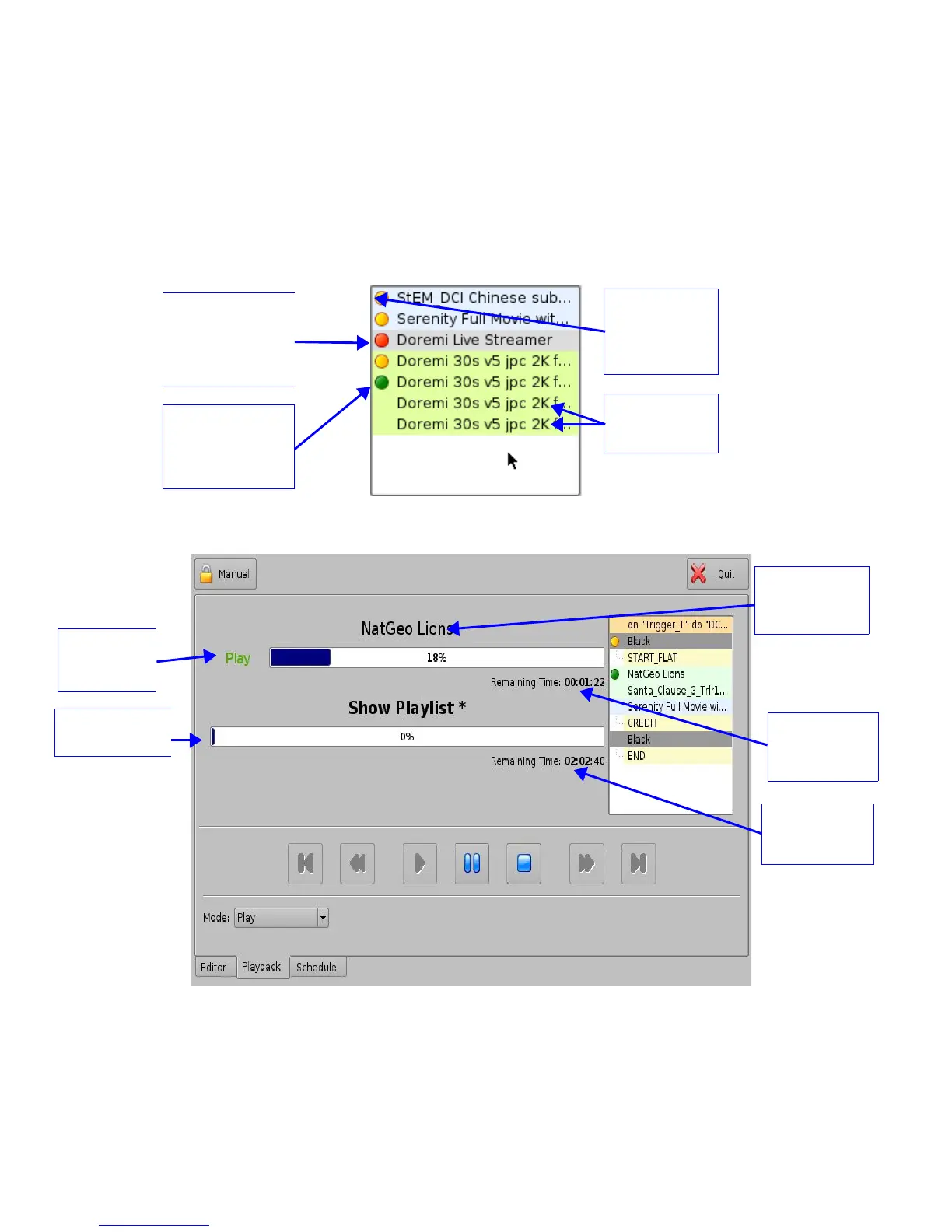
The SPL progress list-box displays the order of the playback (Figure 197).
• Elements already played are flagged using a yellow mark.
• Elements currently being played are flagged using a green mark.
• Elements that were not played due to an error are flagged using a red mark.
• Elements that have not yet been played do not have any marks next to them.
Figure 197: Show Playlist Progress List-box
Figure 198: CineLister GUI – Playback Tab
______________________________________________________________________________________
D2K.OM.001822.DRM Page 153 of 177 Version 1.5
Doremi Labs
Name of the
current clip
being played
Display of the
clip remaining
time
Green
playback
“Play” flag
Show Playlist
progress bar
Display of the
Show Playlist
remaining time
“Green flag”
indicating the CPL
is currently being
played back
“Red flag”
indicating that the
CPL was not
played due to an
error
“Yellow Flag”
indicating that
this element was
already “played”
Elements
waiting to be
played



 To Next Page