9.2 Show Playlist Creation
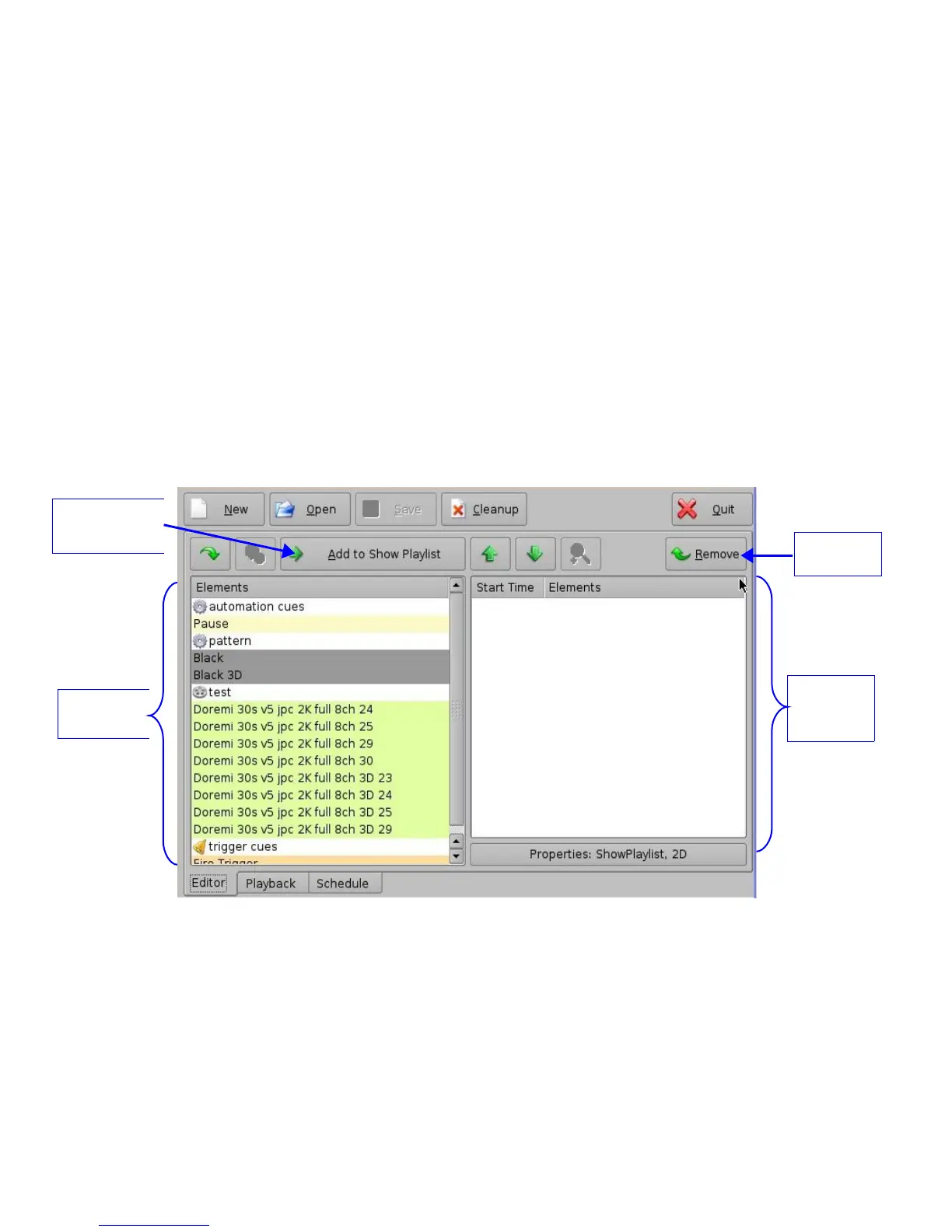
CineLister allows the user to create their own Show Playlist from the elements listed in the left
pane of the Editor tab.
9.2.1 How to Create a New Show Playlist
• Click on the New button from the CineLister Editor tab (Figure 146).
• Click on the elements you wish to add to the SPL from the left pane of the GUI. Use the
“Ctrl” (PC) or “Command” (Mac) button to select more than one element at a time.
• Click on the “Add to Show Playlist” button (Figure 146). The element(s) will appear in the
right pane.
• To remove an element in a Show Playlist, select it in the Show Playlist window and click the
Remove button (Figure 146).
• Click on the “Save” button and you will be prompted to a window asking you to name the
newly created SPL ( Figure 147).
• To save the Show Playlist on a USB, see Section “Export SPL to USB” below.
Figure 146: CineLister GUI – Editor Tab
______________________________________________________________________________________
D2K.OM.001822.DRM Page 117 of 177 Version 1.5
Doremi Labs
Show
Playlist
window
Elements
Window
Remove
Button
Add to Show
Playlist” button



 To Next Page