6.6.7 Removing a Raw Device
• To remove the Raw device, click on it in the Device Manager GUI and press the Delete
button (Figure 86).
6.6.8 Adding a Serial Device
The Serial device is used to be able to manage incoming and outgoing messages over a serial
port. It is a new feature that allows the user to control or interact with some old legacy device that
usually communicates only through serial cables. Outgoing messages can be sent to the
automation using a simple basic automation cue.
Incoming messages are parsed, and then sent to the playback engine in the form of a signal
trigger.
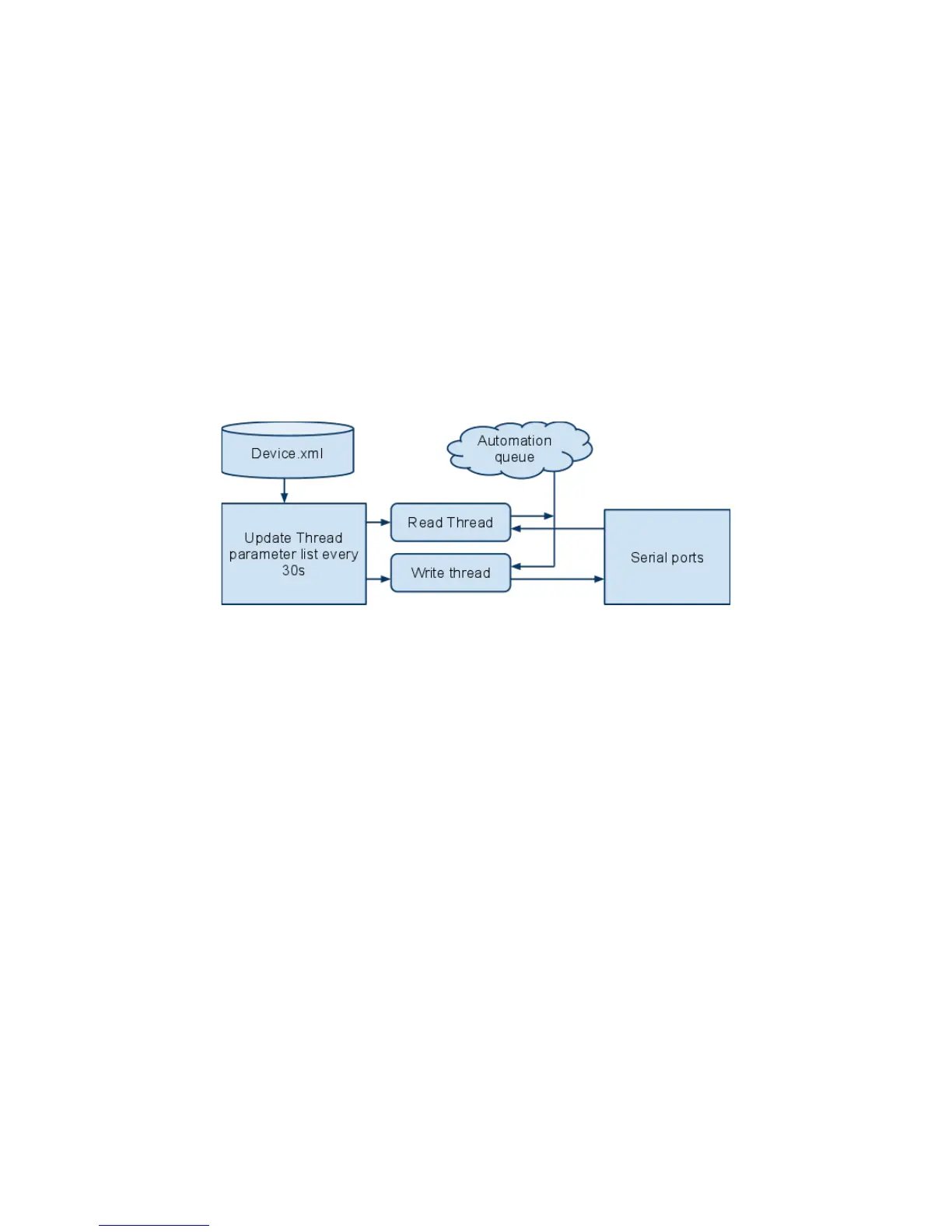
• The schema below explains how the daemon is run:
Figure 87: Serial Device Schema
• The file device.xml contains all elements to configure properly the serial port and how to
scan incoming messages. This file is conveniently managed by the Device Manager GUI
application. The generic serial device driver can manage different serial ports
simultaneously.
• Go to Menu → Doremi Apps. → Device Manager and follow the steps below. The following
window will appear:
______________________________________________________________________________________
D2K.OM.001822.DRM Page 75 of 177 Version 1.5
Doremi Labs



 To Next Page