6.6.4.1 Removing an eCNA Device
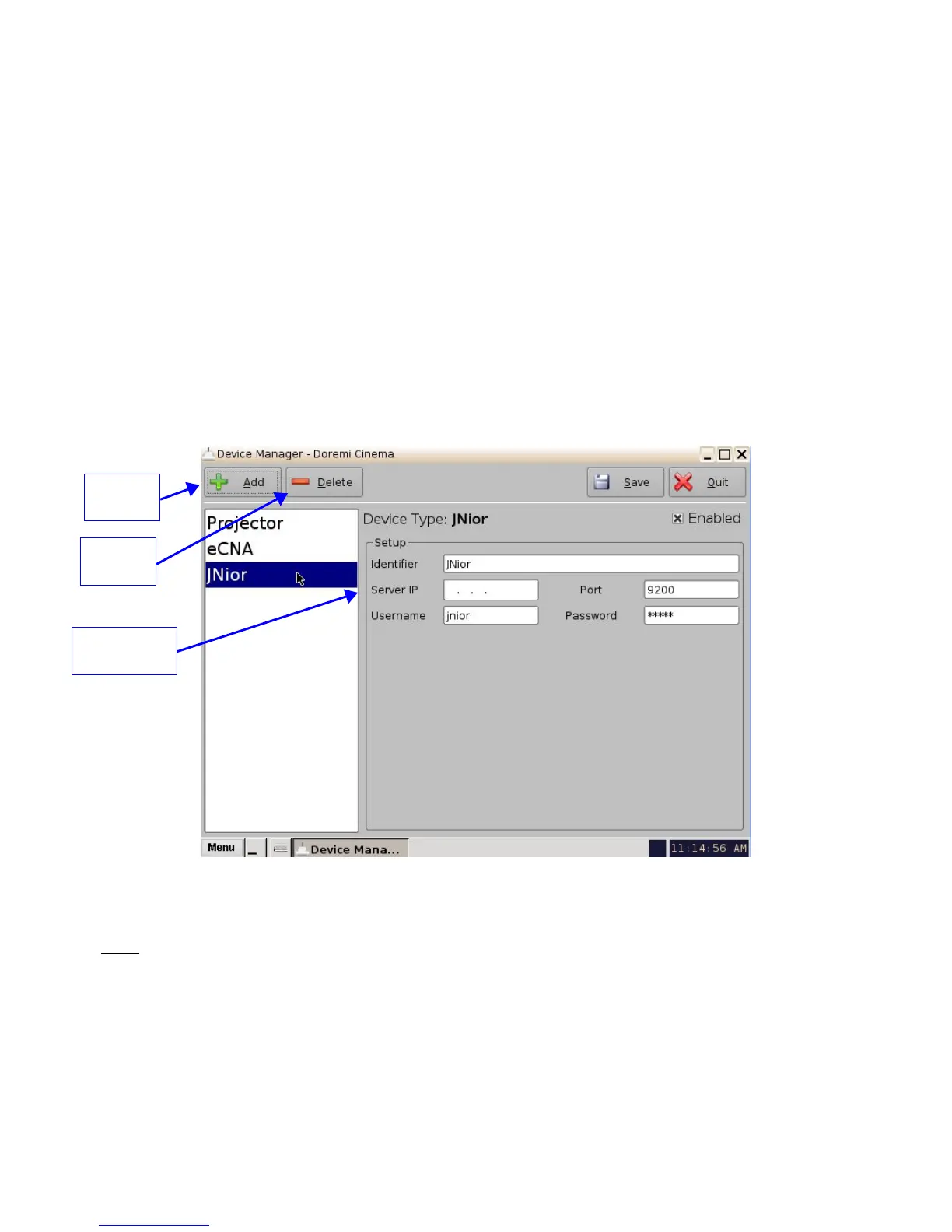
• To remove the eCNA device, select it in the Device Manager GUI and click the Delete
button (Figure 84).
6.6.5 Adding a JNior Device
• To add the JNior device, click the Add button in the Device Manager window.
• The "Add Device" window will appear. Select the item called “JNior” and click the Add
button.
• The Device Manager GUI will be updated to reflect the addition of the JNior device (Figure
85).
• Input the name of the JNior device in the Identifier field.
• Input the JNior Server IP address in the appropriate field as illustrated below
(Figure 85).
Figure 85: Device Manager GUI – JNior Device Configuration
• The port number field will already contain the appropriate value (factory default value).
Note: The JNior device documentation will provide the correct username and password (factory
default values).
• Click the Save button to record the settings. A window will appear asking for a password.
Enter the password to proceed.
• Click Quit when finished with the configuration. If not, continue and add more devices.
______________________________________________________________________________________
D2K.OM.001822.DRM Page 73 of 177 Version 1.5
Doremi Labs
JNior IP
Address Field
Add
Button
Delete
Button



 To Next Page