9 Show Playlists
A Show Playlist (SPL) is a succession of Compositions (CPL's), Automation Cues, and Trigger
Cues. Show Playlists make up the chain of events that account for the playback of a show. Using
CineLister, you can create and edit SPL's.
• Types of elements that can be used when creating an SPL:
• Audio-visual content (e.g., features, test content, trailers, live, etc.) See Section 9.1
below.
• Automation cues (Macro automation events).
• Trigger cues (events upon which a Macro Automation Cue is executed).
9.1 Audio-Visual Content
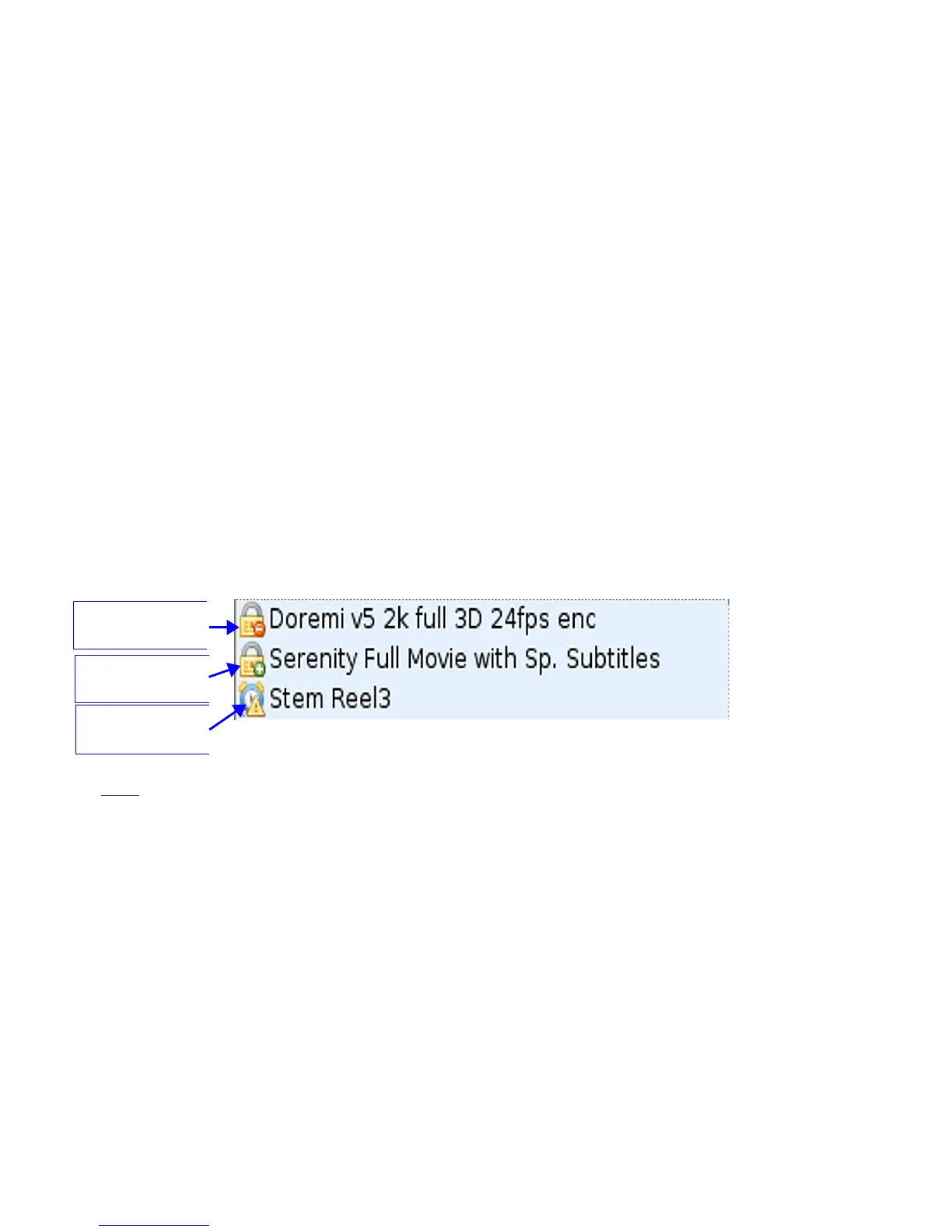
• When the audio-visual content is encrypted, an icon is displayed with the content.
• Lock Icon with Red minus sign: The required KDM is not available. Thus, the
content cannot be played ( Figure 144).
• Lock Icon with Green plus sign: A valid KDM is available for that content and that
content can be played ( Figure 144).
• Timer Icon with Orange caution sign: The required KDM is present and will expire in
less than 48 hours. You are warned that you will not be able to play the content
anymore after expiration of the KDM ( Figure 144).
Figure 144: Audio-Visual Icons
Note: See Section 10 on accessing KDM information associated with a CPL.
______________________________________________________________________________________
D2K.OM.001822.DRM Page 115 of 177 Version 1.5
Doremi Labs
Lock Icon with Red
minus sign
Lock Icon with
Green plus sign
Timer Icon with
Orange caution



 To Next Page