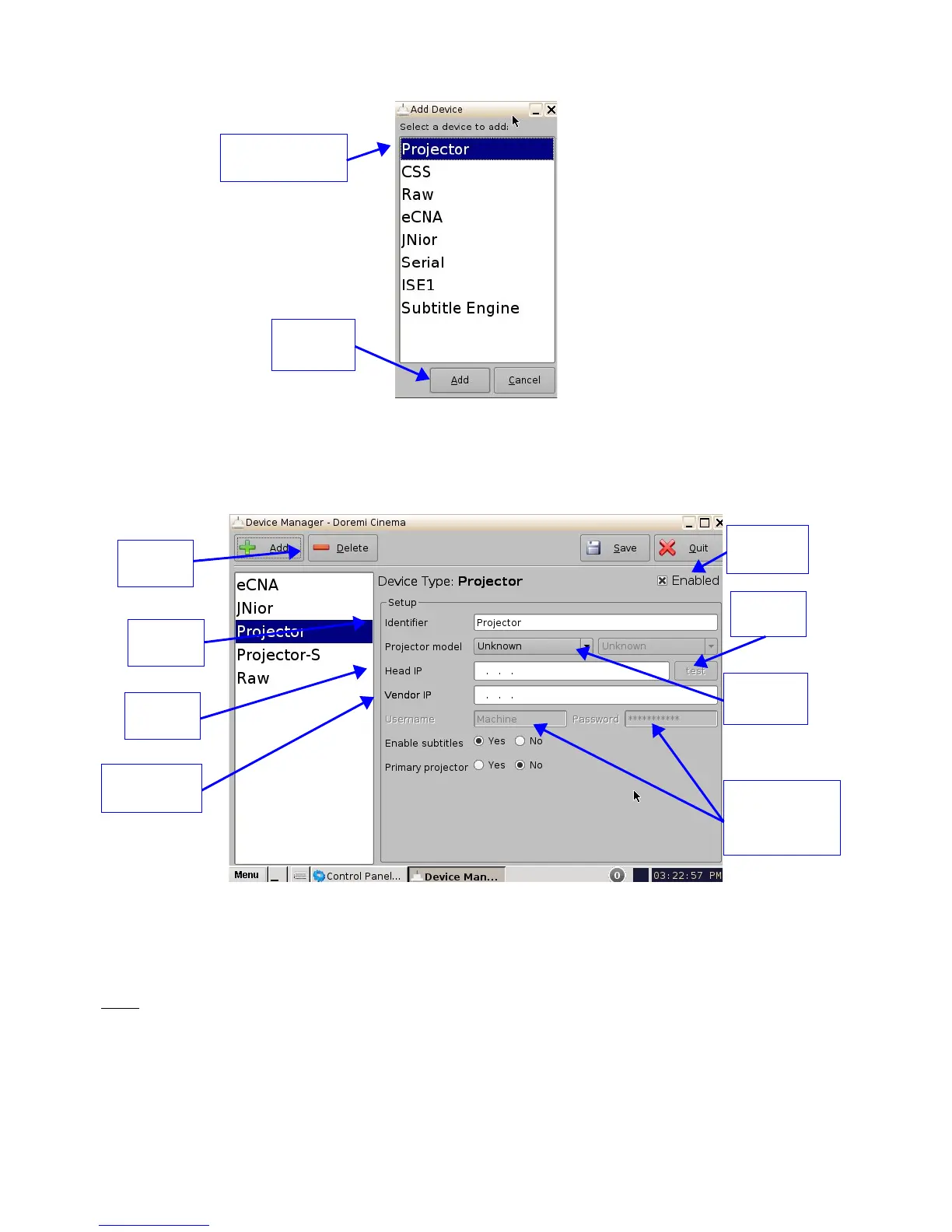
Figure 82: Device Selection Window – “Projector” Item Selected
• The main configuration window will be updated to reflect the addition of the "Projector"
device. The user will be able to enter the projector parameters as illustrated below:
Figure 83: Device Manager GUI – Projector Fields Configuration
• To perform the projector configuration, follow the steps below:
• Specify a projector identifier (e.g., projector name, screen #) in the first field.
Note: The selection of primary and secondary projectors only applies to Sony SRX Projectors. For
all other projector types, please select "Primary." Also, this could apply if the user were to use dual
projector for 3D (left projector would be “Primary” and right projector would be “Secondary”).
______________________________________________________________________________________
D2K.OM.001822.DRM Page 70 of 177 Version 1.5
Doremi Labs
Add
Button
“Projector” item
selected
Delete
Button
Projector
Identifier
Head IP
Field
Vendor IP
Field
Projector
Model
Test
Button
Username and
Password (do
not change)
"Enable
subtitles"



 To Next Page