620 Eos Apex, Eos Ti, Gio, Gio @5, Ion Xe, Ion Xe 20, and Element 2 User Manual
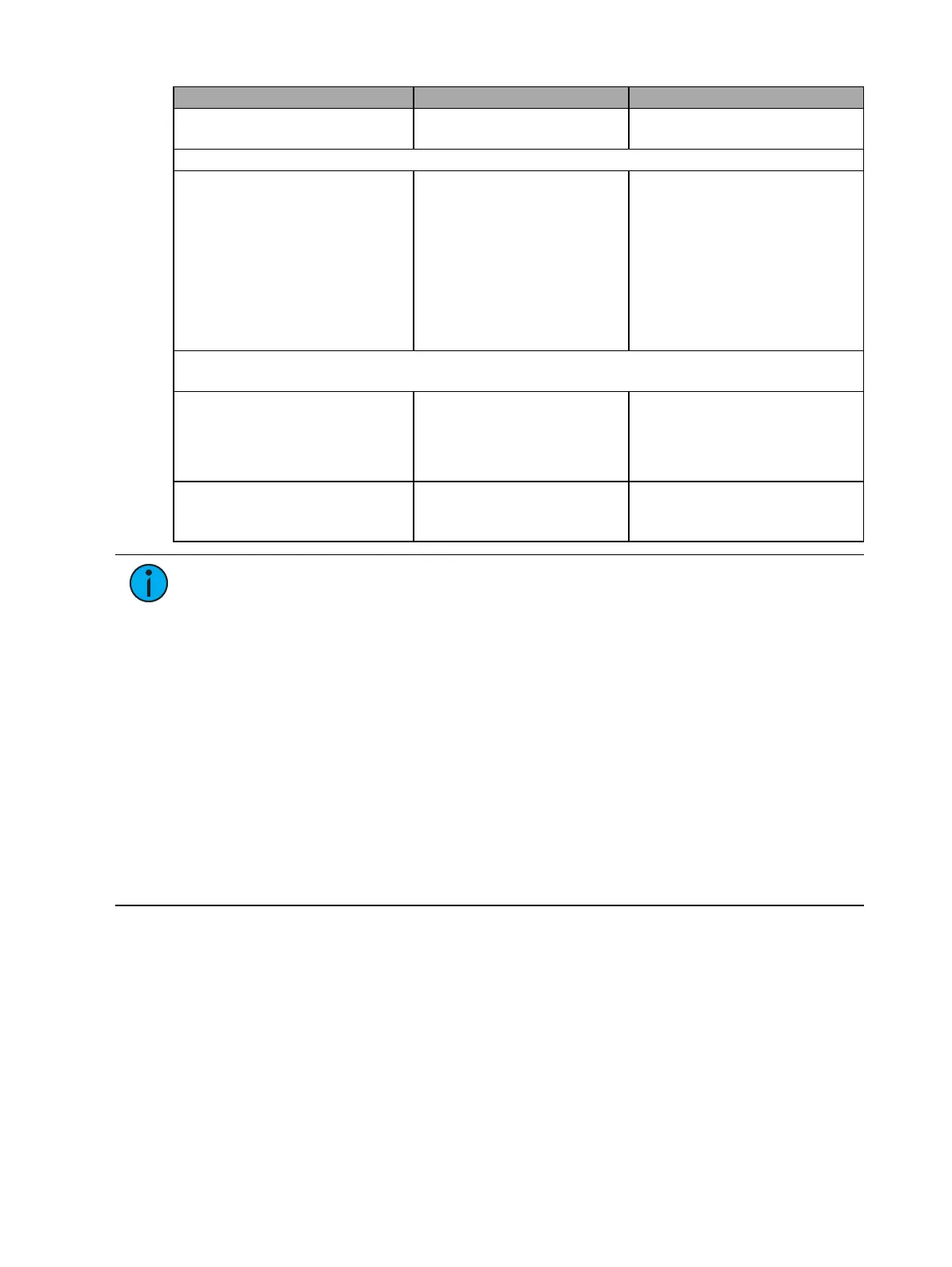
OSC Method Arguments Examples/Comments
/eos/ds/1/page/10 (page down
by 10)
Using Direct Selects
/eos/ds/<index>/<button
index>
number for button edge:
1.0=down, 0.0=up
(optional)
/eos/ds/1/1=1.0 (press first
button of OSC
direct select bank #1)
/eos/ds/1/1=0.0 (release first
button of OSC
direct select bank #1)
Direct Select Information sent by Eos – see
Implicit OSC Output (on page630)
for more
information
/eos/out/ds/<index>
String argument containing
descriptive text for direct
select at <index>: target
name, page number, mode
/eos/out/ds/1/1=”Channels
[1]”
/eos/ds/1/1=”Groups [1 –
Flexi]”
/eos/out/ds/<index>/<button
index>
String argument containing
target description
(name/number)
/eos/out/ds/1/1=“Cyc [1]”
Note:
<index> is a 1-based index of any number of OSC direct select banks you wish
to create. <target type> may be one of the following:
Chan
Group
Macro
Sub
Preset
IP (intensity palette)
FP (focus palette)
CP (color palette)
BP (beam palette)
MS (Magic Sheet)
Curve
Snap (snapshot)
FX (Effects)
Pixmap
Scene
OSCFader Banks
Fader banks share fader mapping with Eos, but since an OSC Fader Bank can have any number
of faders per page, the paging will be different. Like Direct Selects, you must first send one of
the OSC Fader Bank creation commands before the fader pages will work. Faders will be
mapped to the same fader number as Eos.
Example:
Create an OSC fader bank with 10 faders per page /eos/fader/1/config/10
OSC Fader 1/1 is the same as console fader 1/1.
OSC Fader 2/1 (Fader 11) is the same as console fader 2/1.



 To Next Page