Issue 4.5 August 2005 Serial Communications 6-3
SERIAL PORT CONNECTION
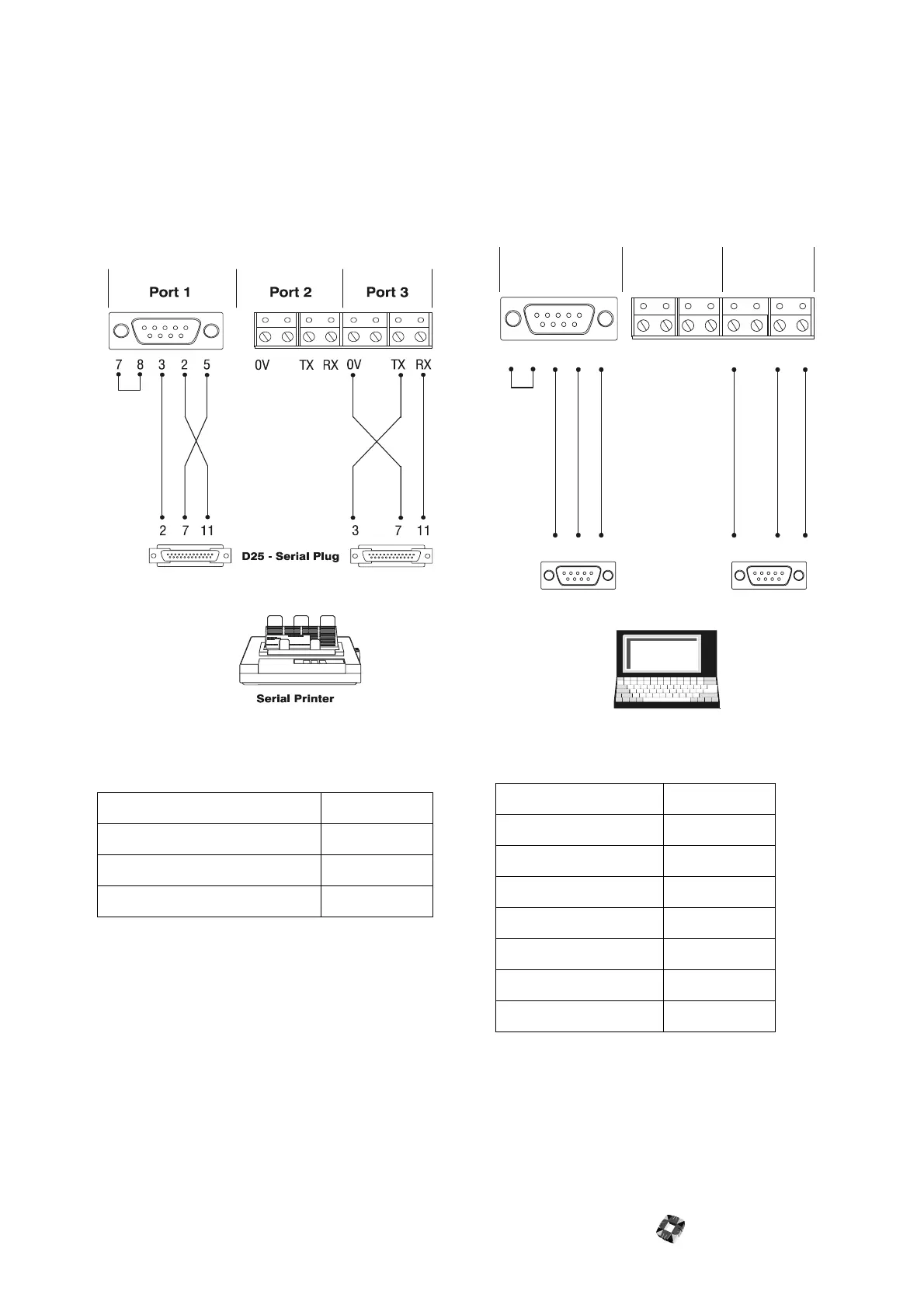
Connecting a printer
A local serial printer can be connected to the 3GS. Any
80 column serial printer that can be configured for the
data format illustrated in the following diagram, and
which will accept TTL signal level will work with the 3GS.
Serial port 3 on the 3GS controller defaults to the
following printer set-up:
Note 3GS provides three serial ports that offer a
wide range of communication capabilities.
However, you should refer to Set Data Format in
3GS Programming for information on the range of
possible serial port settings.
Direct Connect to a PC/Laptop
When programming the system locally with Panelman,
you will need to connect the 3GS to the serial port on
your PC or laptop.
The system should be configured as follows:
Baud Rate: 1200
Parity: EVEN
Stop Bits: 1
Data Bits: 7
Printer: No
System ID: 1
Access Control: 31
Log Filter: 32767
Dial Mode: 0
Data Bits: 8
Baud Rate: 2400-19200
Parity Even or None
Port 1 Port 2 Port 3
0V
0V
TX
TX
RX
RX
DB9 - Serial Plug
PC or Laptop
5
5
5
22
3
3
3
278



 To Next Page