3GS Technical Manual
Issue 4.5 August 2005
Programming Menus 8-43
SETUP CARDS - CARDS - ASSIGN
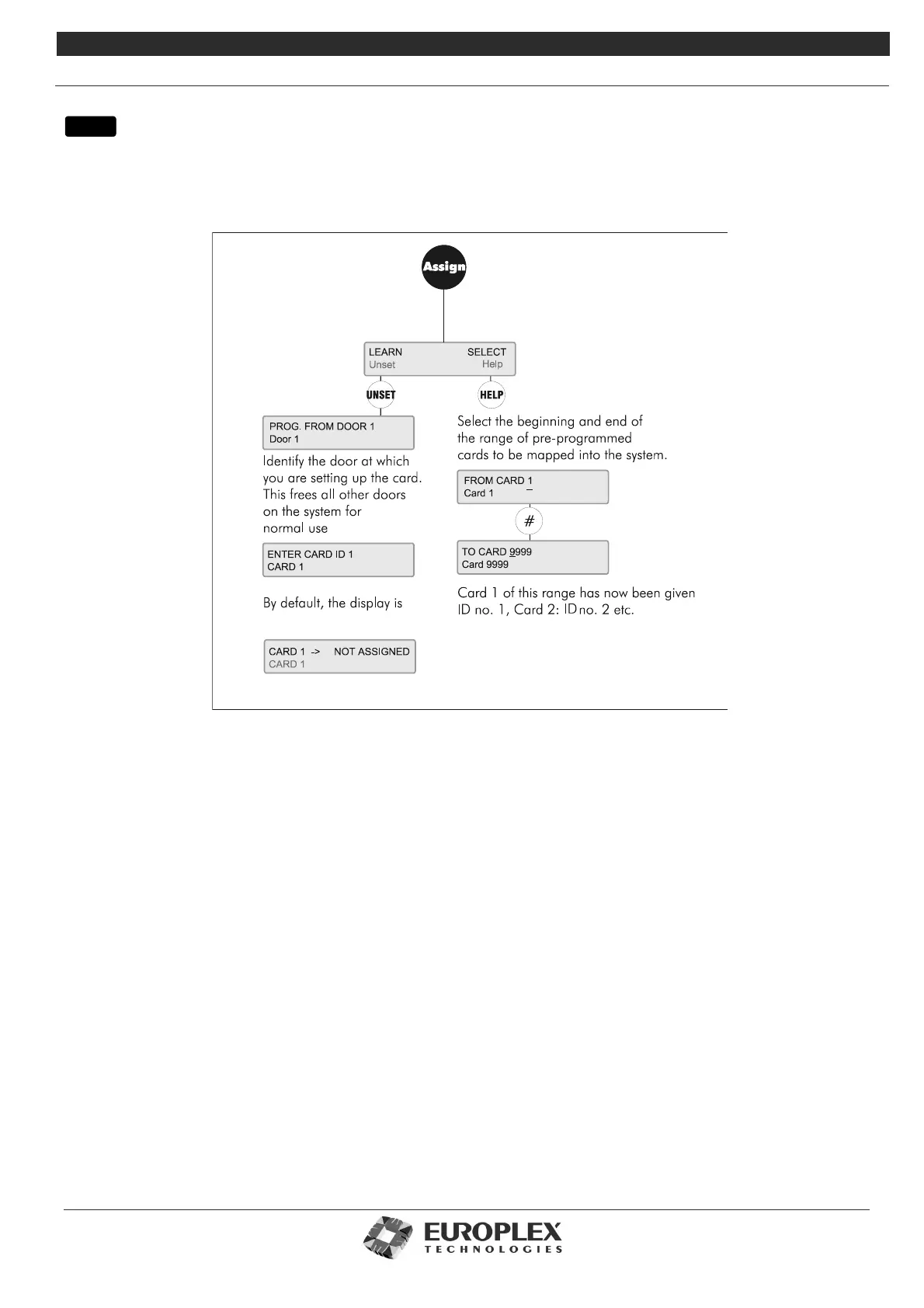
This menu is used to insert cards onto the 3GS system.
Additional Information
This menu allows you to assign IDs to cards in 2 ways:
•Learn: The card to be passed is of unknown origin and the pre-encoded number is not known. In this case, the card is
presented at a card reader and then given a card ID. When you re-assign the ID to your present card, the existing ID,
description, and door group/time zone information is over-written and must be re-set.
You will be prompted if the ID has already been assigned, in which case you can over-write the existing card, or choose the
next available ID.
• Select: Batches of cards with pre-coded numbers of between 1 and 9999 can be passed directly into the system and given
corresponding card IDs. The first card of the batch becomes Card ID 1, the second becomes Card ID 2, and so on.
In effect, this gives you 1-to-1 mapping, automatically assigning IDs to cards.
Note: The Learn Option is not available form Software version 5.80 onwards.
menu



 To Next Page