3GS Technical Manual
Issue 4.5 August 2005
8-36 Programming Menus
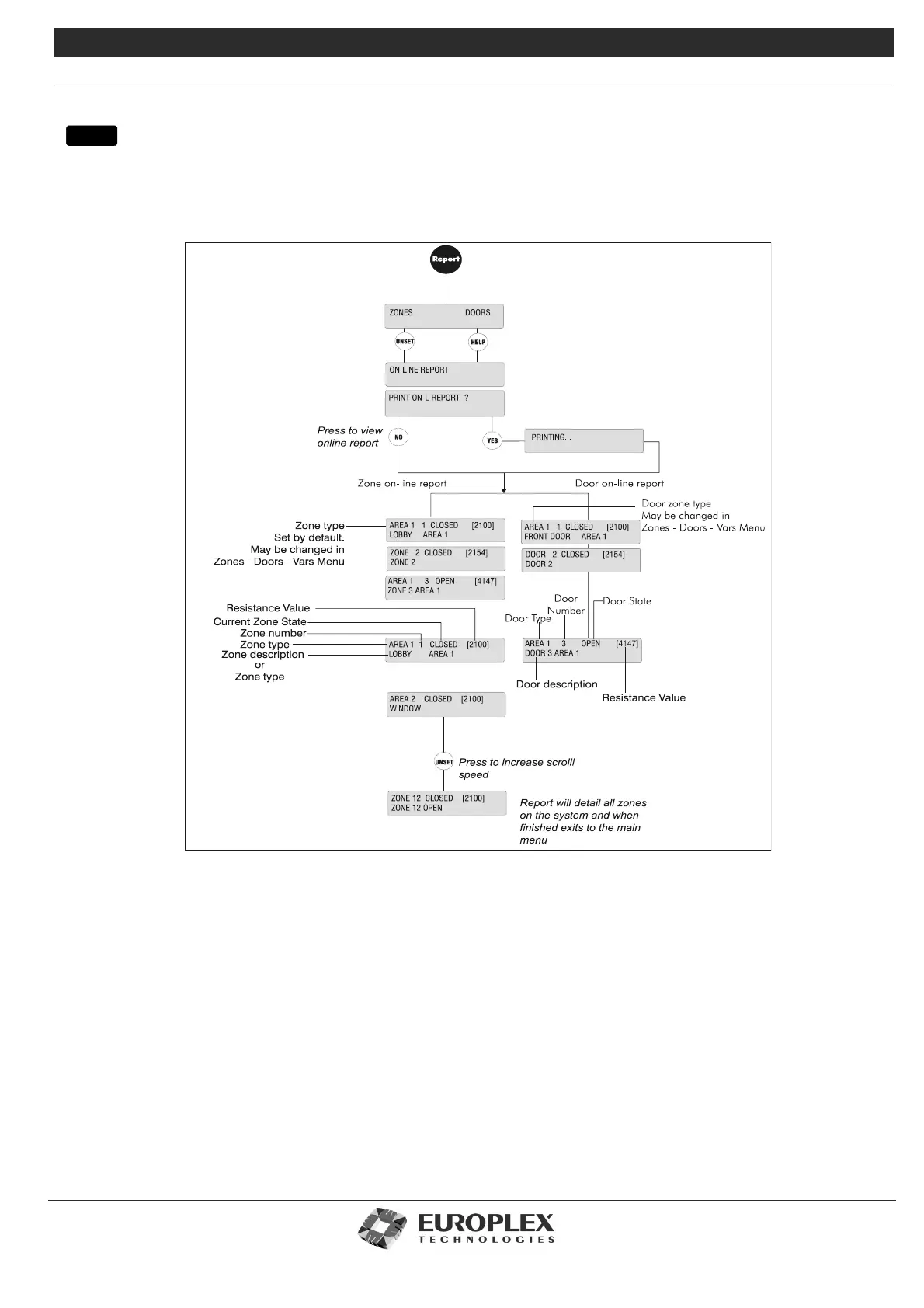
SERVICE MODE - ONLINE REPORT
Function: The Online Report submenu allows you to generate an online report for zones or door inputs (inputs which have
EOLs fitted). This report displays all online zones or doors connected to the panel which have states other than
DISCON (disconnected).
Additional Information
To print a report
Before printing the report, ensure a serial printer is attached to one of the serial ports of the Controller. Use the Set Data
Formats menu to configure the serial port for printer settings.
FINISHED is printed at the end of the report. To terminate the printout at any stage press the NO key (this displays an
ABORTED message).
If you do not require a hard copy, you can send the report to the display by pressing the NO key when the print alternative is
displayed.
The report starts with the zone which has the lowest number on the system and increases numerically until all the online zones
have been reported. The system displays zone type, number, state, analogue value (in brackets), node number, and the input
to which the zone has been assigned. Each zone state displayed will be prefixed with a character if a zone is either manually
inhibited, command string inhibited, or disabled.
Note Use the # key if you need to skip quickly through the report.
menu



 To Next Page