3GS Technical Manual
Issue 4.5 August 2005
Programming Menus 8-57
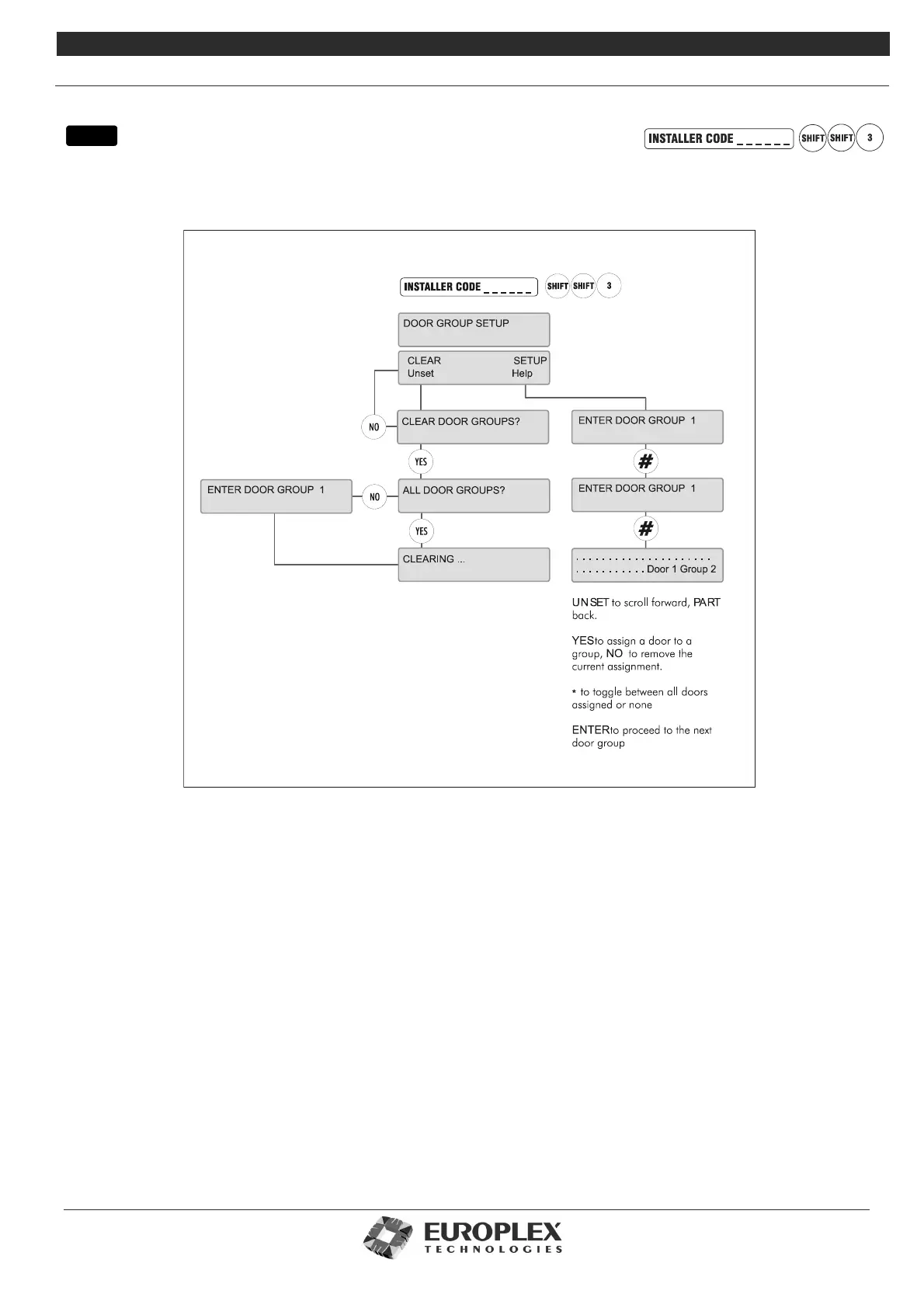
DOOR GROUP SETUP
Function: This menu allows you to group doors together for use on the Access Control system.
Additional Information
Clear
This option allows you to clear the doors from all or individual door groups.
Setup
This option allows you to link doors together in a group for use with cards through access levels. For example, if you have already
configured door group 7 and you want to re-configure it, enter 7 to go into the settings for that group. Otherwise, you can set up
each group in turn by completing the menu options for each group and continuing on to the next.
Having given the number of the group you wish to set up, the display represents each of the 64 doors in the system (32 displayed
at a time) as a dot, followed by the number of the door and group. As with Door Configuration options, a door is added to the
group by pressing YES (default is NO), UNSET moves forward to the next door, and PART moves back. The * button toggles
between assigning all doors to the group or assigning none. # accepts the settings made for the group and returns to the ENTER
DOOR GROUP number prompt. NO then quits the menu.
Before exiting, the system asks you if you want to PRINT ALL DOOR DATA? You then have the option of printing the details (that
is, group number and ID of doors contained in the group) of all or individual groups. YES prints the data, NO quits the menu.
menu



 To Next Page