3GS Technical Manual
Issue 4.5 August 2005
8-82 Programming Menus
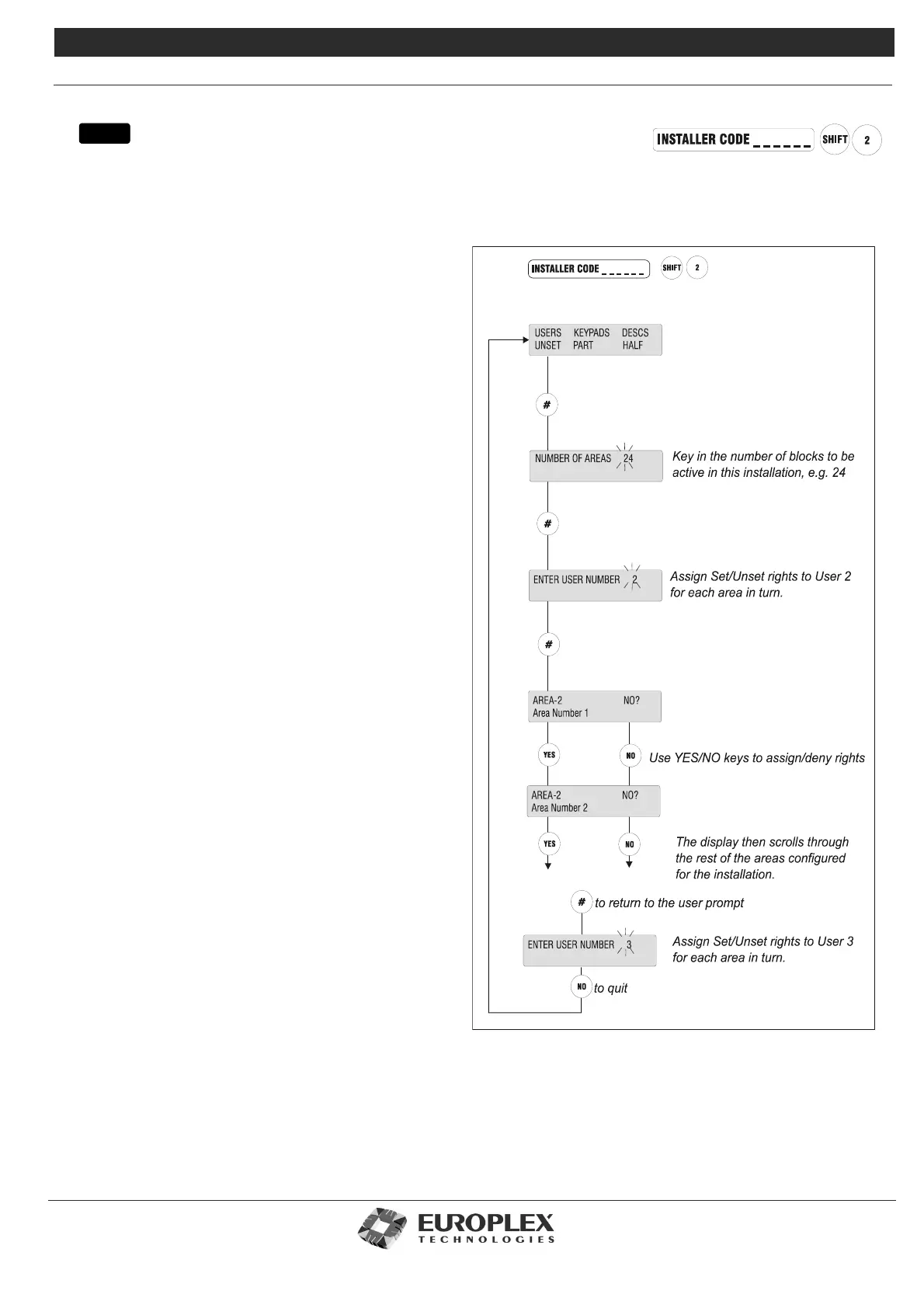
AREA SETUP
Function: The Area Setup menu allows you to set the number of areas to be active in the system and assigns Area Set/Arm
and Unset/Disarm rights to system users, keypads to areas, and programming area names.
Additional Information
The system currently allows for up to 30 areas, and can be
set/armed for any number of areas up to 30.
Setting the number of areas in the system is an installer
option only. The option to assign user rights to areas is
available to both Installer and Master User.
Providing the user with an area gives them the right to set/
arm or unset/disarm that area. However, the user must also
be given the PART SET user option for area set/arm, and the
HALF SET user option for area set/arm – see the 3GS
Version 5 User Guide. This allows the user to be given or
denied the right to set/arm an area. Installer’s are not
allowed to set/arm or unset/disarm areas.
Once the user set/arm or unset/disarm rights have been
assigned, they are effective immediately so that individual
users will only be able to set/arm or unset/disarm those
areas to which they have rights. PART and HALF keys are
used for Area Unset/Disarm and Area Setting/Arming – see
the 3GS Version 5 User Guide. Setting the number of areas
to 0 will configure the system for no areas and PART and
HALF keys are used to PART SET and HALF SET the system.
Area Keypads
Use this option to assign keypads to areas so that messages
for individual areas can only be seen on the keypads
assigned to the area.
The system may be set up so that each area has a keypad
installed at a point convenient to the Exit/Entry route. In this
case, you should assign this keypad to the area. Once
assigned, the keypad will display only those alert messages
relating to that particular area, and when the user is setting
the system, will display the number of that area first
allowing instant setting.
Alternatively, one keypad may be positioned at a point
central to a number of areas – for example, Areas 5 and 7.
In this case, the keypad can be assigned to both areas and
will then display messages for these two areas only. When
setting, the display will prompt the user to first set/arm Area
5, followed by Area 7, and will then scroll through the other
areas configured.
menu



 To Next Page