3GS Technical Manual
Issue 4.5 August 2005
Programming Menus 8-81
Additional Information
ID Codes
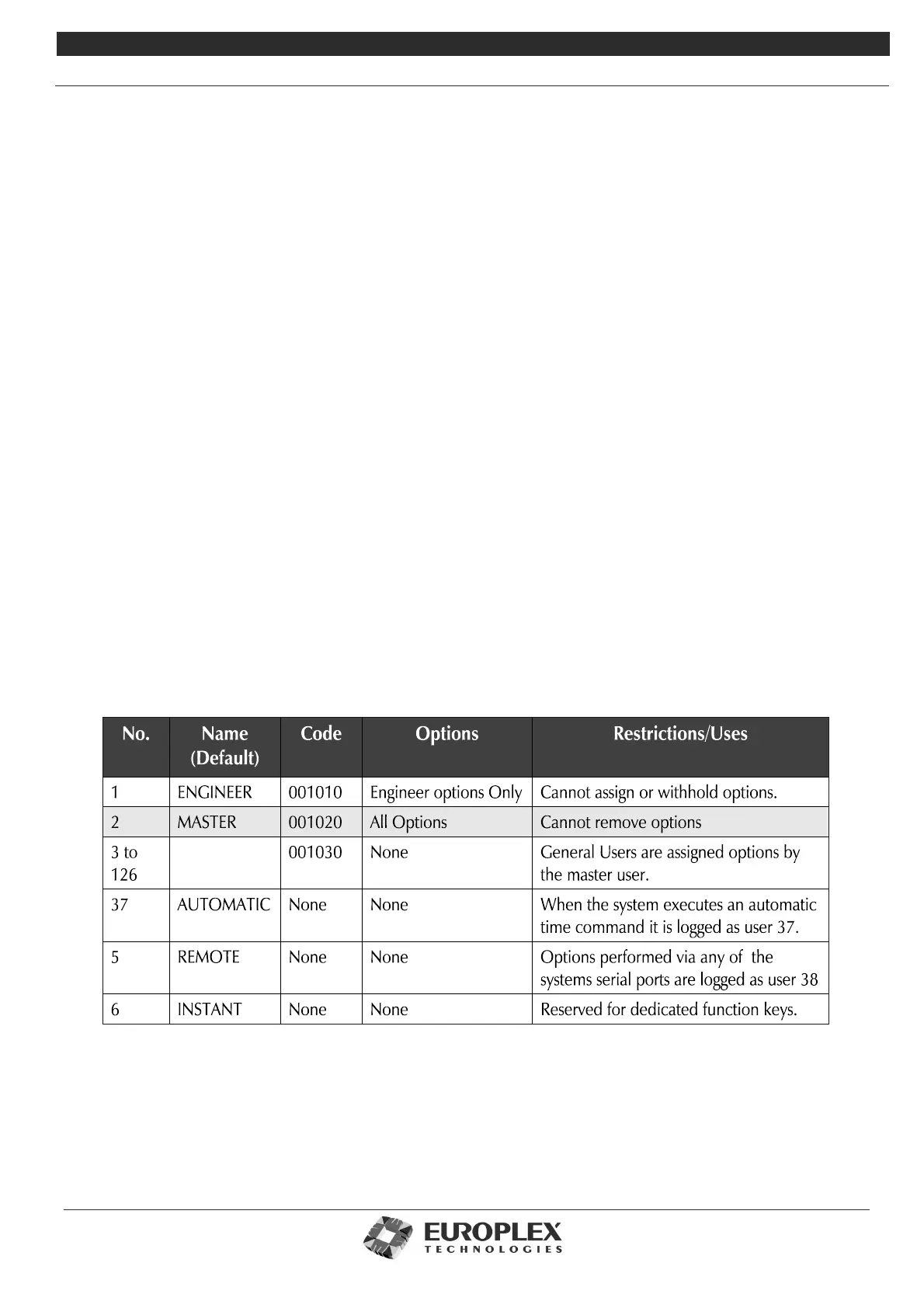
The first step should be to change the master default code (1020) by selecting ID.S. All system users should be assigned codes
in the same fashion. If required, the user can assign their own code by using the Change ID option (the master user must give
the user this option). An ID code must have 6 digits.
Note ID codes for the Class IV system are 6 digits in length. 3GS software which supersedes Version 5.50 will have 6 digit codes
by default.
Note The 3GS also has a Duress facility whereby in a crisis situation a user may activate a silent panic alarm (no bells/
sirens and communication is initiated) by incrementing their ID code by 1. For example, if code=1239, entering 1240
will generate a duress alarm. Therefore, it is not advisable to assign sequential codes (for example 1234, 1235) as the
lower code cannot utilise the Duress facility.
Options
System users can be assigned options as required. Press YES to assign an option, NO to withhold and scroll forward. When
the options have been assigned, press # to accept. The next user number is displayed. When scrolling through the user help
menu, a user will only see those options which have been assigned to them.
If the USER SET UP option is given to a user, that user may assign options to other users. However, the user is restricted to
assigning only those options they possess themselves.
Names
Up to 23 characters may be entered for a user name. This greatly enhances the interpretation of the system log, identifying
by name who set/armed or unset/disarmed the system, and so on. When NAMES is selected, a flashing cursor appears. Place
the text overlay on the keypad to identify characters and key in names as shown in “Typing Text” on page 8-4.
As an alternative to the User Set Up option, codes/options/names may be downloaded from a PC using Panelman software.
The first option to be displayed is Unset?. To give a user the option to unset/disarm the panel, press the YES key. Continue in
this fashion until the required options are assigned and then press # to accept the data.



 To Next Page