3GS Technical Manual
Issue 4.5 August 2005
8-54 Programming Menus
TIME ZONE SETUP
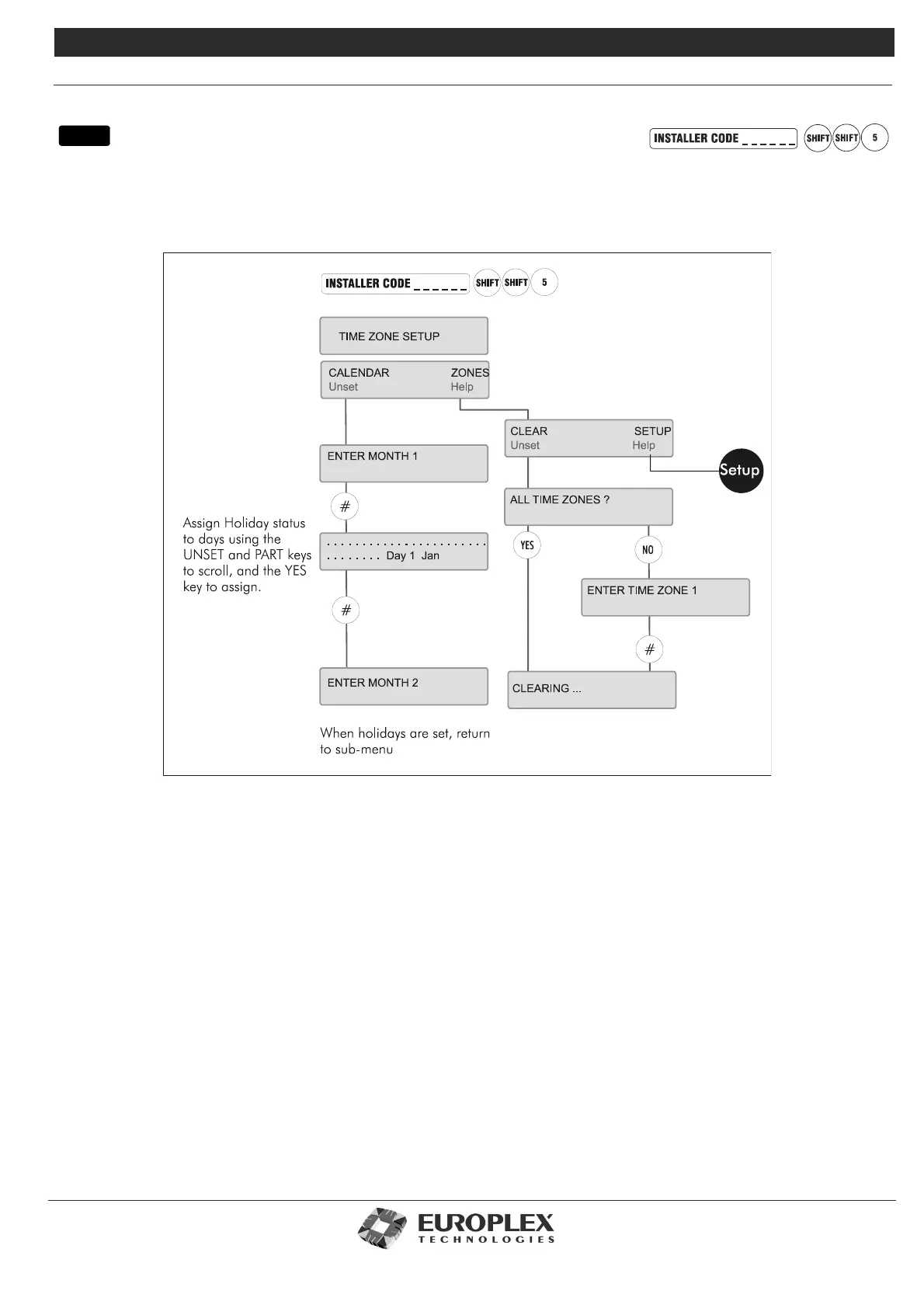
Function: This menu allows you to setup and clear time zones and configure holidays for use on the Access Control system.
Additional Information
Calendar
This option allows you to select the days required as holidays for the Access Control system and is linked to the time zone setup
menu overleaf. Enter the number of the month (Jan=1, Feb=2, and so on). Days are represented on the display as dots, with 31
days allowed for all months. A day is assigned Holiday status by pressing YES, (default is NO). UNSET/PART scrolls forward/back. The
* button toggles between assigning Holiday status to all days or assigning it to none. # accepts the settings made for the month and
returns to the enter month number prompt. NO then quits the menu.
Clear
This option allows you to clear all or individual time zones from the system.The first option is to clear ALL TIME ZONES? Press YES
to clear all time zones.To clear individual time zones, press NO.
Setup: See page 8-55
This menu allows you to setup the time zones on the 3GS access system by specifying the on/off times, the days of the week, and
the conditions to be applied during the time zone.
menu



 To Next Page