3GS Technical Manual
Programming Menus 8-65
Issue 05 April 2005
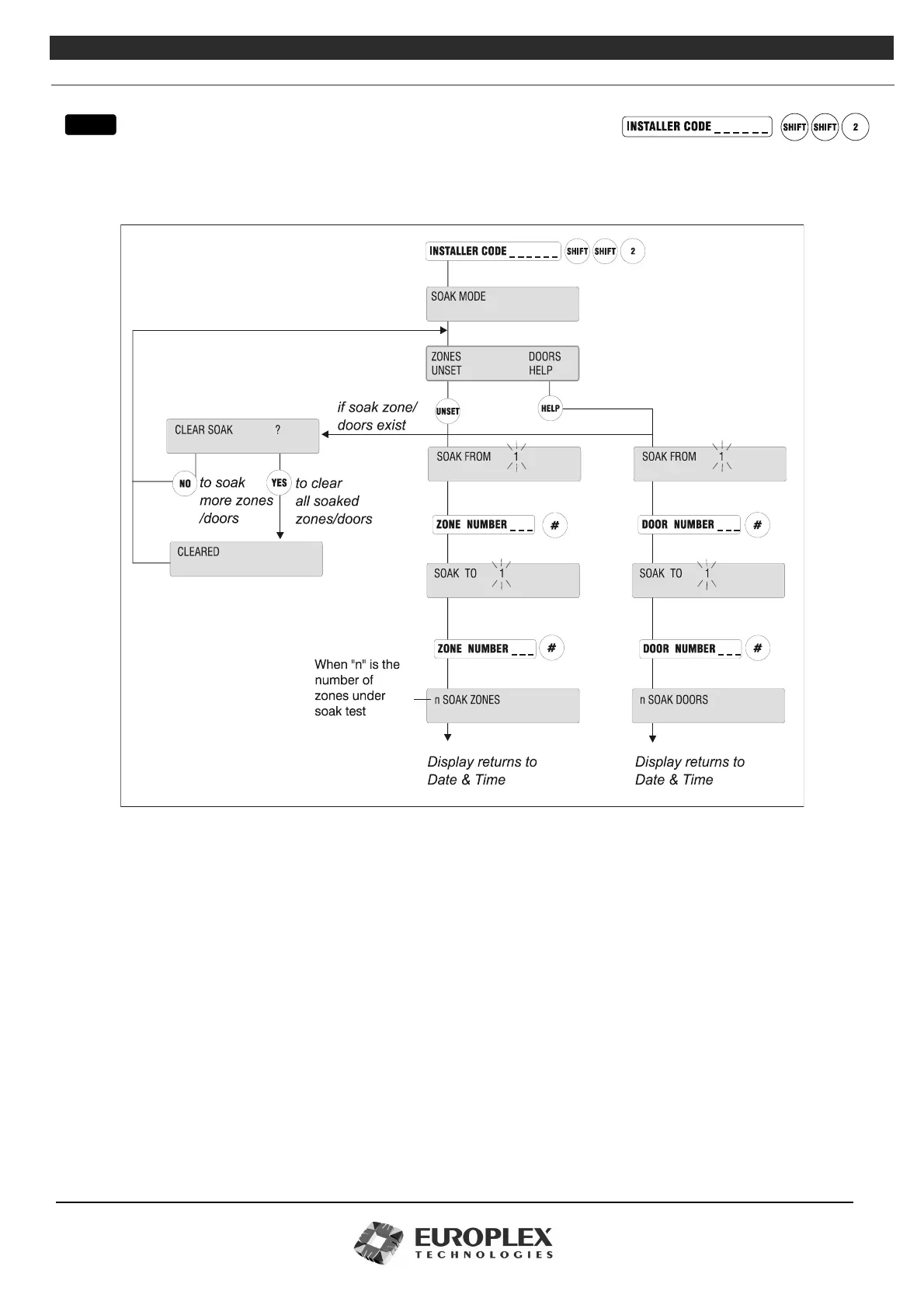
SOAK MODE
Function: This menu allows you to monitor troublesome or suspect zones (sensors/detectors) in an installation.
Additional Information
Soak Mode
Upon entering this mode, the number of zones/doors to be tested can be chosen – whether its an individual zone/door or a
block of zones/doors. TAMPER and DISCON activations are not ignored.
Zones can be soaked individually or in blocks – for example, 3 to 3 or 1 to 20.
Activity is only relevant in FULL SET mode and then it is only logged (no outputs or messages are triggered). No alarms are
triggered in any mode.
Soak Mode can be used for troublesome detectors after adjustment to confirm that their operation is reliable before use in the
system. As all open and closed transitions are logged, with exact time of operation, it is easy to see how often each soak detector
operated and for how long.
If no activity is logged during the period of a zone’s soak test, the zone automatically returns to normal status (that is, at next
UNSET/DISARM after the expiry of soak days). The length of a zone soak test is set in days in the Variables submenu – see
“Zones/Doors/Vars” on page 8-11 for further information. Re-selection of the option allows you to clear all zones/doors on Soak
Tes t .
Note The maximum number of soak zones is 200
menu



 To Next Page