3GS Technical Manual
Issue 4.5 August 2005
Programming Menus 8-4
Menu Navigation
Remote Keypad Display
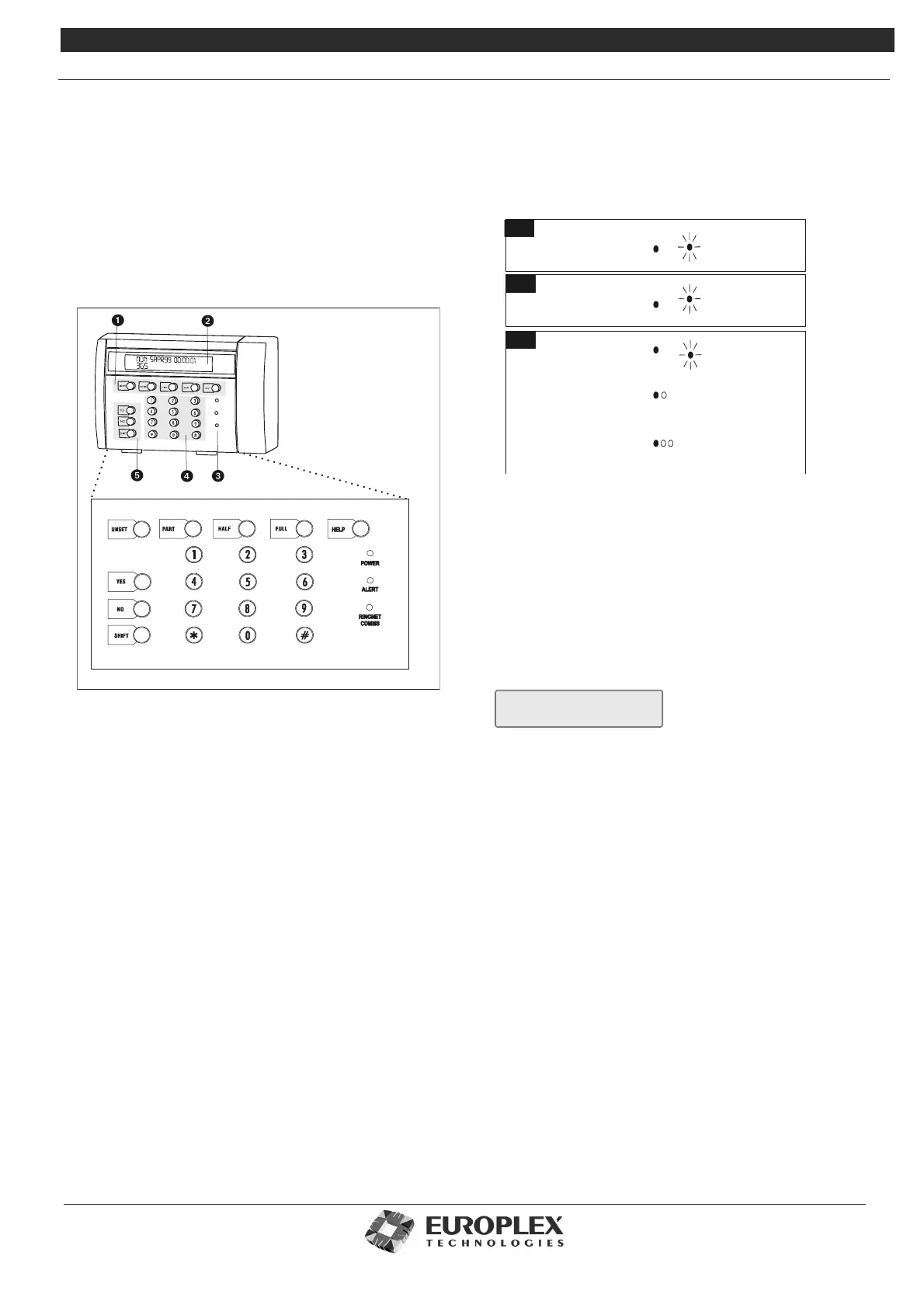
You use the remote keypad display (RKD) to control,
program and observe the past or present state of your
installation.The keypad can be divided into the following
main areas as shown below:
Mode Keys. Allow you to arm (Part/Half/Full) and disarm
the system.
Alpha Numeric Display. The 2 x 24 character liquid
crystal display (LCD) shows system messages or prompts.
Status LEDs. The three LEDs to the right of the numeric
keypad provide a visual display of the system status, as
follows:
• Green: indicates system power status.
• Yellow: flashing indicates the occurrence of a system
event. An alert or warning message on the
display will indicate the location and nature
of the event. Once the alert has been
cleared, the LED will remain on until the
event has been reset. This LED will also turn
on to indicate that an engineer is logged on.
• Red: indicates the status of the communications
network.
Numeric Entry Keys. You use the numeric keypad to
enter your user code and to program the system.
Menu Navigation Keys. Allow you to navigate through
the menu structures.
Security
3GS contains a number of features to protect the system
from unauthorized access or attempts to break the codes.
The system allows 45 seconds for a valid code to be entered.
If three or more incorrect codes are entered during this time,
the message below will be displayed and the keypad will be
disabled for 90 seconds.
During this period all key entries are ignored. For every
subsequent incorrect code up to the seventh, the keypad is
disabled for 90 seconds. If another incorrect code is entered
a tamper event is generated, all events are logged.
Note. For security reasons, your actual numeric
code is never shown
Typing Text
You may need to enter text when editing zone descriptions,
node descriptions, user names and so on. There are two
ways you can do this:
• Via either the RKD or HHT keypad
• Via software (such as 3GS+, Panelman, or PC)
When using the RKD or HHT keypads to enter text an
overlay card is provided to help you locate the character
required. The correct character can be selected by adjusting
the cursor orientation (by pressing the SHIFT key) and then
pressing the key associated with the required character as
shown on the overlay card.
LED Steady
LED Flashing
Mains supply failure
System alert message
System warni ng message
Mains supply present
Green
Communications lost line 1A 1B
(flashes off every 2-3 seconds.)
once
Communications lost line 2A 2B
(flashes off every 2-3 seconds.)
twic e
Communications lost
Yellow
Red
Communications OK
(flashes briefly
every 2-3 seconds.)
on
USER CODE ??????



 To Next Page