3GS Technical Manual
Issue 4.5 August 2005
8-5 Programming Menus
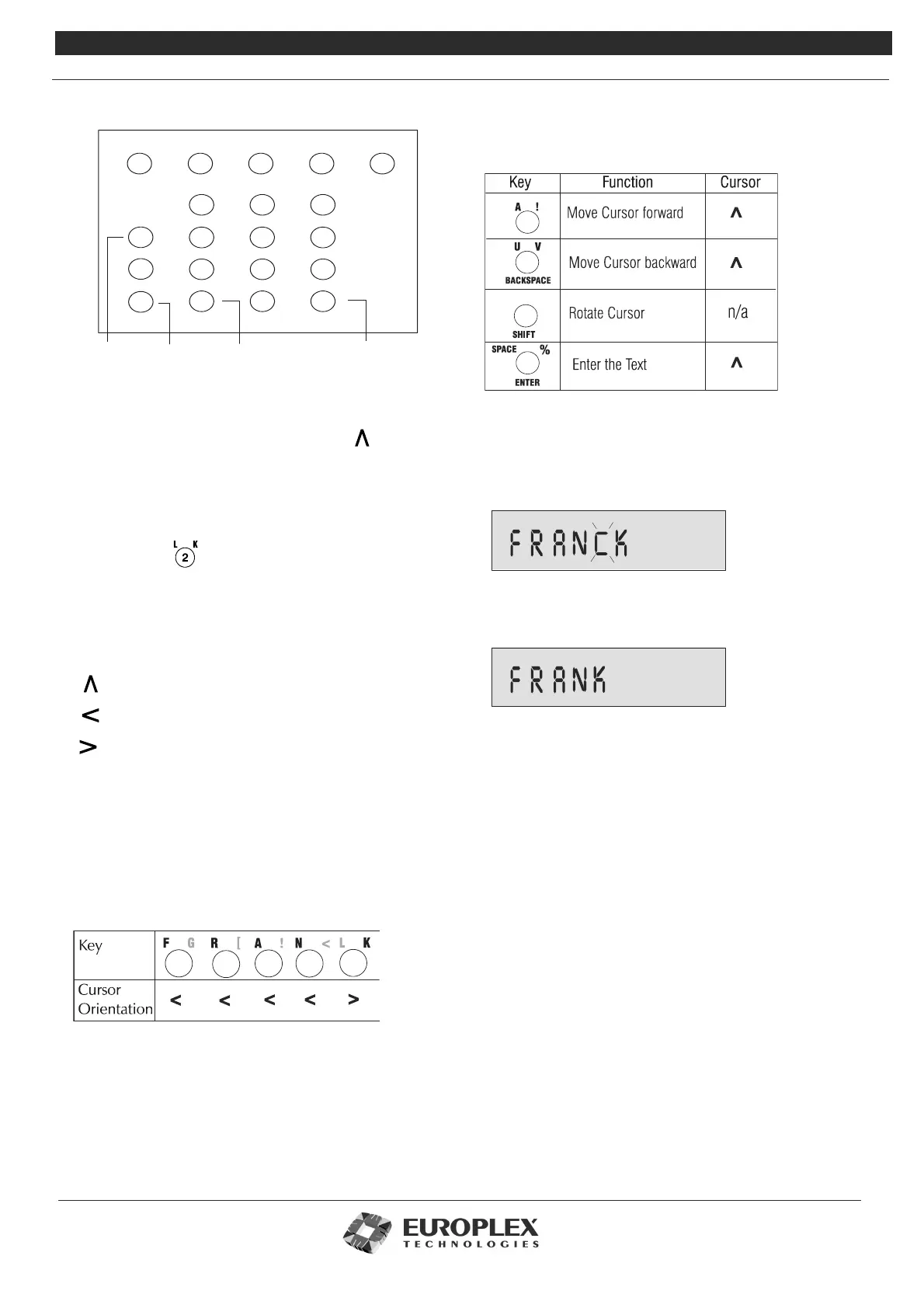
To enter text via a keypad:
1 The cursor will be in character position 1:
2 Place the letter overlay card on the keypad. The overlay
card displays additional characters which are associated
with each key on the keypad.
3 Locate on the overlay the character you wish to enter.
For example:
4 Select the appropriate character.
Most keys will have three characters when in typing
mode. The orientation of the cursor governs which
character is selected:
selects “2”.
selects “L”.
selects “K”.
5 Continue entering the remainder of the text entry.
6 When the required text is displayed on the LCD, press the
ENTER key to complete the entry.
Example: To enter the name FRANK on the display, the user
must press the following keys with the corresponding cursor
orientation as shown:
C .
D ,
+
-
*
/
=
E ,
F G H ?
I J
N <
R [
B :
A !
U V
X
L K
O >
S ]
Y Z
M &
P Q
T W
%
SPACE
ENTERSHIFT
BACKSPACE
Move cursor
forward
Rotate
cursor
Move cursor
backward
Press when
complete
The table below summarises the keys that are used to
manipulate the cursor and to complete a text entry with
their related cursor orientations.
Deleting Text
The user can highlight any character on the display by
pressing the forward/backward keys listed above. Once a
character is highlighted, it will start to flash.
When the cursor
is over the character to be deleted, hold down the SHIFT
key.
The keypad beeps as it deletes characters to the right.
Selecting Options
The 3GS system options can be divided into installer
options and user options. The installer options (detailed
overleaf) are primarily system setup and maintenance
options, and the user options (also detailed overleaf) are
system operation options. The master user is given all the
operational options by default. The master user assigns an
appropriate number of options to the general users
depending on their security requirements – see “Installer
Menu Options.” on page 8-9 for further information.
There are two methods of selecting an option:
• Direct Access – this allows you to select an option
directly.
• Help Menu Access – this allows you to locate an
option by scrolling through the available options.



 To Next Page